You can write the best page in your market and still sit on page two. Why? Because Google doesn't only read your content, it also counts who vouches for it. Links from other websites, better known as backlinks, remain one of the three pillars of SEO, and they're the one most site owners quietly give up on. Finding relevant sites, negotiating a placement, writing a guest article, checking the link is still live months later... it's a part-time job.
This guide shows how Sedestral handles that job with Maya, its backlink agent. You'll see the "My backlinks" overview and list, how Maya finds real sites in your niche and language, how a monthly backlink campaign works from the pages to boost down to the anchors, and how you follow the results. And we'll be upfront about the cost: these are paid placements, bought with a budget you control.
6
AI Agents Covering Every SEO Layer
Why authority still decides who ranks
Two pages, same keyword, similar content. The one that wins is usually the one on the more trusted domain. That trust is what SEO people call domain authority, and it's built mostly through links from other sites. Each link is a vote, and the more relevant and authoritative the voter, the more weight it carries. Our guides on domain authority and link juice explain how that weight travels from one page to another.
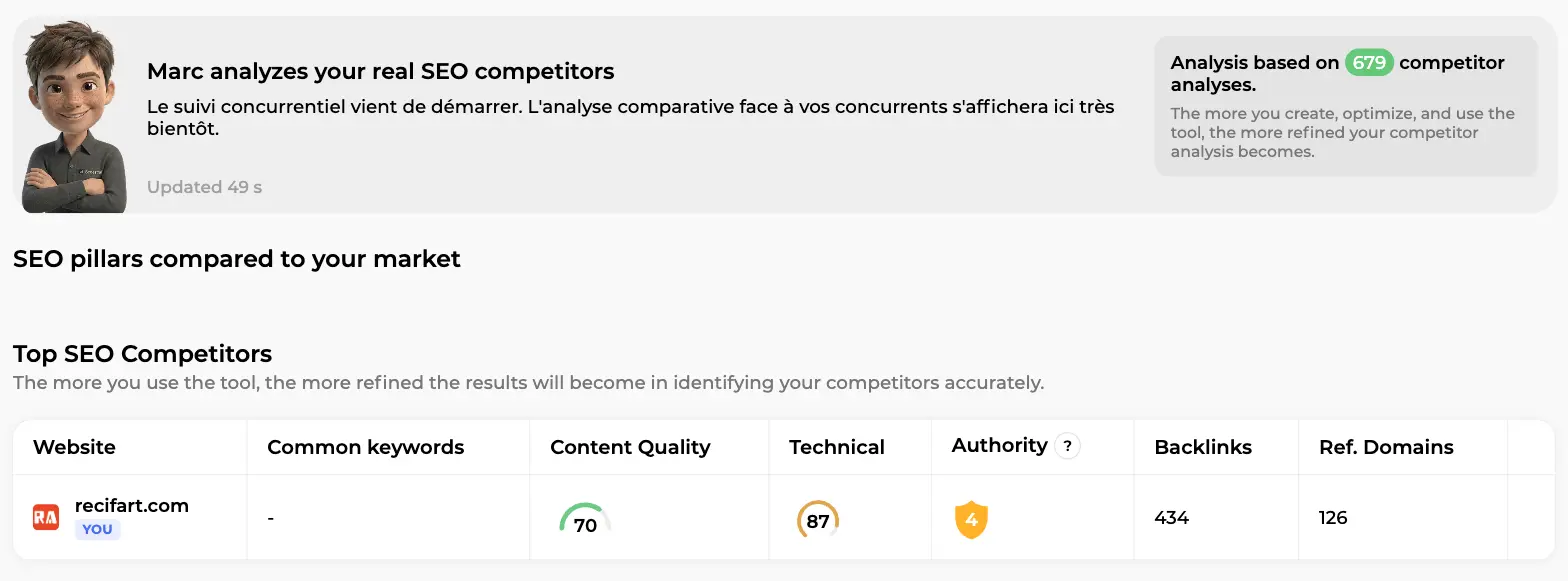
Sedestral makes this visible from day one. In the Competitors screen (Marc's home), the "Top SEO Competitors" table compares your site with the market on the three pillars: Content Quality, Technical and Authority, with the raw Backlinks and Ref. Domains counts next to them. On this screen the example store scores 70 on content quality and 87 on technical, but only 4 out of 10 on authority, with 434 backlinks from 126 referring domains. A very common profile: the content is fine, the site is healthy, the missing pillar is authority. The rest of Marc's screens are in the SEO analytics guide.
Why is that pillar neglected? Because you can't fix it in your editor. Backlinks depend on other people's websites, which is exactly where an agent that does the outreach, the writing and the follow-up earns its keep.
"My backlinks": what Maya monitors every month
Open Backlinks in the "SEO team" side menu. At the top, a card titled "Maya monitors your Backlinks" holds her written report on your link profile, four quick indicators (Relevance, Authority, Quantity, Domains) and the last update time. Below it, "Your Backlink Campaigns" with a black "Create a campaign" button, then Maya's pitch: "Build your site's authority with quality backlinks".
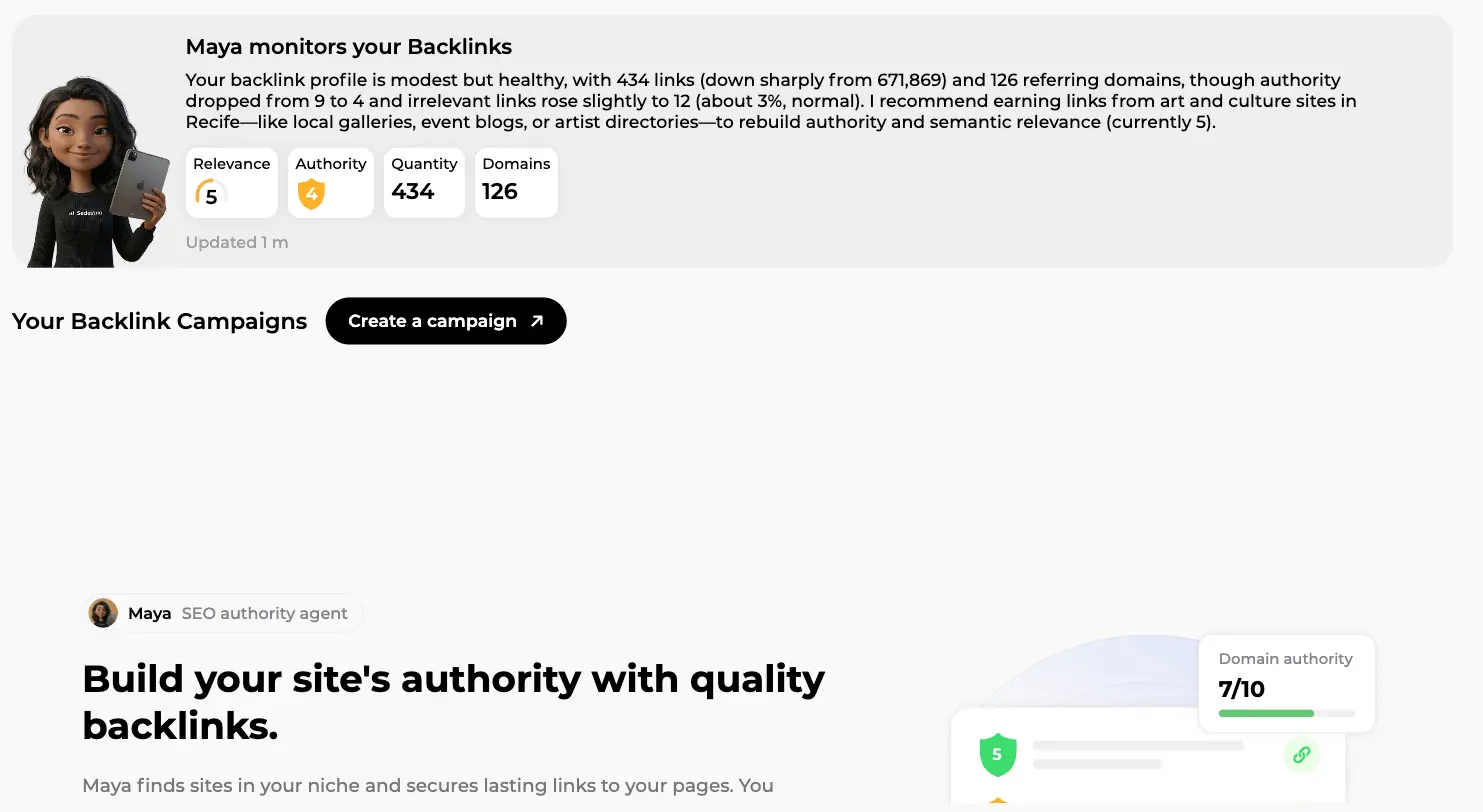
Maya's report is not a template. She reads the actual numbers, flags what moved (a drop in authority, a rise in irrelevant links) and suggests the kind of sites to earn links from. It's regenerated every month with fresh data: a plain-language state of play, no spreadsheet required.
The five indicators and the two charts
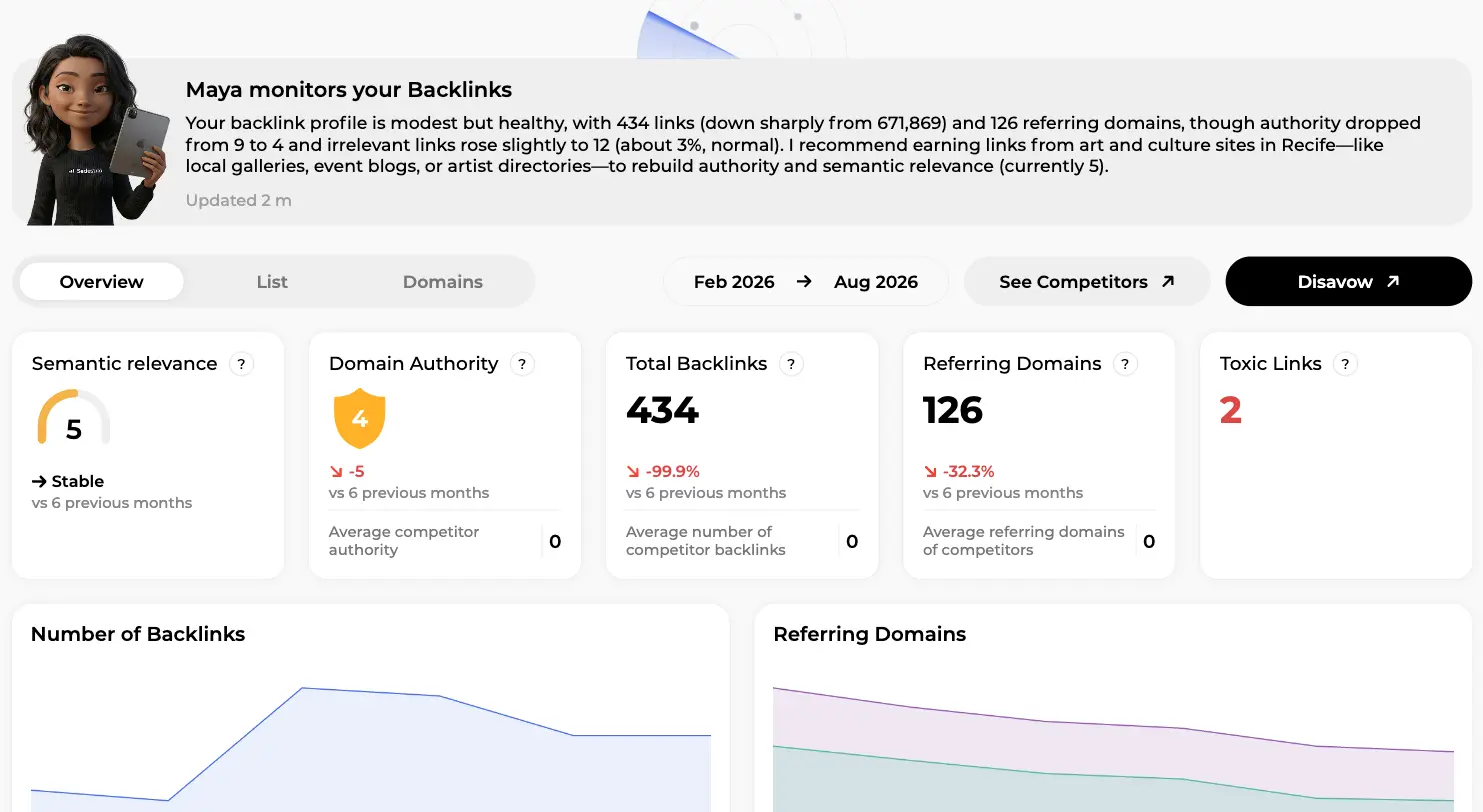
The Overview tab goes deeper. Five cards summarise your profile:
- Semantic relevance (out of 10): how close the sites linking to you are to your business.
- Domain Authority (out of 10): your domain's strength, with the six-month trend and your competitors' average for comparison.
- Total Backlinks: every link pointing to you. One site can send dozens.
- Referring Domains: the number of distinct websites linking to you. The metric that matters most, because Google prefers variety of sources to raw volume.
- Toxic Links: links from spammy sites that could hurt you if they pile up.
Below the cards, two charts track the "Number of Backlinks" and the "Referring Domains" over the period set in the date selector (Feb 2026 to Aug 2026 here). On this screen the example site shows a relevance of 5, an authority of 4 with a -5 trend, 434 backlinks, 126 referring domains down 32.3%, and 2 toxic links. A profile that has lost ground. On the right, "See Competitors" opens the head-to-head comparison with the competitors Marc identified, and "Disavow" prepares a file of toxic domains for Google Search Console if you ever need it.
Tip: watch referring domains before total backlinks. Losing 500 links from a single directory changes nothing. Losing 20 different sites does.
The list and the domains
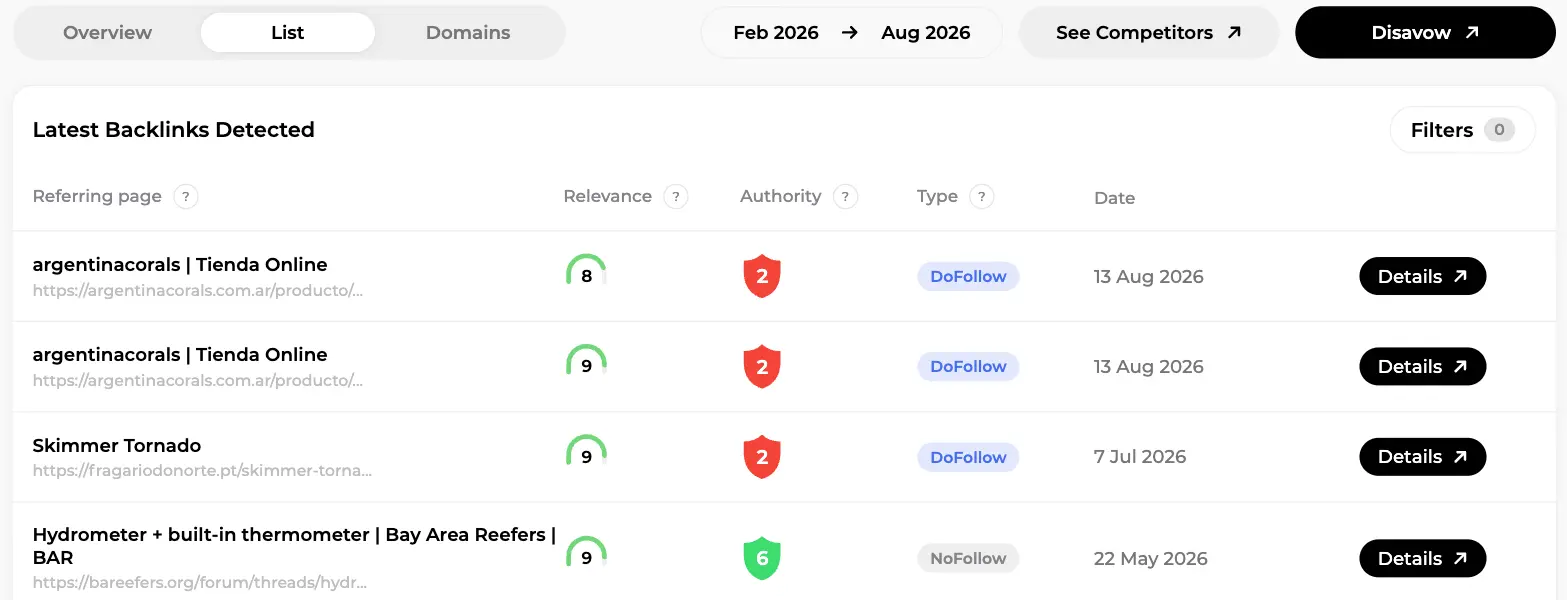
The List tab shows "Latest Backlinks Detected" as a table: referring page (title and URL), Relevance out of 10, an Authority badge, the Type (DoFollow or NoFollow), the detection date and a "Details" button. On this screen you can see links from an Argentinian shop, a Portuguese retailer and a US forum, with relevance scores of 8 and 9 but authority mostly at 2: relevant sites, not powerful ones. The Filters button slices the list by authority, juice transmitted, semantic score, toxicity, status (active or lost), classification (from highly relevant to spam and toxic), platform type and link placement.
The Domains tab groups the same data by website: links sent, authority, toxicity. With the "Lost backlinks" filter, it's the quickest way to spot a good link that disappeared and ask for it back. A "Check a backlink" tab also gives Maya's verdict on any URL you paste before you chase it.
Acquiring backlinks from real sites, with a real budget
Let's not pretend: you don't get 20 quality backlinks by asking nicely. Sedestral's answer is a network of partner sites where Maya can place your links, and each placement has a price. You fund campaigns with credits, you pay once per backlink, and the link stays online with no renewal fee. Prices vary with the host: strong authority, real traffic and a topic close to yours cost more than a generalist site, and Maya explains under each proposal why it's worth it. So yes, this is a paid channel. The difference with bulk link buying is that an agent picks relevant hosts, writes the content, varies the anchors and tracks delivery, which keeps the profile natural. Our link building guide covers why that distinction matters, and the PBN article shows what happens when it's ignored.
Two main formats, plus community links
| Format | What you get | When it shines |
| Guest Article | Maya writes an original article for the partner site, in its niche, with a link to your page on the planned anchor. | The highest quality format: the link sits in fresh, contextual content. |
| Ranked Page | Your link is inserted into an existing page that already ranks on Google for a related keyword. | You inherit the page's traffic and authority straight away. |
| UGC | A link in a community space (forum, directory, comment), at a fixed price. | Cheap diversification, never the core of a campaign. |
Behind the scenes, Maya searches partner sites that match your language and topic: guest articles are filtered by your site's language, so a British store won't get a link from an Italian blog, and ranked pages are matched on the keyword you're targeting. Each candidate gets a semantic relevance score out of 10, an authority score and an estimated traffic (ETV), and a price strategy badge: "Good site" for budget placements with a good quality-price ratio, "Premium site" for high-authority hosts. More on the guest format in our guest blogging guide.
Monthly campaigns: the full flow, screen by screen
A campaign is a monthly batch, named after its creation month ("August 2026" in our example). Everything happens in a three-step wizard shown at the top of the screen: Pages to boost, Keywords to boost, Backlink selection, followed by payment and tracking. Your choices are saved as you go, and nothing is charged until the final confirmation. Google Search Console must be connected, because Maya works from your real positions; the site configuration guide walks you through it.
The campaigns home
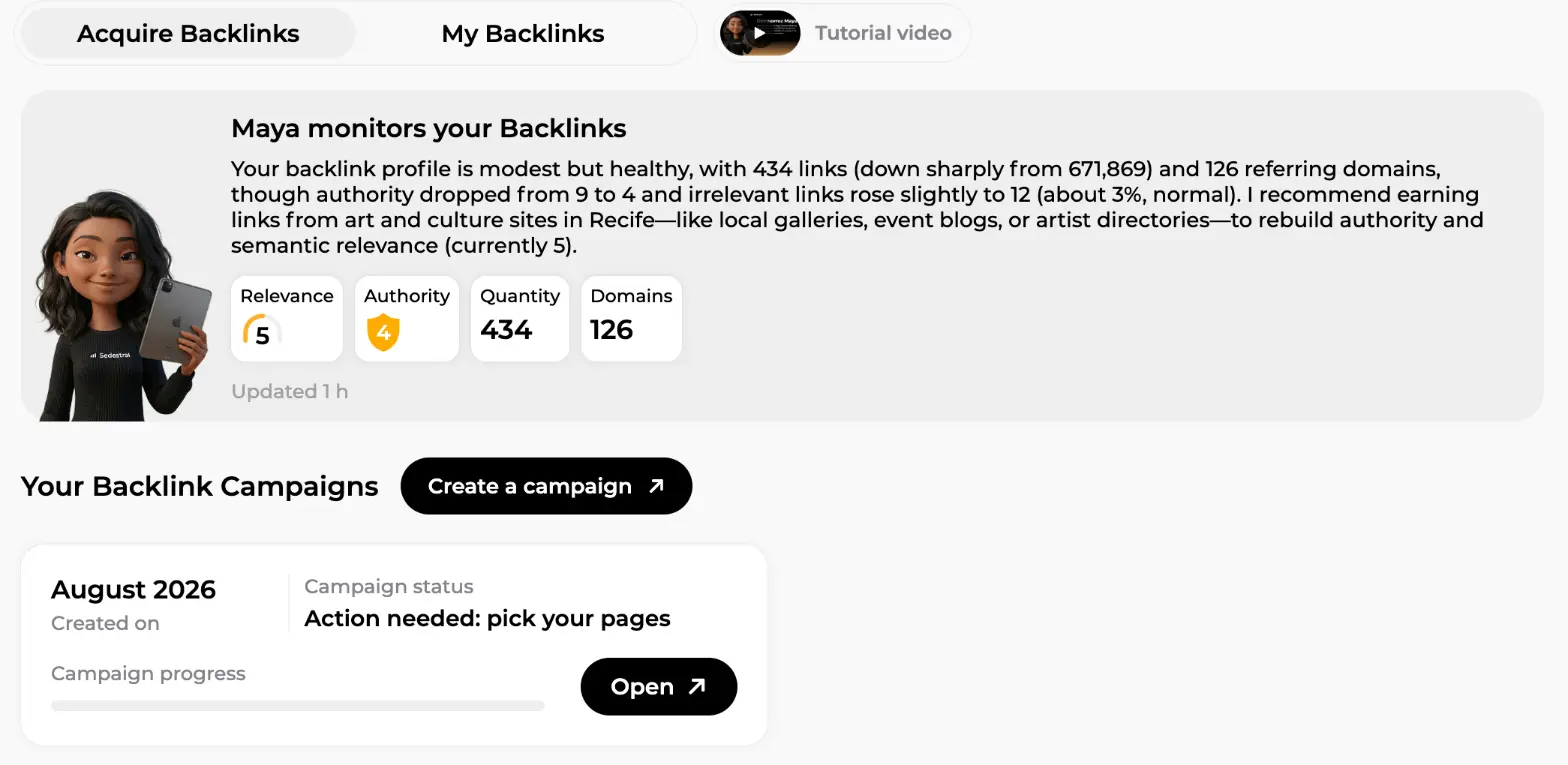
The Backlinks page opens on the Acquire Backlinks tab (its twin, My Backlinks, holds the monitoring screens we covered above). At the top, Maya's summary with its four counters, Relevance, Authority, Quantity and Domains, refreshed within the hour. Below, "Your Backlink Campaigns": one card per campaign with its creation date, a progress bar and a status in plain words. On this screen the August 2026 card reads "Action needed: pick your pages", and its Open button resumes the wizard exactly where you left it. The black "Create a campaign" button starts a new one.
Step 1: pages to boost
The left panel lists your pages with a Backlink effort gauge (Low to Very high, based on how many backlinks your competitors have on the topic), a label such as "Good opportunity", "Quick win" or "Performance drop" with a one-line reason, the page's Authority, and click and impression sparklines from Search Console. The right panel, "Select pages to boost", collects your picks: up to 3 pages per campaign, plus an optional share of the budget for the home page ("Backlinks to homepage", 45% by default) to lift the whole domain.
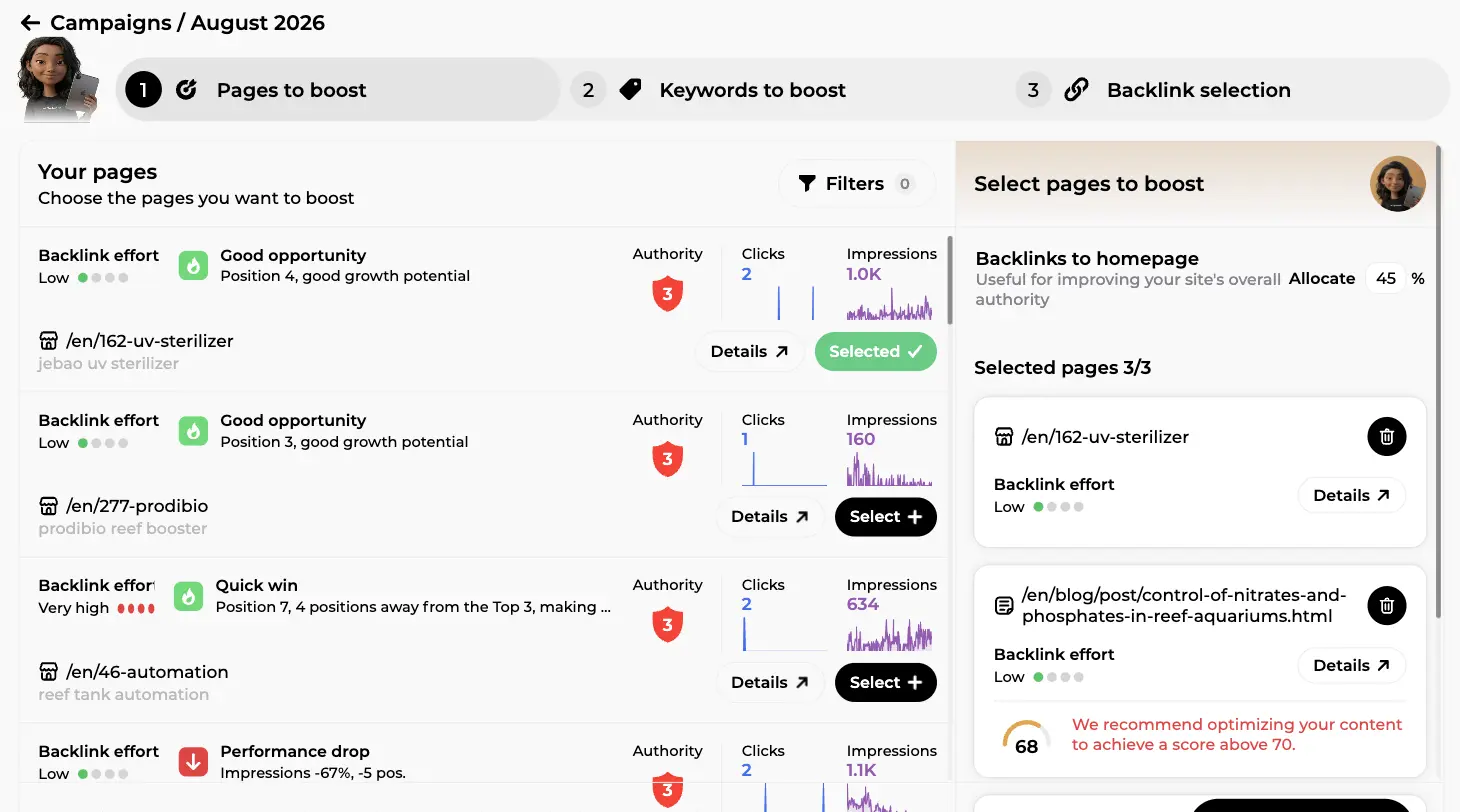
On this screen, two product pages with a "Low" effort and a "Good opportunity" label sit at the top ("Position 4, good growth potential"), a "Quick win" flags a page 4 positions away from page one, and a "Performance drop" warns about a blog post whose impressions fell 67%.
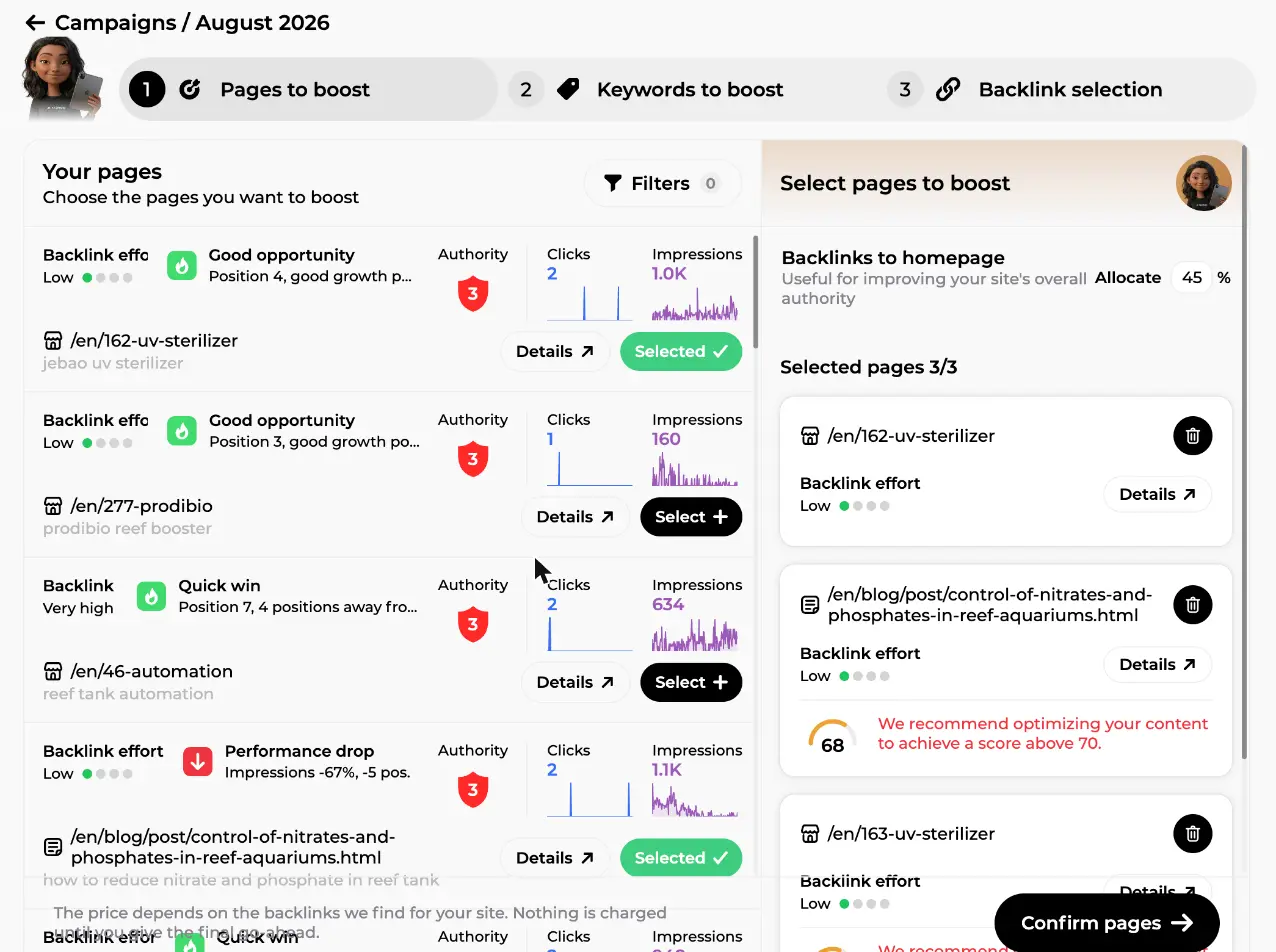
Here is the same step with the selection complete. The right panel shows "Selected pages 3/3", the homepage allocation set to 45%, and, under the selected blog post, an orange gauge: "68, We recommend optimizing your content to achieve a score above 70". That's Maya refusing to let you waste money: a link pointing to thin content does far less than the same link pointing to a page that already answers the query well. Fix the content first with Rémi (see the content optimisation guide), then boost it. And note the line at the bottom of the page list: "The price depends on the backlinks we find for your site. Nothing is charged until you give the final go-ahead."
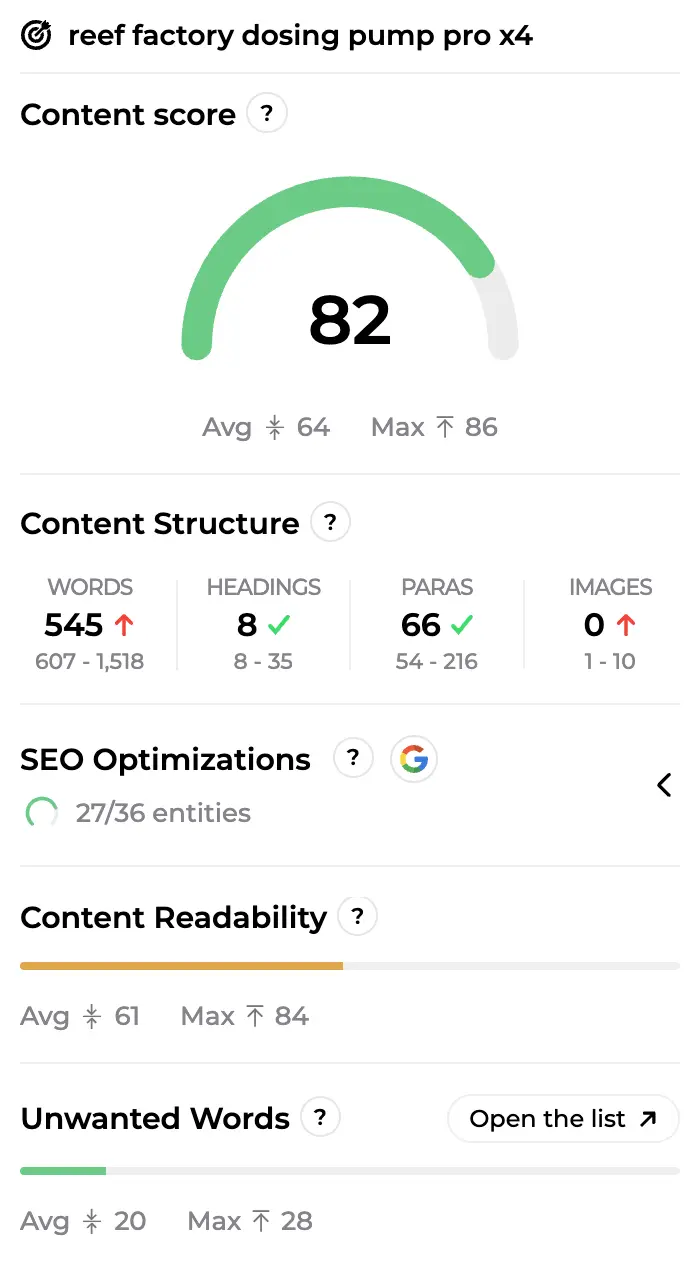
Here is a page after optimisation: a content score of 82 against a market average of 64, structure checks on words, headings, paragraphs and images, and the SEO terms covered. That's a page worth sending links to.
Filters narrow the list by position, clicks, impressions, URL path or page format. Click "Confirm pages" when you're happy.
Step 2: keywords to boost
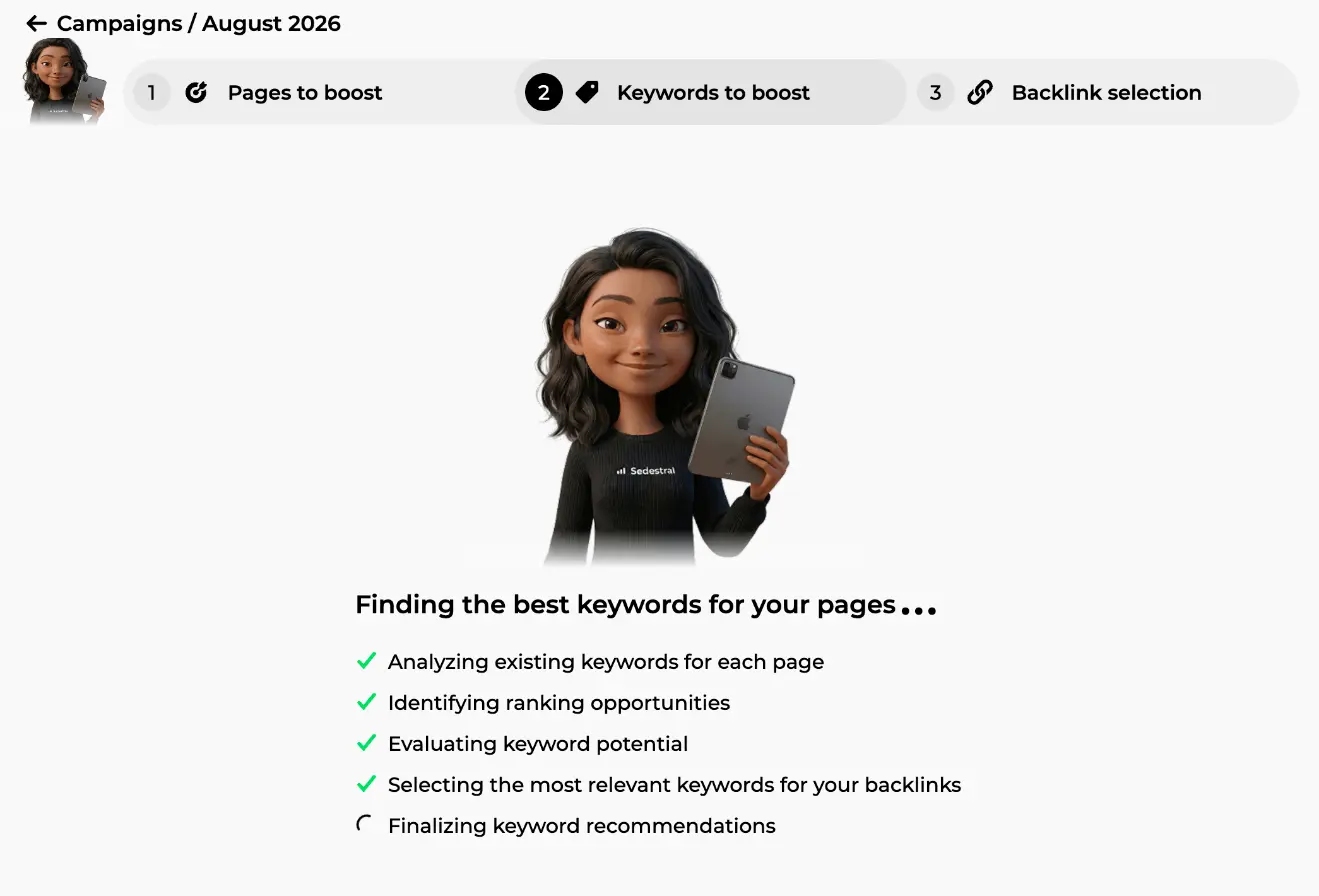
Confirm your pages and Maya takes over for a moment. A progress screen, "Finding the best keywords for your pages", ticks through her checklist live: analysing the existing keywords of each page, identifying ranking opportunities, evaluating keyword potential, selecting the most relevant ones for your backlinks.
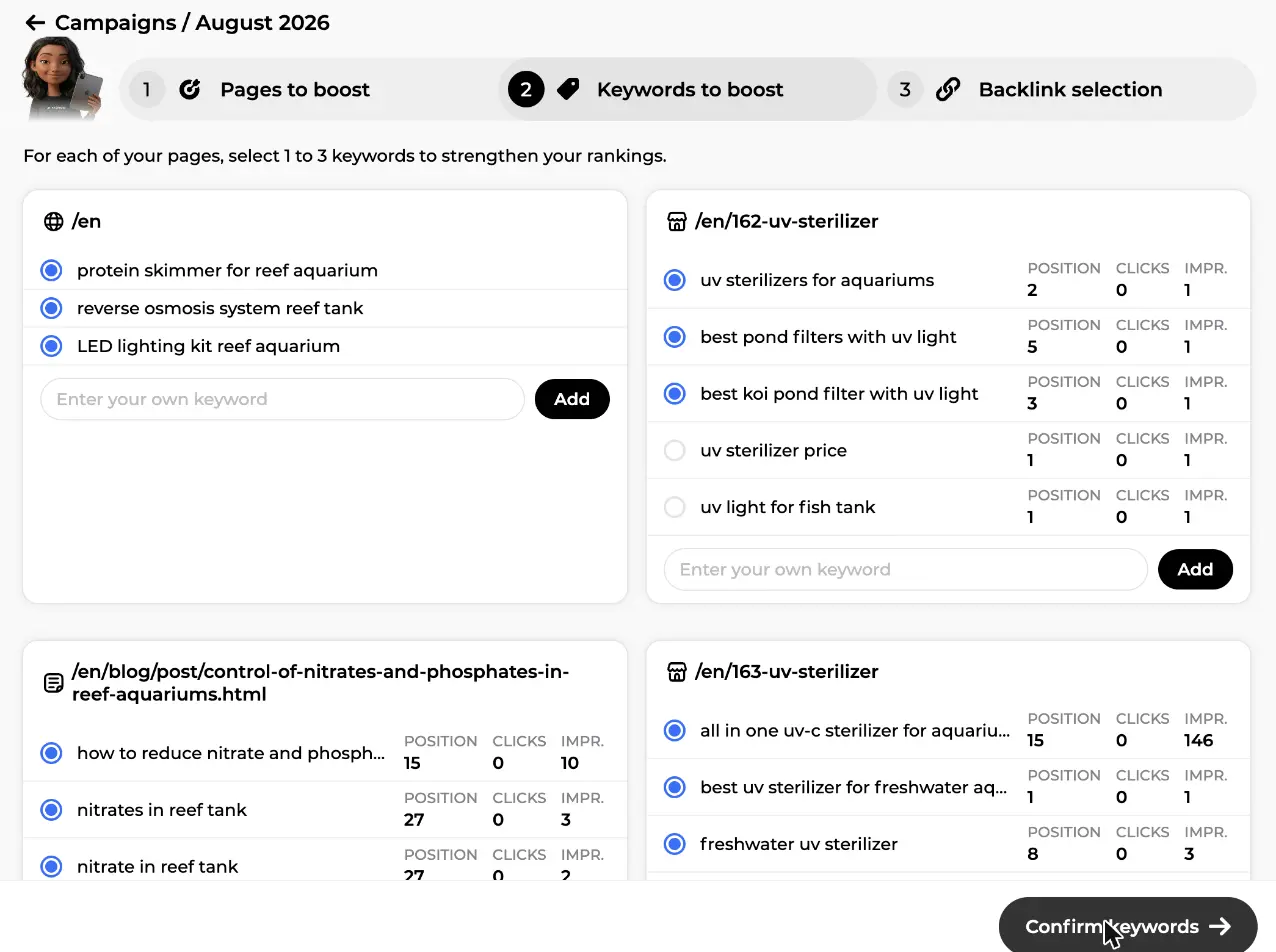
Then the selection screen appears, one card per page: "For each of your pages, select 1 to 3 keywords to strengthen your rankings". Maya pre-selects her picks, and every keyword comes with your current position, clicks and impressions from Search Console, so you decide on data rather than gut feeling. On this screen a UV steriliser product page has "uv sterilizers for aquariums" at position 2 and "best pond filters with uv light" at position 5, while the blog post sits at position 27 on "nitrates in reef tank". The sweet spot is a keyword where you already rank between 5th and 30th: close enough that one or two good links push you onto the first page. Untick anything you disagree with, or type your own in the "Enter your own keyword" field and press Add. Then "Confirm keywords".
Step 3: Maya searches 85,000 partner sites
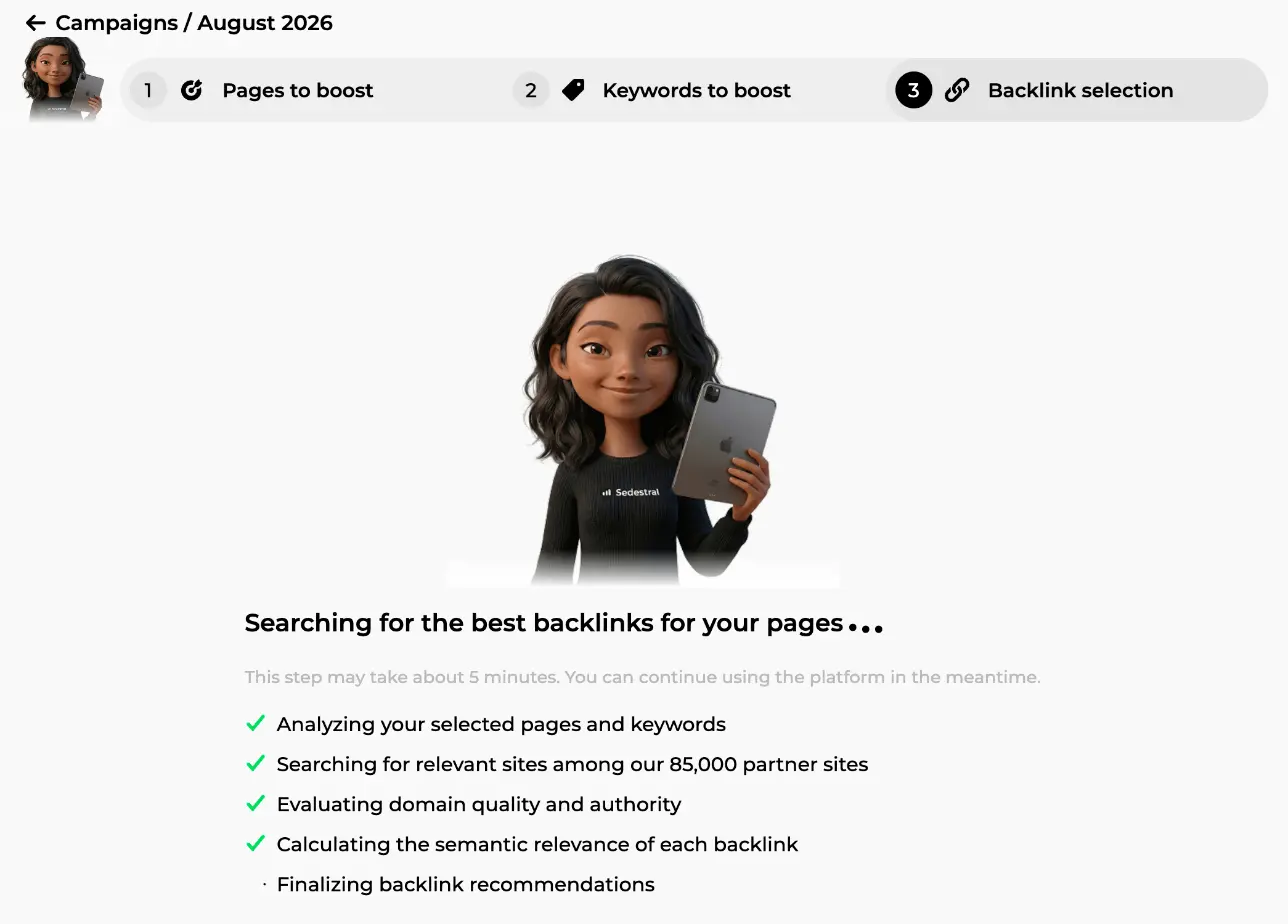
The third step opens on a longer search, announced honestly: "This step may take about 5 minutes. You can continue using the platform in the meantime." The checklist shows what those minutes buy: analysing your selected pages and keywords, searching for relevant sites among 85,000 partner sites, evaluating domain quality and authority, calculating the semantic relevance of each backlink. Every candidate is scored against your pages, your keywords and your language.
The results: premium sites and UGC links
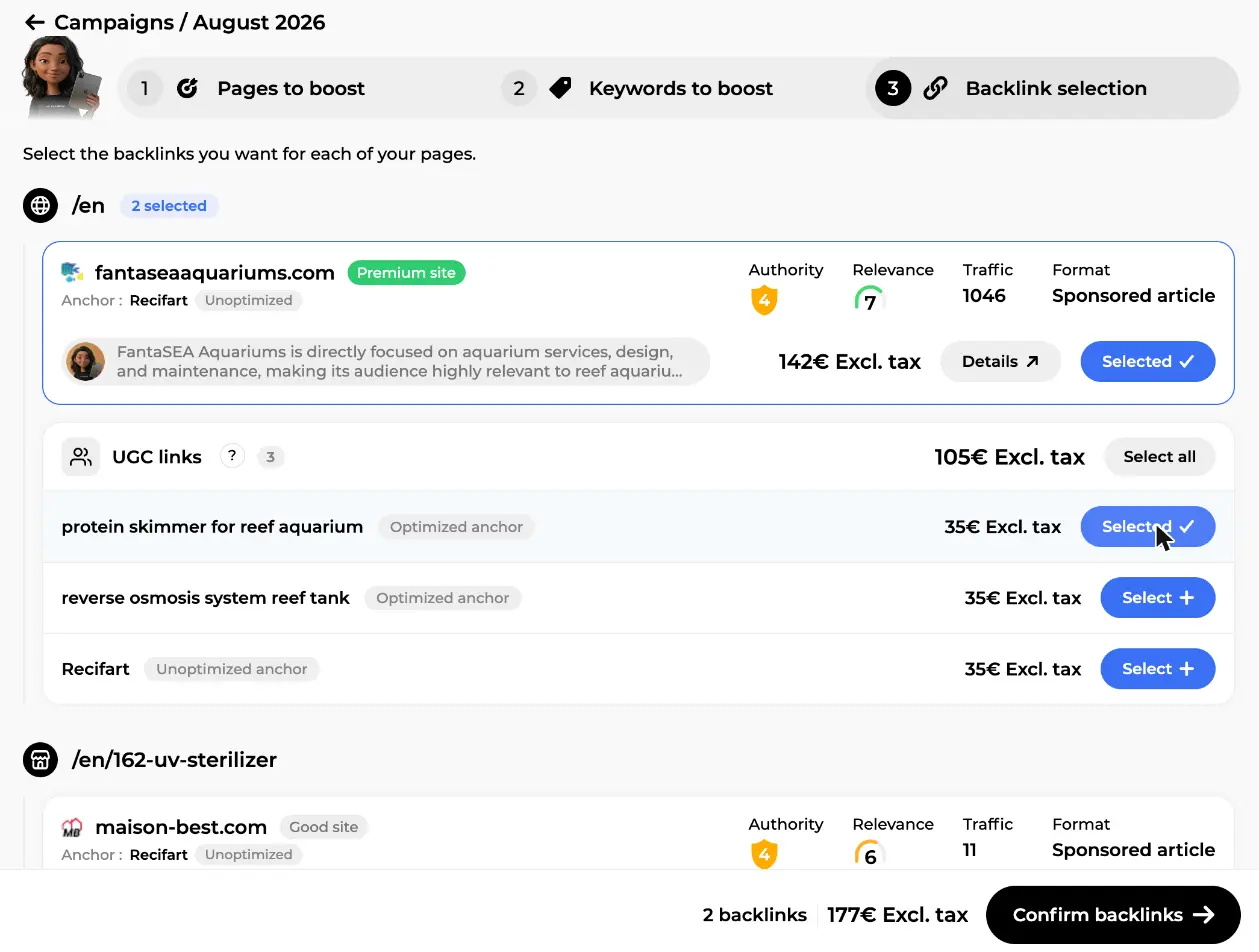
The results come back grouped per page, each offer as a card. For the home page in our example, the first proposal is fantaseaaquariums.com with a green "Premium site" badge: format "Sponsored article" (a guest article Maya writes and the partner publishes), authority 4, relevance 7 out of 10, an estimated traffic of 1046 visits, the planned anchor ("Recifart", flagged Unoptimized) and the price, 142€ excl. tax. Under the domain, Maya's one-line justification: the site is "directly focused on aquarium services, design, and maintenance", so its audience matches yours. Below it, a "UGC links" pack: 3 community links for 105€ with a "Select all" button, or 35€ each, every link with its own anchor. The bar at the bottom starts at 0 backlinks and 0€.
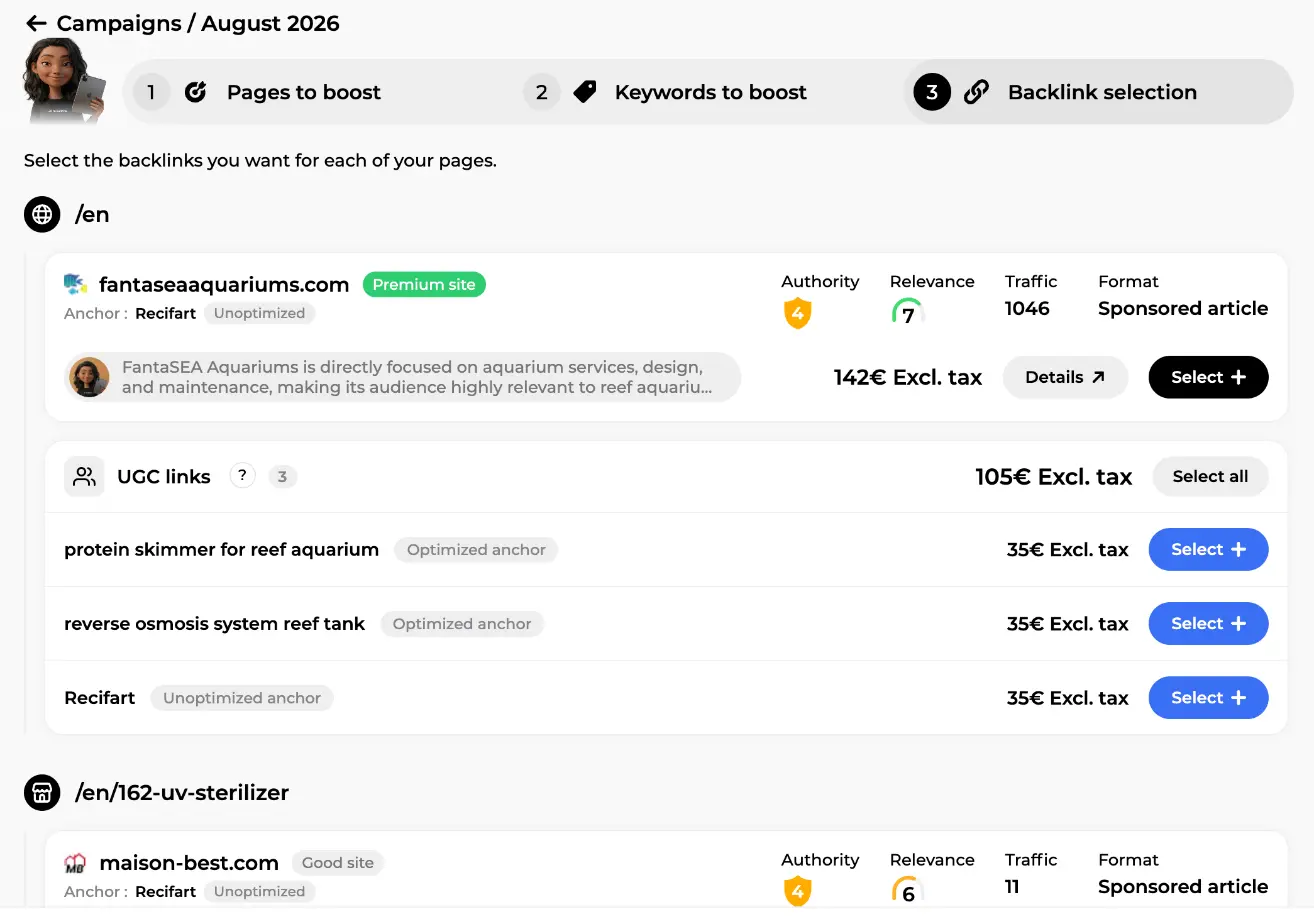
Look at the anchor flags before anything else. An "Optimized anchor" carries one of your target keywords ("protein skimmer for reef aquarium" here); an "Unoptimized anchor" uses your brand name or a neutral phrase. Maya mixes the two on purpose, because a profile where every link repeats the exact keyword reads as manipulation to Google. Keep her balance unless you have a strong reason not to.
How to judge an offer: the details popup
Not sure about a host? "Details" opens the "Backlink details" popup, the full file on the site. At the top, its URL with the format tag ("Guest Article"), then Maya's analysis in her own words. Four cards follow: the price, the ETV (the traffic the domain is estimated to earn, 1046 here), the domain rank (4) and the page rank. Then the semantic relevance gauge (7/10), the anchor with its flag, and the domain metrics: 42 backlinks, 12 referring domains, 41 referring pages, a 10% spam score, 0 toxic links, 12 nofollow links.
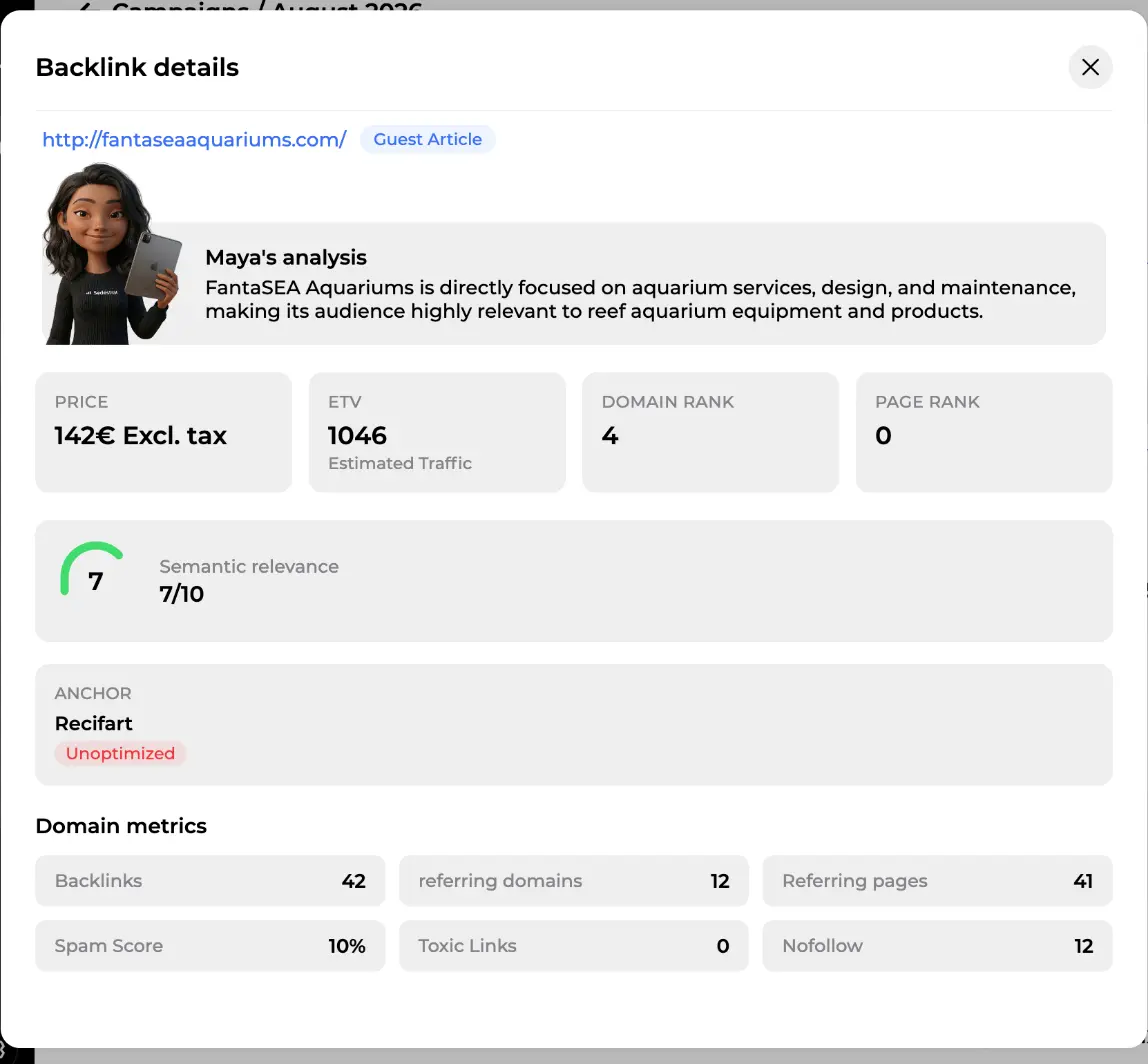
A quick way to read that file: relevance first, below 5 walk away whatever the price; then spam score and toxic links, which should be low or zero; then referring domains against total backlinks, because 12 domains for 42 links is a natural ratio; and finally ETV, since a link on a page real people visit doesn't just pass authority, it sends visitors.
The running total and the final go-ahead
Every "Select" feeds the bar at the bottom of the screen. On this screen two offers are in, the premium sponsored article and one UGC link, and the bar reads "2 backlinks, 177€ Excl. tax" next to the "Confirm backlinks" button. This is the last screen before payment. You're perfectly free to take 2 offers out of 10 and keep the rest for next month; a small, relevant, regular campaign beats a big one-off purchase every time. And up to this point, Maya's searches included, nothing has been charged.
Payment and budget
"Confirm backlinks" leads to the payment screen, which lists each target page with its backlinks, the total number of links, the total price and your credit balance. If the balance covers it, "Confirm and pay"; otherwise the button becomes "Top up" and your selection waits for you. Credits are debited at this point and at no other, and every cancellation is refunded automatically. Rough guidance: with a low authority (0 to 3), two to four "Good site" links a month is plenty; a medium authority (4 to 6) can take four to eight, mixing in Premium on the pages that make you money; a strong profile should focus on a few Premium links only.
Or hand the whole thing to Maya
Not sure which pages or how many links? Click "Configure autopilot" on the campaigns page. Set the number of campaigns per month (1 to 4), pages per campaign, allowed formats and strategies, and whether the home page gets a share. Every month, Maya audits your pages, skips those boosted recently, picks keywords and placements within your budget, writes the guest articles, orders and tracks. Autopilot campaigns carry their own badge and use your credits, so keep the balance topped up.
Following the results
After payment, the campaign card shows a status and a progress bar, and "Open" leads to the tracking page: "Backlink acquisition in progress" with the count of links delivered, then per page the state of each link: awaiting processing, order in progress ("Guest article writing in progress" for articles), awaiting publication, Delivered with the date and the final URL as a clickable link so you can check it yourself, or Lost link if the partner removed it later. Delivery takes 30 days at most after payment, usually much less.
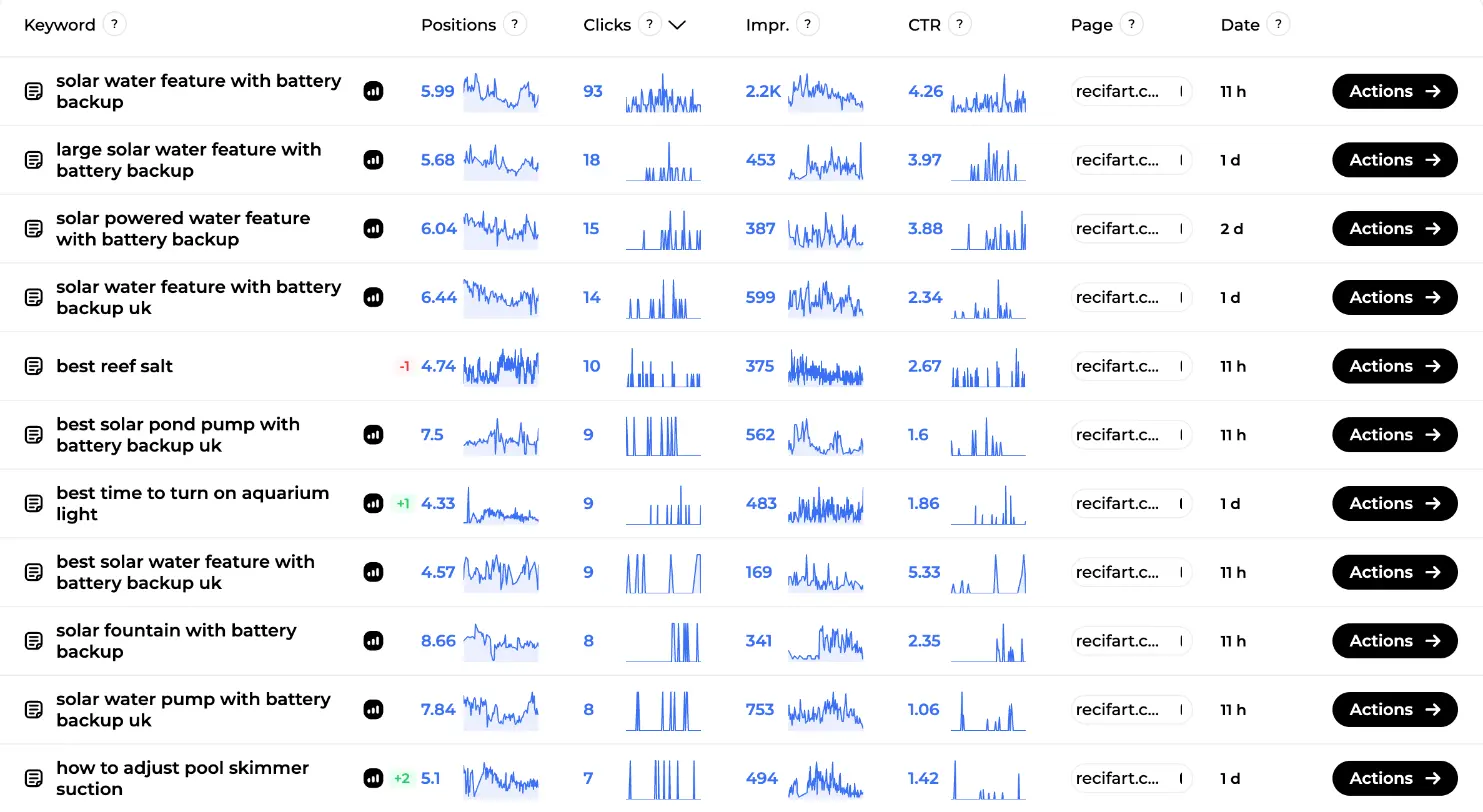
Then, patience: allow two to four months before positions react. Two places let you watch it happen. The "My backlinks" overview picks the new links up in its monthly refresh (referring domains up, authority following). And the SEO Visibility screen, Marc's "My keywords" table, shows position, clicks, impressions and CTR per keyword with sparklines and daily deltas (the "+1" and "+2" badges in green, the "-1" in red). On this screen the example store's keywords hover between position 4 and 9, exactly the range where a good link tips a page into the top 3.
Pair that with the monthly content audit and you have a loop: boost, measure, adjust next month's campaign. And if a boosted page is stuck for technical reasons, Nox's technical audit will say so before you buy more links to it.
Create your account and connect your site
In short
- Authority is the pillar you can't fix in your editor. Marc's competitor table shows where you stand; Maya's "My backlinks" overview tracks it every month.
- The List and Domains tabs show every link Google sees, with filters and a Disavow export.
- Backlinks are paid placements on real partner sites: guest articles written by Maya, ranked pages and cheap UGC links, matched to your language and topic, bought once per link with credits.
- A campaign takes three steps: pages to boost (max 3 plus the home page), keywords, then Maya's shortlist with mixed anchors. Nothing is charged until you confirm at the very end; then she orders, writes and tracks.
- Results take two to four months; follow them in the backlinks overview and the SEO Visibility keywords table.
Discover the whole Sedestral SEO team
Let AI Handle Your Content Publishing
Alya researches keywords, writes and publishes content directly to your CMS, WordPress, Shopify, Wix and more, on autopilot.