Want to give your visitors a lightning-fast mobile experience while nailing your Core Web Vitals for Google? For years, the Google AMP framework (Accelerated Mobile Pages) looked like the obvious answer. Sold as a revolution, it promised near-instant loading and real SEO benefits, while slashing load time on mobile devices.
But in 2026, the mobile web has moved on. Is the AMP format still a silver bullet for your pages, or has it become technical baggage you'd rather not carry? This guide takes an honest look at what the technology is still good for by weighing its core principles against what modern SEO actually demands.
What is Google AMP and how does it work?
Launched by Google in October 2015, at a time when the search engine was desperate to speed up the mobile web, the AMP project (Accelerated Mobile Pages) sits squarely in the long line of innovations that make up the history of Google. This open-source framework, now run by the OpenJS Foundation, has one single goal: maximum performance on mobile.
Thanks to strict technical rules, AMP delivers an almost instant render, which directly improves the user experience. The idea is simple: generate a stripped-down version of your HTML, pair it with an optimised JavaScript library, and remove everything that slows the display down.
The three technical pillars of the AMP format
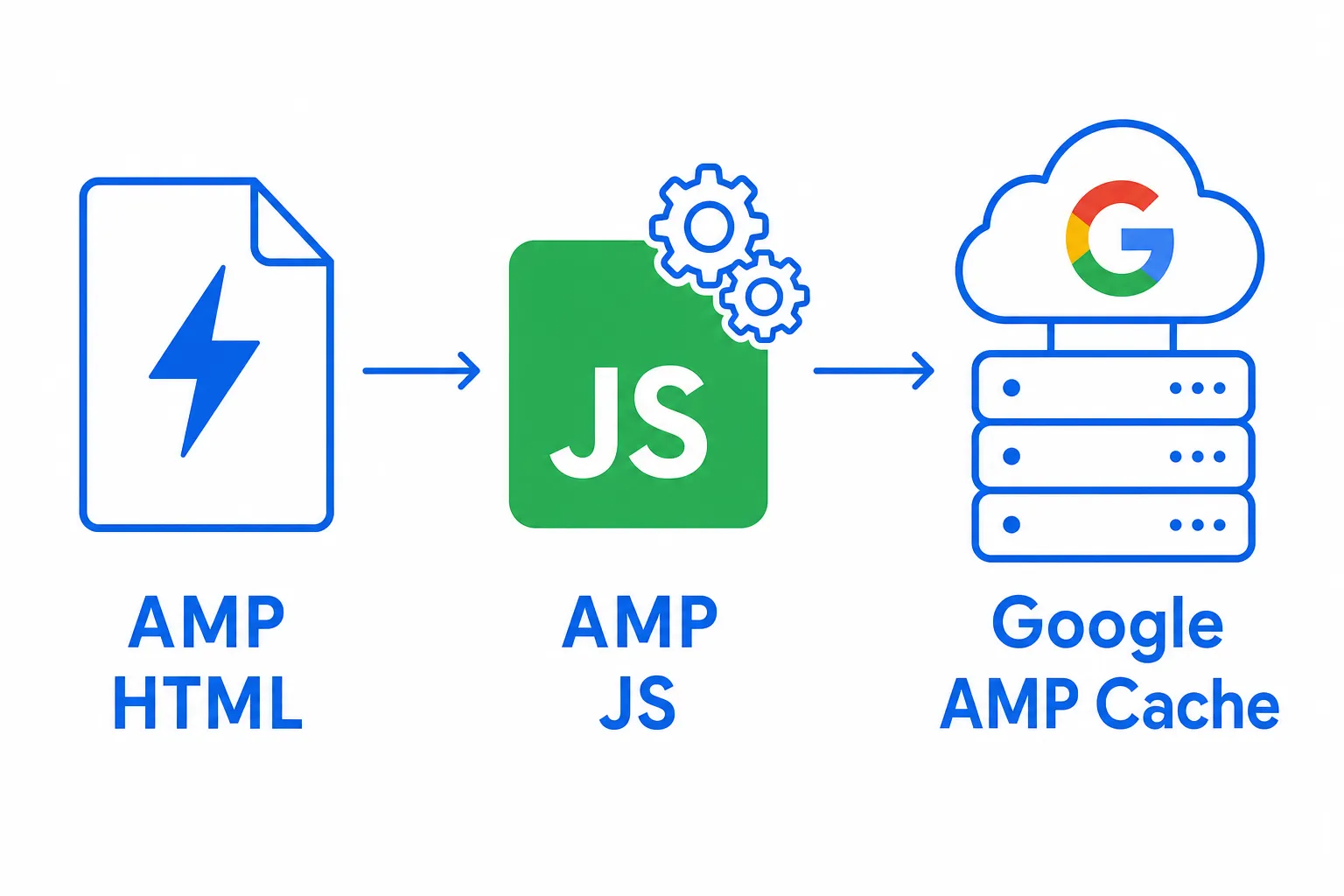
The Google AMP architecture rests on three major components that account for its excellent performance:
- AMP HTML: A simplified version of standard HTML. It bans anything that slows down page loading (such as unauthorised third-party JavaScript) and replaces it with optimised AMP components (
<amp-img>,<amp-video>, and so on). Every page has to start with<!doctype html>and include the dedicated JavaScript runtime. - AMP JS: A single asynchronous JavaScript library that manages resource loading intelligently. It prioritises rendering the main content while deferring less critical elements such as media.
- Google AMP Cache: A free, global content delivery network. This Google-hosted cache serves AMP-compatible pages straight from its ultra-fast servers, allowing them to appear instantly in search results. Other providers, such as Cloudflare, have offered their own AMP caches in the past.
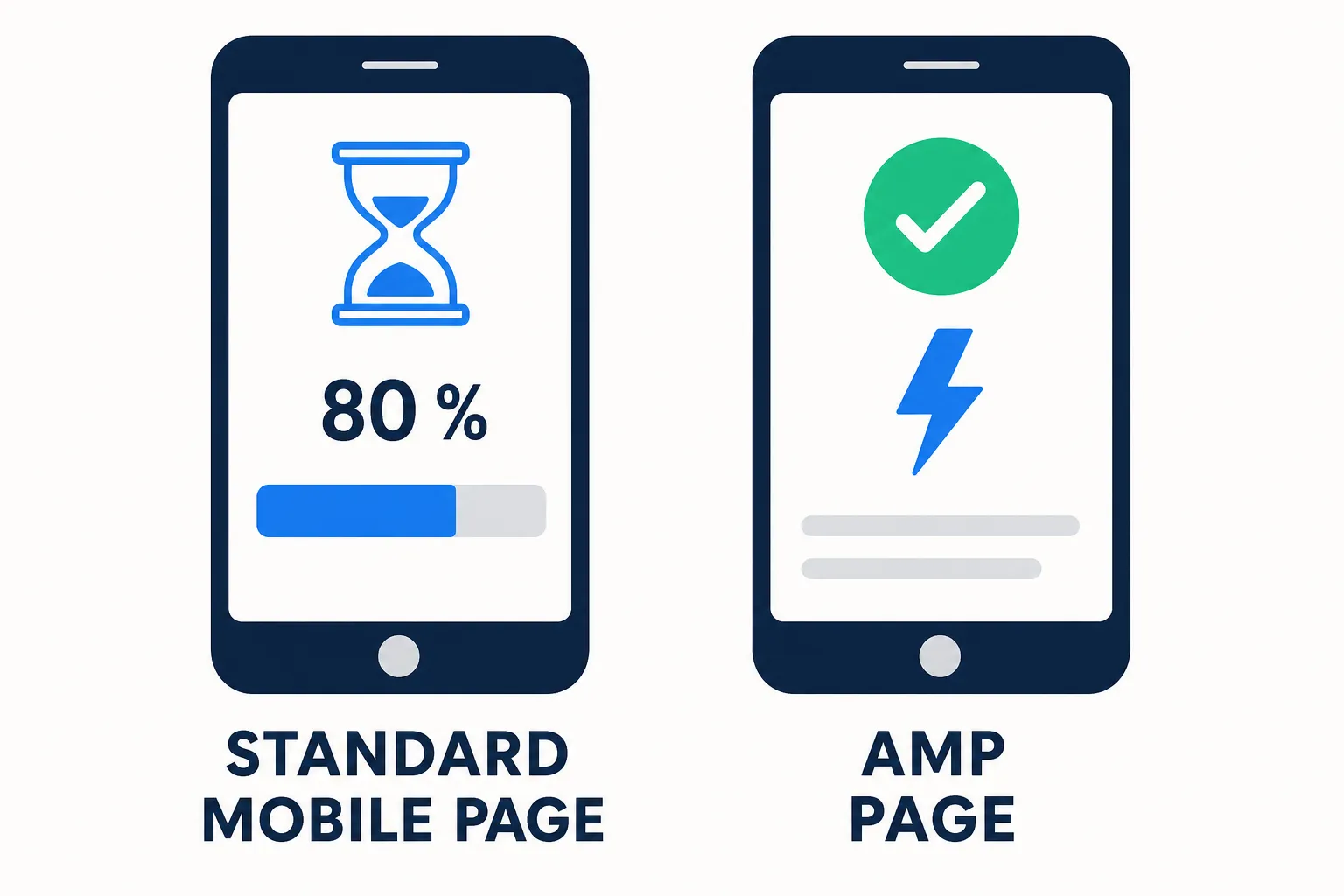
Because of these technical restrictions (inline CSS capped at 75 KB, no blocking custom JavaScript, fixed dimensions for media), AMP pages deliver exceptional performance. They typically load in under a second, even on 3G mobile networks.
Canonical architecture and AMP pages: how it works
The system relies on a dual structure: the canonical HTML version contains <link rel="amphtml" href="…/amp">, while the AMP page points back to the original with <link rel="canonical" href="…">. This relationship prevents any duplicate content issue and tells search engines exactly which version to prioritise for indexing.
AMP landing pages can also be used on their own, particularly in advertising campaigns where loading speed plays a key role in maximising conversions.
The SEO impact of AMP today: myths and realities in 2026
Let's clear something up. Google AMP once came with distinct visibility perks, but those privileges are gone.
- The AMP badge: The old lightning-bolt icon that flagged AMP pages in Google search results was removed in 2021.
- The Top Stories carousel: This news section is no longer reserved for AMP pages. Any website that follows the Google News guidelines and delivers good performance (Core Web Vitals) can appear there.
What is the real impact of AMP on rankings in 2026?
AMP's effect is now entirely indirect and boils down to one thing: its ability to help you achieve excellent Core Web Vitals. Google doesn't favour the AMP format as such, but it does reward good performance (LCP, CLS, INP).
By design, AMP forces performance best practices on you. A well-built AMP page almost always hits flawless CWV: LCP under 2.5 seconds, CLS below 0.1 and a healthy INP. That said, a standard page carefully optimised to reach the same numbers will be treated exactly the same way by Google's algorithm.
What really matters is outperforming your competitors, which means mastering competitor analysis in SEO to sharpen your strategy.
Bottom line: AMP is no longer a direct ranking factor, but it remains one tool among many for improving the criteria that do move the needle, namely Core Web Vitals and the mobile user experience. The positive behavioural signals (higher click-through rate, longer sessions, fewer bounces) generated by an ultra-fast page can indirectly lift your rankings thanks to lower load time and higher speed.
When is AMP still relevant in 2026?
Adopting the AMP format is a serious technical and operational investment. So it's worth weighing the pros and cons before you commit.
Good candidates for the AMP format
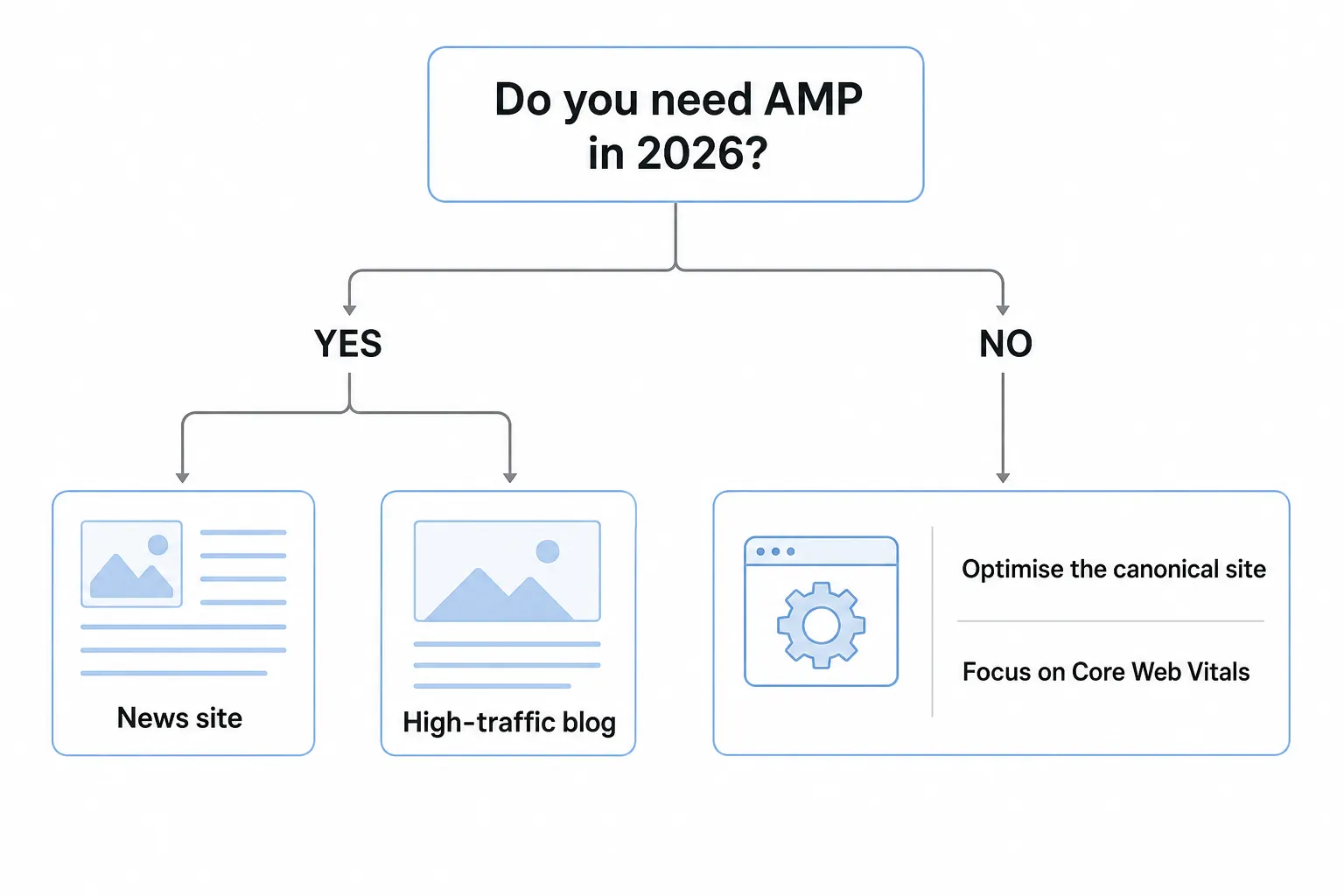
- Media and news sites that publish articles frequently, where every second shaved off load time on mobile translates into better reader retention. The Washington Post (+23% in users returning within 7 days after adopting AMP) is proof it works.
- High-traffic blogs, where the first impression has to be instant to cut the bounce rate and improve the user experience.
- Some simple e-commerce product pages designed to convert organic traffic. Building dedicated AMP landing pages for targeted campaigns is a way to maximise display speed and lift conversions.
- Practical content such as recipes, tutorials or FAQs, where the main goal is a quick read rather than complex interaction.
- Strategic pages (customer support, official announcements) that need to stay available even during traffic spikes.
The recommended strategy for developers
In 2026, rather than starting a new AMP project, we recommend optimising the performance of your main site with techniques such as lazy loading, responsive images, advanced compression or a CDN. These native optimisations can often match the benefits of the AMP format without maintaining a separate version.
If your current AMP implementation works well and doesn't cost you a fortune in maintenance, keep it. What matters is checking that its restrictions (limited JavaScript/CSS) don't get in the way of your key features (custom tools, a sophisticated e-commerce journey).
How to implement AMP correctly?
If you've decided AMP fits your needs, a rigorous implementation of your AMP content is still essential. The challenge isn't just producing pages, it's making sure they're valid and properly indexed. To build an optimal AMP-format page, here's how to go about it:
Basic structure and required elements
Every AMP-format page has to follow a precise HTML structure:
- Always start with
<!doctype html>, then<html amp lang="en">(or<html ⚡>). - Include the AMP script in the head:
<script async src="https://cdn.ampproject.org/v0.js"></script>. - Add the default boilerplate CSS (a few lines) that temporarily hides the content while it loads, preventing visual jumps.
- Use the optimised AMP tags (
<amp-img>,<amp-video>) rather than the classic ones, and always specify their dimensions (width/heightorlayoutattributes). - Keep your inline CSS in check (75 KB max) and ban any non-compliant external file.
Canonical linking and discoverability
Linking your standard version and AMP version correctly is crucial to avoid duplicates and make indexing easier:
- On your classic page: add
<link rel="amphtml" href="AMP_URL"> - On your AMP page: add
<link rel="canonical" href="ORIGINAL_URL">
This pair of tags helps Google understand the relationship between the two formats. The AMP page can then be served from the cache while keeping the original URL in search results (via Signed Exchange, if configured).
AMP components and use cases
AMP elements are strong replacements for standard web features:
<amp-carousel>: interactive image galleries.<amp-list>+<amp-bind>: dynamic content (filters, sorting).<amp-accordion>: FAQs with collapsible sections.<amp-form>: form handling.<amp-analytics>: simplified integration of tools such as Google Analytics.<amp-ad>: serving AMP HTML ads compatible with ad networks (AdSense, Google Ad Manager), in line with the AMP ads specifications.
Each component needs its own script (for example: <script async custom-element="amp-carousel" src="https://cdn.ampproject.org/v0/amp-carousel-0.1.js"></script>).
Validation and technical debugging
Before going live, always test your AMP page with the AMP Validator. A single error, however minor, invalidates the page and gets it pulled from the Google cache.
- Official online tool: https://search.google.com/test/amp makes it easy to check whether your pages are AMP compliant.
- Browser extension: The "AMP Validator" extension for Chrome detects errors and displays them directly in the developer console.
- Developer option: The
npx amphtml-validator URLcommand lets you bake AMP validation into your CI/CD pipeline. - Google Search Console: Its dedicated "AMP" report lists indexing errors, valid pages and required fixes (such as oversized CSS or missing tags).
Common issues include: missing width/height attributes on <amp-img>, CSS over 75 KB, unauthorised scripts, or components used without their matching script.
Structured data and rich results
To qualify for rich snippets (Article, Recipe, etc.), your JSON-LD structured data has to be strictly identical between the AMP version and the classic version. Check that they match with Google's Rich Results Test.
How does AMP optimise Core Web Vitals?
Understanding how it works helps you judge the AMP framework on its merits. Whether you adopt it or not, the goal stays the same: optimise your website's user experience (UX) to satisfy both visitors and search engines, and boost your SEO in the process.
Optimising LCP (Largest Contentful Paint)
The AMP JS library prioritises above-the-fold content and preloads critical resources. Because it loads asynchronously, no script blocks the rendering of the main elements. The runtime automatically identifies the image or text block that counts as the LCP and optimises it first.
You'll typically get an LCP under 1.5 seconds, even on 3G, thanks to preloading from the Google AMP Cache.
Optimising CLS (Cumulative Layout Shift)
This is one of AMP's real strengths. The AMP framework forces you to specify dimensions (via <amp-img>, <amp-video>, etc.), so the browser can reserve the space before anything loads. The result: no layout shift at all.
This approach keeps CLS below 0.1 almost every time, a genuine asset for both user experience and SEO.
Optimising INP (Interaction to Next Paint)
AMP bans heavy JavaScript, which keeps the browser responsive. User interactions (taps, typing...) are handled almost instantly. Third-party scripts run in sandboxes (<amp-iframe>), so they never drag down the smoothness of the page.
Impact of the AMP cache on performance
The Google AMP Cache, along with other delivery networks such as Cloudflare AMP Real URL in its day, serves AMP pages in an optimised form from servers close to the user. This dramatically cuts network response time (TTFB), improving the experience on every web page.
Cached URLs are rewritten (for example: https://cdn.ampproject.org/c/s/site.com/amp.html) and can be loaded ahead of time from the search results (via prerendering), which makes the display almost instant.
The cache also applies several optimisations: converting and compressing images to WebP/AVIF, injecting critical CSS directly into the code, and signing resources to secure the HTML content.
Monetisation, advertising and analytics on AMP
Integrating Google Analytics and conversion tracking
The <amp-analytics> component makes it easy to add Google Analytics (GA4, since standard Universal Analytics stopped processing data on 1 July 2023, and Analytics 360 on 1 July 2024) using a JSON configuration and predefined variables (clientId, pageview, event, scrollDepth). Here's a simplified example configuration:
<amp-analytics type="googleanalytics" config="https://amp.analytics-debugger.com/ga4.json" data-credentials="include"> <script type="application/json"> { "vars": { "GA4_MEASUREMENT_ID": "G-XXXXXXXXXX", "DEFAULT_PAGEVIEW_ENABLED": true } } </script> </amp-analytics>
To track conversions, you can forward events to server-side Google Tag Manager or use <amp-pixel> for a lighter option (for example to confirm a purchase or a newsletter sign-up).
Advertising and AMP HTML ads
The <amp-ad> component supports the main ad networks (Google Ad Manager, AdSense, etc.) through asynchronous loading and formats optimised to protect performance. AMP HTML ads, built specifically for AMP, are secure and compatible with both AMP and non-AMP inventory, giving users a consistent experience.
Example syntax: <amp-ad type="adsense" width="300" height="250" data-ad-client="ca-pub-XXXXX" data-ad-slot="YYYYYYY"></amp-ad>
Observed results: faster AMP pages improve ad viewability, with a higher CTR and a better CPA. In tests run by plista across several publishers, the average CTR rose by 220%, with peaks of up to 600%.
GDPR compliance and consent management
To comply with GDPR (and similar laws such as the CCPA) and collect consent before any tracking or ad display, use the <amp-consent> component. It shows a consent banner and blocks analytics and advertising scripts until the user accepts, keeping your web experience on the right side of the regulations.
Limitations, risks and alternatives to AMP
Technical constraints and maintenance
Maintaining two different versions (an AMP page and a standard version) frequently leads to content inconsistencies, markup errors and extra development costs. The JavaScript restrictions also limit complex interactive features: elaborate widgets, dynamic personalisation and advanced e-commerce tools (product configurators, comparison tools).
For ambitious projects (web apps, SaaS, marketplaces), traditional Core Web Vitals optimisation or a Progressive Web App (PWA) usually lets you sidestep the rigidity of the AMP format while keeping excellent performance.
Risk of dependence on the Google ecosystem
Buying into the Google ecosystem (AMP cache, CDN, proprietary format) worries some technical teams keen to keep their independence. Serving pages through the AMP Cache/Viewer is also a problem because it reduces direct traffic to your site and limits your control over URLs, even if Signed Exchange technology offers a partial fix.
Modern alternatives to AMP
Native optimisations can match, or even beat, the performance of the AMP format without a dedicated version:
- Native lazy loading (
loading="lazy") to optimise how images and iframes load - Smart handling of responsive images with the
<picture>tag, modern formats (WebP/AVIF) and thesrcsetattribute - Brotli or Gzip compression across all resources (html, css, javascript)
- Server-Side Rendering (SSR) or Static Site Generation (SSG) for an ultra-fast initial render
- The HTTP/2 or HTTP/3 protocols to improve request parallelism and cut latency
- Deployment on a high-performance CDN (Cloudflare, Fastly, Akamai) with smart edge caching
- Code splitting and tree shaking to keep JavaScript weight to a minimum
Apply these methods rigorously and you'll reach excellent Core Web Vitals scores while keeping full technical freedom, a far cry from the limits imposed by the AMP format.
History of the AMP project and how Google's requirements evolved
Launched in October 2015, the AMP project was designed to improve how content displays on mobile, in particular by cutting out intrusive ads and heavy JavaScript that hurt the user experience.
Initially mandatory to appear in Google's "Top Stories" carousel, that requirement was dropped between 2020 and 2021 in favour of Core Web Vitals, which became the new ranking criteria.
Now run by the OpenJS Foundation and its community, AMP is released under the Apache 2.0 licence. Since 2018, its governance has worked on a balanced voting system to prevent any single player from dominating.
Version 1 of the runtime is now stable, while continuing to evolve with regular additions such as stories, email and ad components.
Adoption was massive at its peak, with hundreds of millions of AMP documents served in more than a hundred languages.
Major media outlets (such as CNN, The Guardian or The Washington Post), platforms (Pinterest, eBay, Reddit) and several CMSs via WordPress, Joomla or Drupal plugins automatically generate /amp/ versions of their pages.
Official resources and tools to go further
To deepen your knowledge with reliable, up-to-date sources:
- Official AMP Project Documentation: the go-to reference for anything technical, with components, tutorials and practical examples.
- Understanding page experience (Google Search Central): Google's guide to page experience and Core Web Vitals, which apply to every page whatever the technology behind it.
- PageSpeed Insights: this Google tool analyses the Core Web Vitals of any URL (AMP or not) and gives precise optimisation advice.
- Official AMP Test: check online, in seconds, whether your AMP pages meet the technical standards.
- AMP Validator CLI (npm): ideal for validating your AMP HTML code automatically in your continuous deployment pipeline.
To fit AMP pages into your SEO strategy effectively, we also recommend browsing our complete SEO glossary, which covers every technical, editorial and authority concept you need to rank.

Automate Your SEO With AI Agents
Sedestral connects six AI agents to your website to handle content, audits, rankings and backlinks, without the manual grind.