JavaScript is now an essential pillar of modern web development, but the way you implement it can seriously hurt your search rankings. Here's the paradox: a page that works perfectly for your users can stay completely invisible to Google and the other search engines.
This complete guide, built on years of hands-on experience optimising complex sites, gives you every key you need to get your JavaScript SEO right. We're not stopping at theory: you'll get proven strategies, practical checklists and expert tips so your content gets the visibility and performance it deserves in the search results.
Key takeaways
- Rendering comes first: Google absolutely has to "see" your content. Server-side rendering (SSR) remains the most reliable option for the pages that matter most to your rankings.
- Performance is decisive: Core Web Vitals (LCP, INP, CLS) are directly affected by JavaScript. How well you optimise your scripts has a direct impact on where you rank.
- SEO basics still matter: Readable URLs, valid links and metadata included in the original source code are non-negotiable prerequisites.
- Check regularly: Use Google Search Console and SEO tools like Screaming Frog to simulate how a page renders and catch the problems you can't see.
How Google processes JavaScript
To optimise a website that runs on JavaScript, you first need to understand how search engines interpret the language. Unlike classic HTML, which is readable instantly, dynamic content generated by JavaScript goes through a complex crawling and rendering process, which can slow down or even block indexing.
How Google crawls JavaScript
Google processes your JavaScript pages in three key stages:
- Initial crawl: Googlebot starts by downloading the raw HTML of your page, exactly what you see with "View page source" (Ctrl+U).
- Render queue: For dynamic content (typical of CSR applications), Google puts the page in a queue. The Web Rendering Service (WRS), which runs on Chrome, then executes the JavaScript to rebuild the full page.
- Final indexing: Once rendering is complete, Google can analyse the final content and add it to its results.
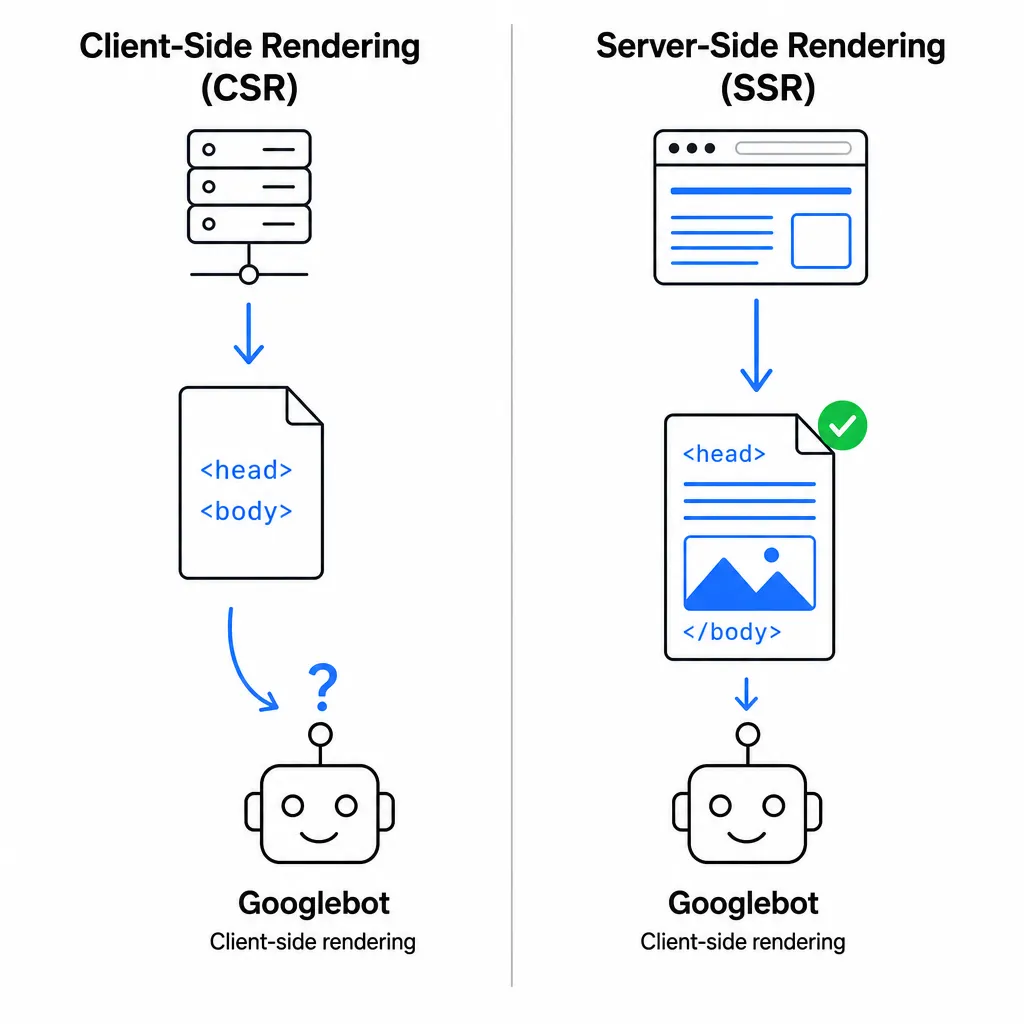
The big catch? The rendering stage adds an extra step: Google says a page may wait in the render queue for a few seconds, sometimes longer, and anything missing from the rendered HTML simply isn't indexed.
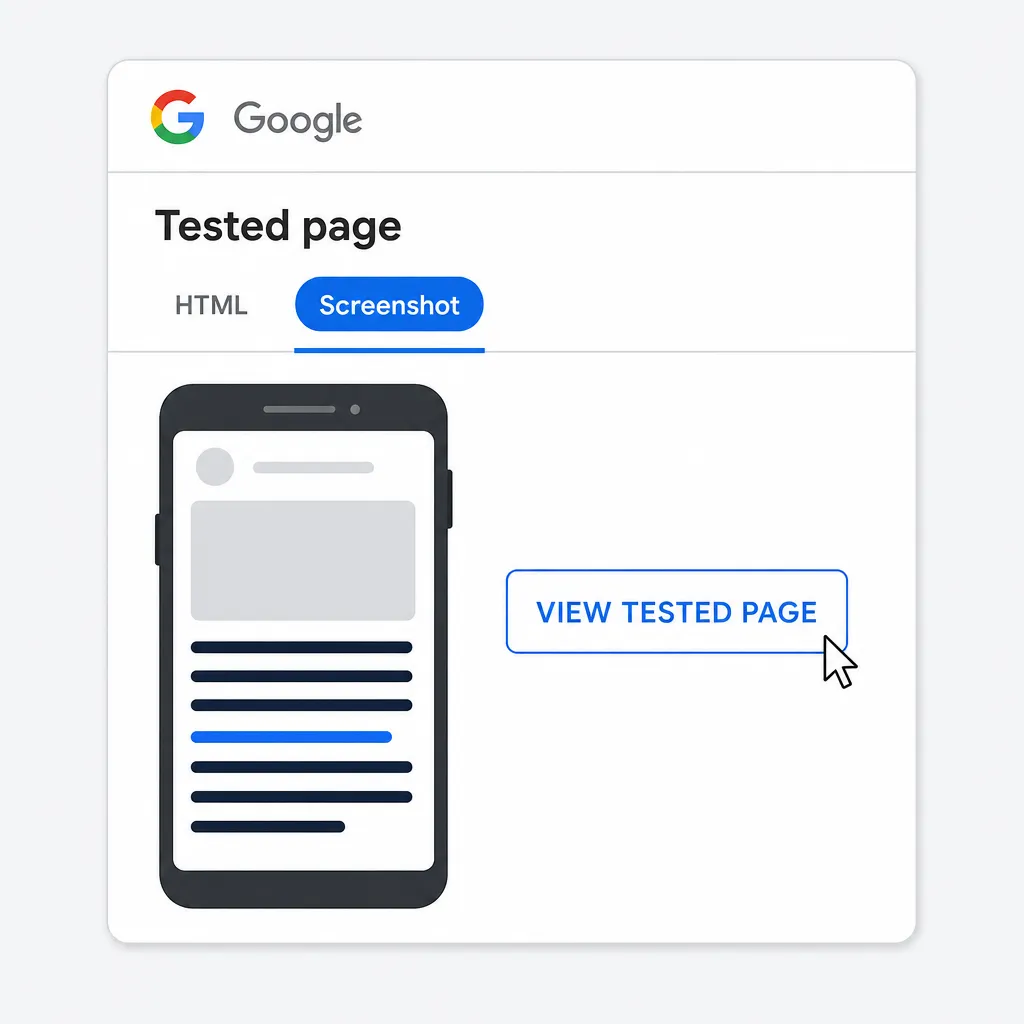
💡 Expert tip: To check exactly what Google sees after rendering, use the URL Inspection tool in Google Search Console. Run a "Test live URL" and look closely at both the screenshot and the rendered HTML. If your main content is missing, you've got a critical indexing problem to fix straight away.
Why server-side rendering transforms your SEO
Server-side rendering (SSR) changes the indexing game by handing crawlers like Googlebot a fully built HTML page before it even reaches the browser. Every element that matters for SEO shows up immediately: headings, links and metadata, with no dependence on client-side JavaScript execution.
- Client-Side Rendering (CSR): Here, the server sends a bare-bones shell (
<div id="app"></div>) and the browser does the heavy lifting of executing the JavaScript to display the content. This approach has obvious weaknesses when it comes to crawling. - Server-Side Rendering: Here, rendering happens on the server before anything is sent to the client. This option improves both indexing and the site's overall performance.
The improvement in Core Web Vitals is especially noticeable. SSR boosts Largest Contentful Paint (LCP) by delivering the main content right away, avoiding the delay caused by loading JavaScript bundles.
Technical mistakes that block JavaScript indexing
Some technical problems, often invisible to users, can make your site unusable for crawlers. An experienced SEO consultant spots these major roadblocks quickly.
- 🚫 Blocking .js and .css resources in robots.txt
- Consequence: Google can't render your pages properly and only sees a stripped-down version with no styles or functionality. A rule like
Disallow: /assets/, for example, becomes a disaster if that folder holds your essential CSS and JavaScript files. - 🔗 Fragment-based navigation (#)
- Consequence: Google generally ignores everything after the
#in a URL. For sections like/services#seo, use clean paths instead (/services/seo) with the History API so your navigation is SEO-friendly. - 🖱️ Content that only appears after user interaction
- Consequence: Googlebot can't interact with your interface, so any crucial content has to be visible on the initial page load to count for indexing.
- 🎭 Changing critical SEO tags on the client side
- Consequence: Dynamically modifying
canonicalortitletags with JavaScript creates inconsistencies: Google may index the initial version before your scripts ever run. - ⛓️ Redirects handled only on the client side
- Consequence: JavaScript redirects waste crawl budget. Google has to wait for the full render to see the final destination, which slows down the crawling of your site considerably.
Our beginner's guide walks you through the fundamentals of SEO with a practical method, with a focus on JavaScript SEO: how crawlers analyse and index content rendered with JavaScript, how to set up your sitemap and robots.txt files, the differences between client-side and server-side rendering, how to use structured data and how to optimise performance so your JavaScript pages actually rank. You'll also find tips on keyword research, HTML structure, internal linking, backlinks and the must-have tools (Google Search Console, PageSpeed Insights, GA4) to measure your results. Read the complete guide to SEO and JavaScript.
Optimising JavaScript for Core Web Vitals
Heavy, poorly optimised JavaScript is the number one threat to your Core Web Vitals, the metrics that directly affect your rankings in Google. Rigorous technical optimisation is essential for solid SEO.
Improve LCP and INP quickly
- Smart code splitting: Don't force visitors to download your entire application's JavaScript in one go. Split your code into lightweight modules that load only when they're needed.
- Best practice: Use dynamic
import()statements so components only load on the pages that use them.
Real-world example: Code splitting is like a library that hands you books one at a time instead of burying you under the whole collection at the door.
- Optimised loading (async/defer): For non-critical scripts, always use these attributes:
<script src="analytics.js" async></script>: downloads in parallel and executes immediately<script src="chat-widget.js" defer></script>: downloads in parallel and executes after HTML parsing. Usually the better choice.- Avoid layout shifts (CLS): Reserve the space needed for dynamically loaded elements. Set their dimensions (
width/height) or use the CSSaspect-ratioproperty to keep the layout stable.
Managing third-party scripts without slowing everything down
External scripts (analytics, ads, widgets) are often the worst offenders for performance.
💡 Pro tip: Defer loading them until the first user interaction (click, scroll, hover). This technique protects your Core Web Vitals without sacrificing functionality.
You can implement it with a simple event handler:
// Deferred loading of third-party scripts ['scroll', 'click', 'mouseover', 'touchstart'].forEach(event => { document.addEventListener(event, loadThirdPartyScripts, {once: true}); });
Rendering strategies: choosing the right approach
Your choice of rendering strategy directly shapes the SEO performance of your JavaScript application. Each method brings specific benefits depending on your needs.
| Strategy | Best use case | SEO benefits | Limitations |
| SSR (Server-Side Rendering) | E-commerce, frequently updated content | Immediate indexing, always-fresh content - ideal for SEO | Higher server load, more complex development |
| SSG (Static Site Generation) | Brochure sites, blogs, documentation | Maximum performance via CDN, excellent compatibility with Google | Requires a full rebuild for every change |
| Dynamic prerendering | Gradual migration of existing applications | A workaround Google no longer recommends | Variable costs, risk of inconsistency |
Mastering hydration for optimal SEO
In a hybrid approach, the server first sends static HTML (speeding up loading for Google and users alike), then client-side JavaScript steps in to "hydrate" the page and make it interactive.
Handy analogy: Picture getting a prefabricated house (static HTML) and then adding the electricity and plumbing (JavaScript) to make it fully liveable.
Crucial point: The HTML generated on the server must match the result after hydration exactly. Any mismatch can cause rendering problems and damage your technical SEO.
SXO (Search Experience Optimisation) shows that modern SEO relies as much on user experience as on classic techniques. To optimise JavaScript SEO, a few best practices are essential: reduce JavaScript's impact on rendering and performance by minifying files, deferring non-critical scripts and lightening the main thread. Favouring server-side rendering or prerendering guarantees better indexing of dynamic content by Google. Adopting lazy loading and modern image formats noticeably improves Core Web Vitals (LCP < 2.5s, minimal CLS). A rigorous semantic structure and structured data enrich your content, while tools like PageSpeed Insights and Search Console let you measure the precise impact on traffic and conversions. Discover our tips for optimising JavaScript to boost both SEO and UX.
Script governance with Google Tag Manager
No more scripts pasted straight into your code by hand! Google Tag Manager (GTM) is the go-to solution for managing your marketing and analytics tags efficiently without compromising your SEO.
- Streamlined centralisation: Move all your trackers (GA4, Meta Pixel, LinkedIn Insight Tag) into GTM to clean up your source code and improve load times.
- Asynchronous loading: The GTM container runs scripts asynchronously by default, protecting the Core Web Vitals that matter for your rankings.
- Structured DataLayer: Implement a robust
dataLayerto pass data reliably from your backend to GTM, instead of relying on fragile DOM scraping. - Privacy compliance: GTM makes it easy to implement Consent Mode v2, automatically adjusting tags according to each visitor's consent choices under GDPR, the UK GDPR and US state privacy laws.
// Example dataLayer implementation for e-commerce
dataLayer.push({
'event': 'purchase',
'ecommerce': {
'transaction_id': '12345',
'value': 99.99,
'currency': 'USD'
}
});
Making sure your JavaScript pages are indexable
Even with flawless client-side JavaScript rendering, a few basic mistakes can undermine your SEO. These fundamental rules are essential to any effective optimisation.
Crawlable URLs and internal linking
The one thing to remember: your links must always use the standard HTML tag. Always use the <a href="/my-page"> syntax for navigation. Search engine crawlers only read the href attribute - they never execute onClick handlers.
Here's the right way to implement navigation in a single page application:
<a href="/products/running-shoes" onclick="navigateSPA('/products/running-shoes')">Running Shoes</a>
Stable and reliable metadata
Your title, meta description and canonical tags and your structured data are crucial for SEO. They absolutely must be present in the HTML source sent by the server. Generating them only through client-side JavaScript makes indexing fragile.
Example of a well-optimised structure:
<head><title>Premium Running Shoes | Our Store</title><meta name="description" content="Discover our selection of premium running shoes for every terrain."><link rel="canonical" href="https://example.com/products/running-shoes" /><script type="application/ld+json">{"@context": "https://schema.org","@type": "Product","name": "Premium Running Shoes"}</script></head>
JavaScript SEO audit: a complete method
To improve the rankings of your JavaScript application, a regular technical audit is a must. Here's a method proven by JavaScript and SEO experts.
This practical guide shows you how to assess JavaScript's impact on your SEO:
- Check crawling and rendering (review robots.txt, sitemap and indexing tests)
- Identify problematic scripts
- Evaluate the real user experience
- Roll out targeted optimisations (deferring non-critical scripts, asynchronous loading, lazy loading and cache management)
All while measuring the precise impact on Core Web Vitals with Google Search Console, PageSpeed Insights and Screaming Frog. We also cover how to prioritise fixes and why continuous monitoring after a migration is key to keeping your site properly crawled and indexed by search engines.
Read our complete technical SEO audit guide, JavaScript optimisation included
- ✅ Test without JavaScript: Use a browser extension to temporarily disable JavaScript. Check that your main content, navigation and links are still accessible. This test measures how dependent you are on client-side rendering.
- ✅ Source vs rendered comparison: Compare the initial source code (
Ctrl+U) with the final DOM in your browser's developer tools. Does your key content need dynamic rendering to appear? - ✅ Crawl with JavaScript rendering: In Screaming Frog, enable rendering mode (
Configuration > Spider > Rendering > JavaScript). Compare results with and without JavaScript to spot content that's invisible to Googlebot. - ✅ Validate with Google's tools: Cross-check the Google Search Console URL Inspection tool with the Rich Results Test - they use the same rendering engine as Google's crawler.
- ✅ Check for blocked resources: Make sure your robots.txt doesn't block the essential .js/.css files Googlebot needs for proper indexing.
Advanced best practices by JavaScript framework
The major JavaScript frameworks offer specific features to improve your SEO. Here's how to get the most out of each ecosystem.
Next.js (React) - optimised SSR
- getServerSideProps: perfect for dynamic content (e-commerce, user profiles)
- getStaticProps + getStaticPaths: optimises static pages for maximum SEO performance
- next/head (or the Metadata API in the App Router): dynamic management of meta tags
// Typical SEO setup with Next.js export async function getServerSideProps(context) { const productData = await fetchProduct(context.params.id); return { props: { product: productData } }; }
Angular Universal - server-side rendering
- Native server-side rendering through Angular Universal (built into Angular SSR in recent versions)
- Streamlined tag management with the
MetaandTitleservices - Fine-grained control over the hydration process
Vue.js + Nuxt.js - performance and SEO
- Universal architecture ideal for rendering and SEO
- Automatic robots.txt optimisation
- Smart XML sitemap generation

Automate Your SEO With AI Agents
Sedestral connects six AI agents to your website to handle content, audits, rankings and backlinks, without the manual grind.