Getting your pages indexed on Google is the one step you can't skip if you want them to show up in search results. Before a page can rank anywhere, it has to be discovered, crawled, then added to the index. Understanding how that process works is the best way to make sure your content meets Google's standards and clears its indexing requirements. In this guide, you'll learn how to get your pages indexed faster and make them more visible.
Why indexing matters for your website
Indexing is where any visibility on Google begins. Despite what many people assume, publishing a page doesn't automatically put it in the search results. Google first has to discover the URL, crawl it with its bot (Googlebot), then decide whether or not to add it to its index.
Without that step, even the best content in the world stays invisible to searchers. That's why it's worth understanding how Google works and which factors sway its decision to index a page. Plenty of things come into play: content quality, the technical structure of your site, the right meta tags, and the overall performance of the page.
In this first part, let's look in detail at how the process works and which signals Google weighs up when deciding whether to index a page.
How Google discovers your pages (crawling)
Before we even talk about indexing, Google has to find your pages. If a page is never spotted by Googlebot, it can never be indexed, and it will never appear in the search results. This step is called discovery.
Here are the main ways Google discovers your content:
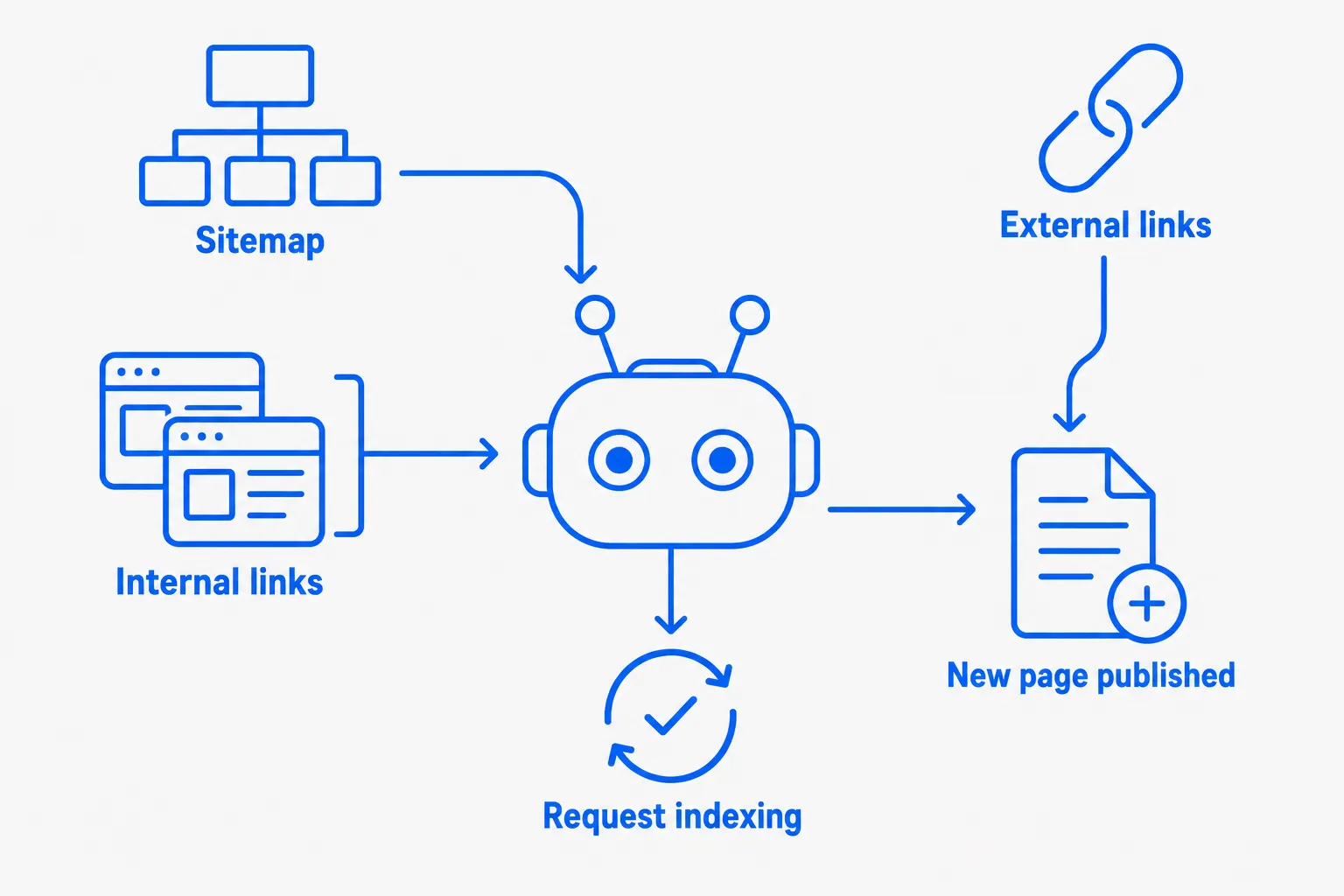
1. Links between your pages (internal linking)
When you add links from one page to another on your site, you help Google move around easily. For example, if your homepage links to a blog post, Google can follow that link and discover the post. If a page has no links pointing to it, Google may never find it.
👉 Always link your new pages from pages Google already knows, like your menu, your homepage or other articles.
2. The sitemap file (sitemap.xml)
A sitemap is a file that lists all the pages on your site. You can hand this file to Google directly through Google Search Console, which can help Google crawl everything faster. Think of it as giving Google a map with every address on your site.
3. Links from other sites (backlinks)
If another site mentions yours and adds a link to one of your pages, Google will follow that link and can discover your content that way. These external links are extremely useful, because they also show that your site is interesting and trustworthy. The more these links come from well-known, quality sites, the more they boost your site's authority in Google's eyes.
👉 Tip: try to earn links from reputable or popular sites in your field. It helps with discovery and with rankings at the same time.
4. Submitting a page manually
You can also ask Google to look at a page, straight from Google Search Console. Just paste your page's URL into the URL inspection tool and click "Request indexing". Handy when you've just published a new article, for instance.
5. Google's regular visits
Once Google knows your site, it comes back regularly to check for anything new. The more new content you publish, the more often Google will visit. That's why an active site is more likely to get indexed quickly.
👉 Tip: publish regularly, even small useful pieces (articles, news, product pages...), to show Google your site is alive and deserves to be crawled more often.
What Google checks before indexing a page
Once Google discovers your page, it doesn't automatically add it to the index. It first runs a series of checks to work out whether the page genuinely deserves a place there.
Your page is competing with thousands of others on the same topic, so Google has to pick the most relevant, useful and reliable content to show in its results.
Here are the main criteria it looks at before deciding whether to index your page:
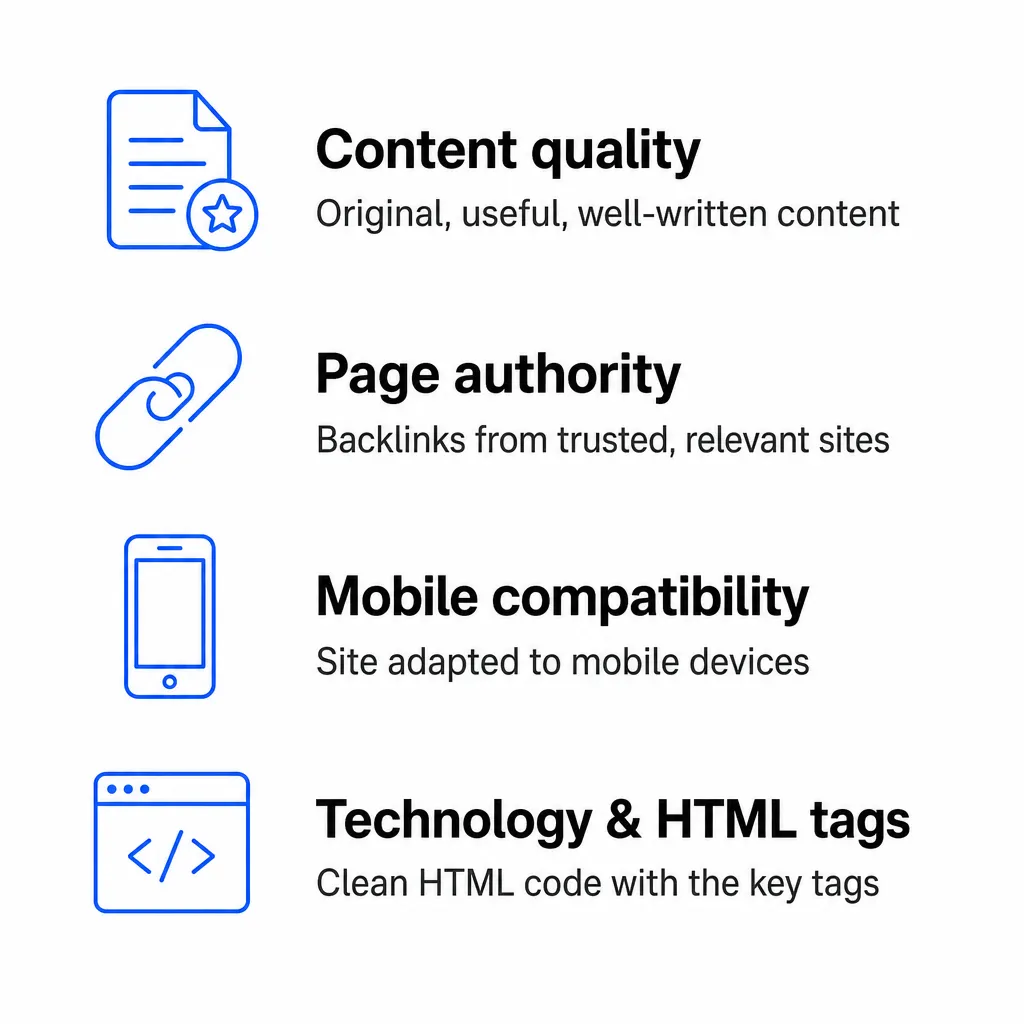
1. Content quality and semantic understanding
Before indexing a page, Google assesses its overall quality. Its goal is to serve content that is useful, reliable and well written, and that matches what people are actually searching for.
To do that, it no longer just checks keywords: it tries to understand what the text means, using algorithms such as:
- Panda (2011), which penalises thin, duplicate or low-value content.
- Hummingbird (2013), which introduced a holistic understanding of queries.
- RankBrain (2015), which learns to connect words to intent.
- BERT (2019), which analyses the context of sentences to pick up on nuances of language.
- Helpful Content Update (2022, now folded into the core ranking systems), which rewards content written for people, not for search engines.
What Google expects from a quality page:
- Original content: no copy-pasting from other sites. What you write needs to add value.
- Clear, structured text: headings, subheadings, short paragraphs, simple sentences.
- Useful answers: your content has to genuinely help the reader understand or do something.
- The right length: enough information to cover the topic in depth (without padding).
- A natural, human tone: no auto-generated text published without a proper edit.
- Intent respected: if someone is looking for a tutorial, they don't just want a definition; if it's a comparison, they expect criteria and a clear opinion. Read our guide on identifying search intent.
What Google penalises:
Thanks to Panda, and more recently the Helpful Content Update, Google can demote or simply ignore:
- Duplicate content (copied from other sites).
- Thin text written just to fill a page.
- Content produced purely for search engines, with no real use to a human.
- Pages that jumble topics together with no logic, or that don't actually answer a specific query.
- Sites that churn out lots of similar, low-value pages purely to rank.
Questions to ask about your content
Before you publish a page, ask yourself these essential questions:
👉 Does this page answer a real question or a clear need?
👉 Am I bringing something different or better than my competitors?
👉 Is my content clearer, more complete, more up to date? Is it genuinely useful?
Don't forget: every topic is competitive. If your page doesn't stand out through its angle, its quality or its depth, Google has no reason to index it.
👉 Analyse the pages that already rank well, then do better: more focused, more precise, more human.
2. Your page's authority: the links that count
Even if you've written a great page, that's not always enough for Google to rate it. It also looks at whether other sites are talking about you. That's what we call authority. And to measure it, Google relies on one very important signal: backlinks.
What is a backlink?
A backlink is a link pointing to your page from another site. For example, if a blog, a news site or a forum adds a link to your article, Google sees it. It's as if that site were saying:
"Hey Google, this content is worth a look, you should show it!"
The more links you have from reputable sites, the more your page gains credibility.
How Google measures your popularity
Google uses a system called PageRank to assess the authority of your pages. It takes into account the external links a site receives, also known as backlinks. These links are treated as votes of confidence: if other sites mention you, your content probably has value.
But not all links are equal. It's not about quantity, it's about quality and, above all, relevance to your topic.
What makes a link genuinely useful:
- It comes from a trusted, recognised site: a news outlet, a specialist blog, a non-profit, a university, and so on.
- It's published on a site that covers the same subject as you. If you run a fishing site, a link from a fishing blog is worth far more than one from a cooking site.
- It's placed naturally, in a well-written article directly related to the topic. Google prefers spontaneous, logical, contextual links over links stuffed into footers, comments or unrelated areas.
A concrete example:
Imagine you've written an article called "How to choose the right fishing reel":
- ✔️ A blog dedicated to sport fishing publishes "Our 5 favourite guides for beginners" and links to your page. → Excellent backlink, exactly what Google likes.
- ❌ An online casino site, with nothing to do with fishing, drops a link to your page at the bottom of a page full of ads. → Google is likely to ignore that link, or even penalise you if you have a lot of them.
How to earn external links
Quality backlinks don't happen by accident. Here are a few simple, effective ways to earn them:
- Create genuinely useful, well-targeted content: a solid article, a practical guide or an original resource is far more likely to be shared naturally by other sites.
- Reach out to sites or blogs in your field: suggest a collaboration, a guest post swap, an interview or a mutual mention. Partnerships are a good way to earn relevant links.
- Share your content on social media, forums or specialist groups, but do it smartly. Add value to the conversation rather than dropping your link anywhere just to make noise.
- ⚠️ Always stay within your topic: a link from a site that has nothing to do with your subject can do more harm than good. Google prefers links that are relevant, natural and useful to the user.
Key takeaways:
👉 A good link comes from a reputable site (news outlet, established blog, specialist forum).
👉 It should come from a site that covers the same subject as you.
👉 It should be placed naturally, inside a useful, well-written article.
👉 One quality link is worth far more than ten dubious or off-topic ones.
In short: the more good links you earn, the more Google trusts you. And the more it trusts you, the better your chances of being indexed quickly... and ranking well in the search results.
3. Mobile compatibility & user experience
Since 2015, Google has made it clear that it favours mobile-friendly sites. That update was called the Mobile-Friendly Update, and Google has since moved to mobile-first indexing across the board. The idea is simple: most people browse on their phone, so Google wants to send them to sites that are easy to read, fast and pleasant to use.
That's not all. Beyond mobile, Google also weighs up user experience (usually shortened to UX). It checks whether your page offers smooth navigation, whether it loads quickly, and whether it's free of technical errors.
Learn more about user experience (UX)
Mobile compatibility: a non-negotiable
A mobile-friendly site is one that:
- Adapts to every screen size (desktop, tablet, smartphone).
- Shows readable text without the need to zoom.
- Has buttons and links that are easy to tap.
- Doesn't display elements that are too wide or badly positioned on mobile.
👉 Google retired its standalone Mobile-Friendly Test in 2023. You can now check how your pages behave on mobile with Lighthouse in Chrome DevTools or with PageSpeed Insights, which runs a mobile audit by default.
Loading speed: a key factor
Google wants to give users pages that open fast. If your page takes more than 3 seconds to load, many visitors will leave before they've even read the content, and Google notices.
A slow site is usually caused by:
- Oversized images.
- Too many unnecessary scripts or animations.
- Slow hosting.
- Poor code or badly optimised plugins.
👉 You can test your site's speed with PageSpeed Insights (pagespeed.web.dev) and get concrete suggestions for improvement.
What Google dislikes on the UX side
- Intrusive pop-ups that hide the content as soon as the page opens.
- Links that are too small or crammed too close together.
- Pages with technical errors (404s, display glitches...).
- Confusing sites where visitors don't know where to click.
Key takeaways:
👉 A good site, in Google's eyes, is one that works well on mobile, loads fast and offers clear, pleasant navigation.
👉 Even if your content is excellent, a poor user experience can block indexing or hurt your rankings.
In short: to deliver a good user experience, use a responsive design, meaning a site that automatically adapts to every screen (desktop, tablet, mobile). Optimise your images so they're lightweight and quick to load (WebP is recommended), and check your pages regularly to fix errors, broken links and slow spots. Finally, keep navigation simple and clear: a well-organised menu, visible buttons and a logical structure help both visitors and Google understand your site.
4. Technology & HTML tags
When Google crawls your site, it doesn't just read the text on screen. It analyses the page's HTML code.
And here's the catch: if Google struggles to read or understand your content, it can't index it. Even if your text is brilliant for a human, it stays invisible in the results if the bot can't "parse" it (in other words, correctly analyse the HTML code).
What Google expects in your page's code
Here are the essential HTML tags Google reads to understand, analyse and potentially index your page. Using them well can improve your visibility. Using them badly can slow down or even prevent indexing.
<title>:
This is the page's main title, the one shown in the browser tab and in the search results.
Length: Google sets no official character limit, but long titles get truncated in the results. It should be clear, unique, include your main keywords, and not be so long that it gets cut off.
<meta name="description">:
This is the summary shown under the title in Google. Google sets no official length limit, but long descriptions get truncated. Write a compelling sentence, clear and descriptive, that makes people want to click.
<h1>, <h2>, <h3>…:
These are the headings and subheadings that structure your content.
Only one <h1> per page, representing the main topic. Then use <h2> for the major sections and <h3> for subsections.
This helps Google understand how your content is organised... and helps readers find their way around.
<a href=""> (internal or external links):
These are the clickable links to other pages. The link text (known as the "anchor") should be descriptive: say where the link goes.
Avoid anchors like "click here" or "learn more" with no context. Go for text like "read our guide to fishing reels": clearer for Google and for the user.
Learn more about the HTML tags to use for SEO
Validate your HTML
Even if your page displays fine in your browser, it may contain errors in the code that Google could misread. Clean, standards-compliant HTML lets Googlebot analyse your page more accurately... and makes indexing easier.
👉 To check whether your HTML is properly written, use the official W3C (World Wide Web Consortium) validator: https://validator.w3.org
5. Blockers to avoid: what stops Google indexing your page
Even with good content and a well-structured, fast, mobile-friendly page, Google can still decline to index it. Why? Because certain technical or deliberate settings can flat out block its access.
Let's go through the main causes:
The robots.txt file blocks access
The robots.txt file lives at the root of your site (e.g. mysite.com/robots.txt). It tells bots (like Googlebot) what they are and aren't allowed to crawl.
Example of a block in this file:
User-agent: *
Disallow: /blog/
Here, Google won't visit any page in the "/blog" folder, so their content won't be crawled. A blocked URL can still be indexed (without its content) if other pages link to it: use a noindex tag to keep a page out of the index.
👉 Tip: make sure you aren't accidentally blocking pages you want on Google. Check what Google sees in the robots.txt report in Google Search Console (Settings > Crawling), which replaced the old robots.txt Tester.
The <meta name="robots" content="noindex"> tag
This tag, placed in a page's HTML, tells Google in no uncertain terms: "Don't index me."
Example: <meta name="robots" content="noindex">. Result: however well written the page is, Google ignores it completely.
👉 Tip: this tag is useful for private pages, but it should never appear on important ones (homepage, articles, product pages...).
Technical errors block access
Google can't index a page it can't load. The most common technical errors:
- 404: the page doesn't exist or has been deleted.
- 500: the server crashes or is misconfigured.
- 403: access forbidden (password, IP restriction).
- Redirect loops or broken redirects.
👉 Tip: use a tool like HTTP Status Checker or a crawler like Screaming Frog to spot these errors.
The page is private or not yet published
It sounds obvious, but sometimes:
- The page is still a draft (unpublished).
- It's password protected.
- It's on a staging site (not yet publicly online).
👉 In these cases, Google simply can't reach it, so it can neither analyse nor index it.
Key takeaways:
👉 A single misplaced line of code or a minor server block is enough to stop a page from existing on Google.
👉 Remember to check access, tags, HTTP status codes and configuration files.
👉 Google helps you spot these problems in Google Search Console, through the "URL Inspection" tool: https://search.google.com/search-console
Watch Out
Publishing Content Before Fixing Technical Errors
Creating new pages on a site with unresolved crawl or indexing issues is unlikely to improve your rankings, use a technical audit tool like Nox to clear blockers before scaling your content output.
How Google's index works and why search intent is essential
When we talk about indexing a website, it's not just about publishing content. You need to understand how Google's index works to maximise your visibility in the search results.
What is Google's index?
Google's index is like a gigantic library that stores every web page Google has crawled and judged worthy of showing.
Getting a page indexed therefore means making sure it exists in that library. If your page is not indexed, it can never appear in Google search, even if someone types its exact URL.
👉 You can check whether a page is indexed in Google Search Console, using the URL inspection tool. It shows you whether the page has been crawled and indexed, or whether something is stopping Google from processing it (a noindex tag, a block in the robots.txt file, a redirect...).
Search intent: what Google really wants to understand
Google doesn't just read your HTML code or your tags: it tries to understand what the searcher is actually looking for. This ability is called search intent understanding.
The intent could be:
- a desire to buy → Google will show product pages.
- a need to compare → Google will surface lists and guides.
- a search for straightforward information → it will favour clear, concise articles.
Thanks to algorithms like RankBrain and BERT, Google can analyse the context of keywords to show the most relevant pages, not necessarily the ones that repeat a word the most.
Learn more about search intent in our dedicated guide.
Conclusion: to get indexed, be better than your competitors
Getting a website indexed on Google isn't automatic. It's a process that depends on several technical signals, but above all on content quality and the competition in the search results. If you want to index your website on Google, ask yourself one simple question: why would Google choose your page over another?
The answer rests on three essential pillars:
1. Content quality: the foundation of all SEO
Clear, original, well-structured content with genuine added value is fundamental. Google's crawlers aim to give searchers useful, readable pages that answer a specific search intent. So you need to take care of:
- Your HTML structure, with the right tags (
<title>,<meta name="description">,<h1>, etc.). - The relevance of the page's content: more complete, more up to date and better written than your competitors'.
- Natural keyword use, without over-optimisation, and with solid semantic consistency.
👉 Don't forget: Google doesn't index every page. It selects. And it only keeps the ones that deliver the most value to the user.
2. Competitor analysis: your content has to outperform the rest
Every keyword is a battle. Analyse the pages indexed on Google for your target query, study their structure, length and depth... then do better. To get your pages indexed, you need to:
- Identify what your competitors leave out.
- Add unique angles, concrete examples and useful data.
- Cover the topic in more depth, without slipping into filler.
👉 Good content isn't just well written: it has to be more relevant than what's already out there.
3. Technical setup, links and indexing signals
Once your content is written, don't forget to:
- Connect your page to others through solid internal linking.
- Include it in an XML sitemap, or request indexing through Google Search Console.
- Check that it isn't blocked by a robots.txt file, a noindex tag or a technical error (404, 500...).
- Earn links (backlinks) from relevant sites to strengthen its authority.
👉 Check the indexing status of your pages in Google Search Console. It's your main dashboard for understanding how Google sees and handles your site.

Rank Higher Without the Manual Work
From technical audits with Nox to competitor monitoring with Marc, Sedestral's AI agents cover every layer of SEO so your team doesn't have to.