Your Shopify store is live, the theme looks sharp, and yet organic traffic has flatlined? Between "miracle" apps and tutorials that promise to rewrite your URLs, the advice keeps contradicting itself: this guide sets the record straight.
The context has changed profoundly. On July 22, 2026, Google's AI Overviews and AI Mode completed their European rollout, France included: on the informational queries they touch, organic click-through rate drops by 61% on average. And since the Winter Edition 2026, Shopify can publish your catalogue directly to ChatGPT, Perplexity and Microsoft Copilot. SEO for a store now means making your product data readable by every machine that recommends the purchase.
This guide is not a list of generic tips: it's a complete methodology, from technical audit to measurement, grounded in what Shopify actually does in 2026.
Phase 1: Shopify's technical foundations
1. What Shopify already does well
Let's start with what you don't have to do. Shopify natively provides: a global CDN with HTTP/3, images automatically converted to WebP or AVIF, HTTPS everywhere, and an automatic XML sitemap that can't be edited; the only native per-page "noindex" is the seo.hidden metafield (value 1), which also removes the page from the sitemap. The .myshopify.com domain 301-redirects to your primary domain.
301 redirects are native too: when you change a page's handle, Shopify offers a "Create a URL redirect" checkbox, ticked by default. For everything else: Content > Menus > View URL redirects, with CSV import. Official limits: 100,000 redirects on standard plans, 20 million on Shopify Plus; a redirect only fires if the source URL returns a 404.
A budget note: on-site SEO is identical from the Basic plan ($39/month) to the Plus plan ($2,300 and up), with just two differences, redirect volume and markets. Upgrading "for SEO" achieves nothing.
2. URLs and canonicals: killing the prefix myth
No, you cannot remove /products/, /collections/, /pages/ or /blogs/ from your URLs. It's impossible, even on Shopify Plus, and the tutorials that "strip" these prefixes with JavaScript rewrites or proxies break rendering and crawling. It's not a handicap either: your Shopify competitors have the same prefixes, and Google ranks pages, not folder structures. What you can edit is the handle (the slug) of each page, in its search engine listing section.
Canonicals, on the other hand, deserve an audit. Two native behaviours are correct: variant URLs (?variant=123456) point to the base product URL, and /collections/x/products/y points to the bare /products/y. The duplication exists at crawl level, not index level, as long as the theme stays clean. Three checks:
- Internal linking: if your theme builds product links with the Liquid filter
product.url | within: collection, replace it with plainproduct.urlso you only link to the canonical version. - Apps: review apps and some themes inject a second block of canonicals or Product schema; these conflicts are a recurring audit finding in 2026.
- Tags:
/collections/x/tag-ypages are crawlable; only multi-tag combinations are blocked by default.
On large catalogues, a mismanaged default architecture can waste crawl and dilute signals across duplicate paths.
3. robots.txt.liquid: Shopify's own crawl lever
Shopify's robots.txt is editable: Online Store > Themes > ⋯ menu > Edit code > Add a new template > type "robots", which creates templates/robots.txt.liquid. The default already blocks /admin, /cart, /checkout, the internal search /search and tag combinations /collections/*+*.
Why touch it at all? Because facets are the number one crawl budget killer: a fashion store with 8,000 products and colour, size, price, material and brand filters can generate over 2 million URLs, and a large part of the crawl can disappear into worthless facets. On Shopify, filters generate ?filter.v.option... URLs, canonicalised to the collection but still crawlable. Google's current doctrine for combinations with no search value: block them in robots.txt rather than noindexing, because noindex still consumes crawl. That's exactly what robots.txt.liquid is for: blocking filter.*, sort_by, specific tags. Conversely, a facet with real search demand ("red dresses") deserves a proper dedicated collection.
⚠️ Careful: make your changes by adding Liquid directives around the default (looping over robots.default_groups), never by replacing the whole file, or you lose the automatic updates; customisation isn't covered by Shopify support, which warns that misuse "can cause you to lose all traffic". And don't block the AI crawlers (GPTBot, OAI-SearchBot, PerplexityBot, ClaudeBot) if you want to exist in their answers.Two complements: pagination URLs ?page=N carry a self-referencing canonical per page, which is correct (rel=prev/next has been ignored by Google since 2019). And the "Indexed, though blocked by robots.txt" warnings on /cart in Search Console are the expected behaviour: don't try to "fix" them.
4. Speed and Core Web Vitals: the real culprit
Let's frame the signal properly: there is no longer a separate "page experience" ranking system, Google clarified that back in 2023. Core Web Vitals remain a lightweight signal; the real reason to optimise is conversion. The thresholds: LCP ≤ 2.5 s, INP ≤ 200 ms (INP replaced FID in March 2024), CLS ≤ 0.1, evaluated on your real users (CrUX data). Look at this real PageSpeed Insights report for a very large Shopify store, Gymshark:
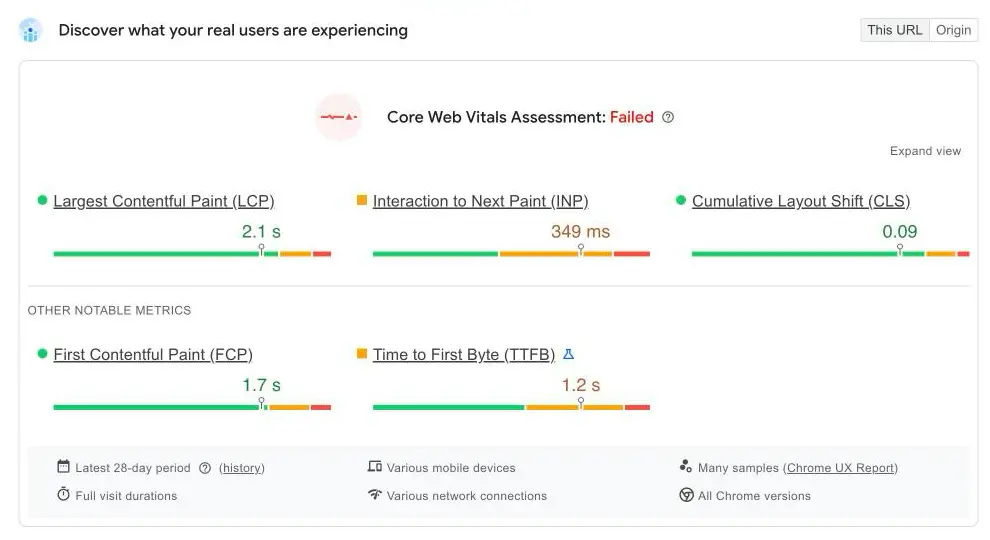
LCP at 2.1 s: pass. CLS at 0.09: pass. But INP shows 349 ms, nearly double the threshold, and the 28-day assessment reads "Failed" (note the 1.2 s TTFB as well). The lesson applies to every Shopify store: the infrastructure delivers a solid base, and what breaks INP is app JavaScript. An average app adds 50 to 150 KB of JS to every page, "app embeds" (star ratings, badges, banners) cause CLS, and a single install can tip a borderline LCP into the red.
The speed plan fits in four points: a recent theme (Dawn, the free reference, performs well on real-world CWV; Horizon, launched in summer 2025, is built mobile-first), purging unused apps and their leftover code (uninstalling doesn't clean the theme), limiting app embeds, and zero "miracle" speed apps: some of them game the Lighthouse score without improving the real experience. To go deeper, read our guide to technical SEO.
Phase 2: On-page optimisation for your store
1. Titles and meta descriptions, page by page
Every product, collection, page and article has its search engine listing section: page title (70 characters recommended), meta description (160 characters), handle. The homepage is set in Online Store > Preferences. Shopify Magic, included on every plan, generates titles and meta descriptions in that section, and Sidekick flags incomplete pages: useful for a first pass, but with no keyword research, no rank tracking, no view of the SERP.
And keyword choice is not a matter of intuition: start from the queries the page already appears on. Sedestral pulls your Shopify products, collections, blog articles and pages into one place and identifies those queries, with position, clicks and impressions:
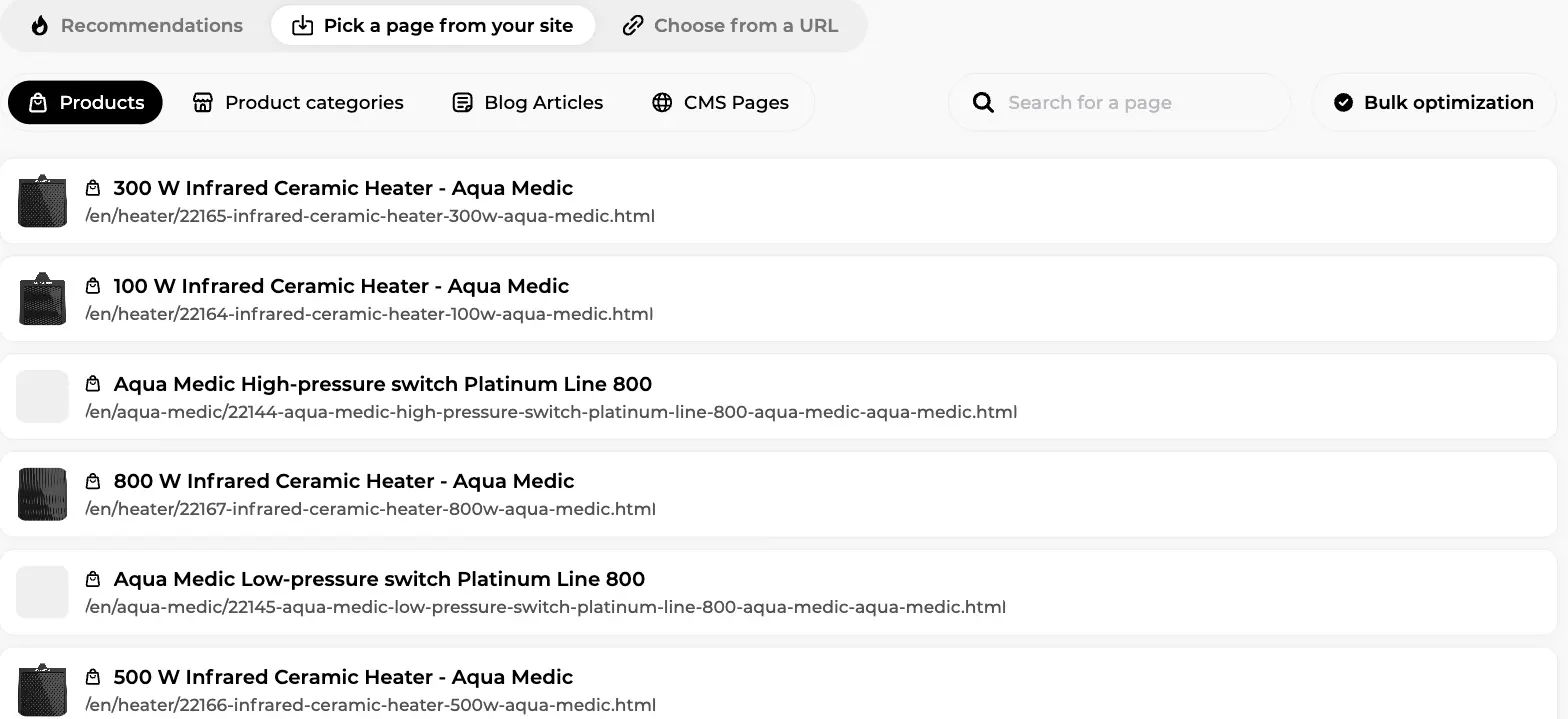
In this screen, connected to a live aquarium supplies store, the Products tab lists every imported product page, ready to be worked on one by one or queued for bulk optimisation. For each page, you then confirm the main keyword and review the title and description before anything ships:
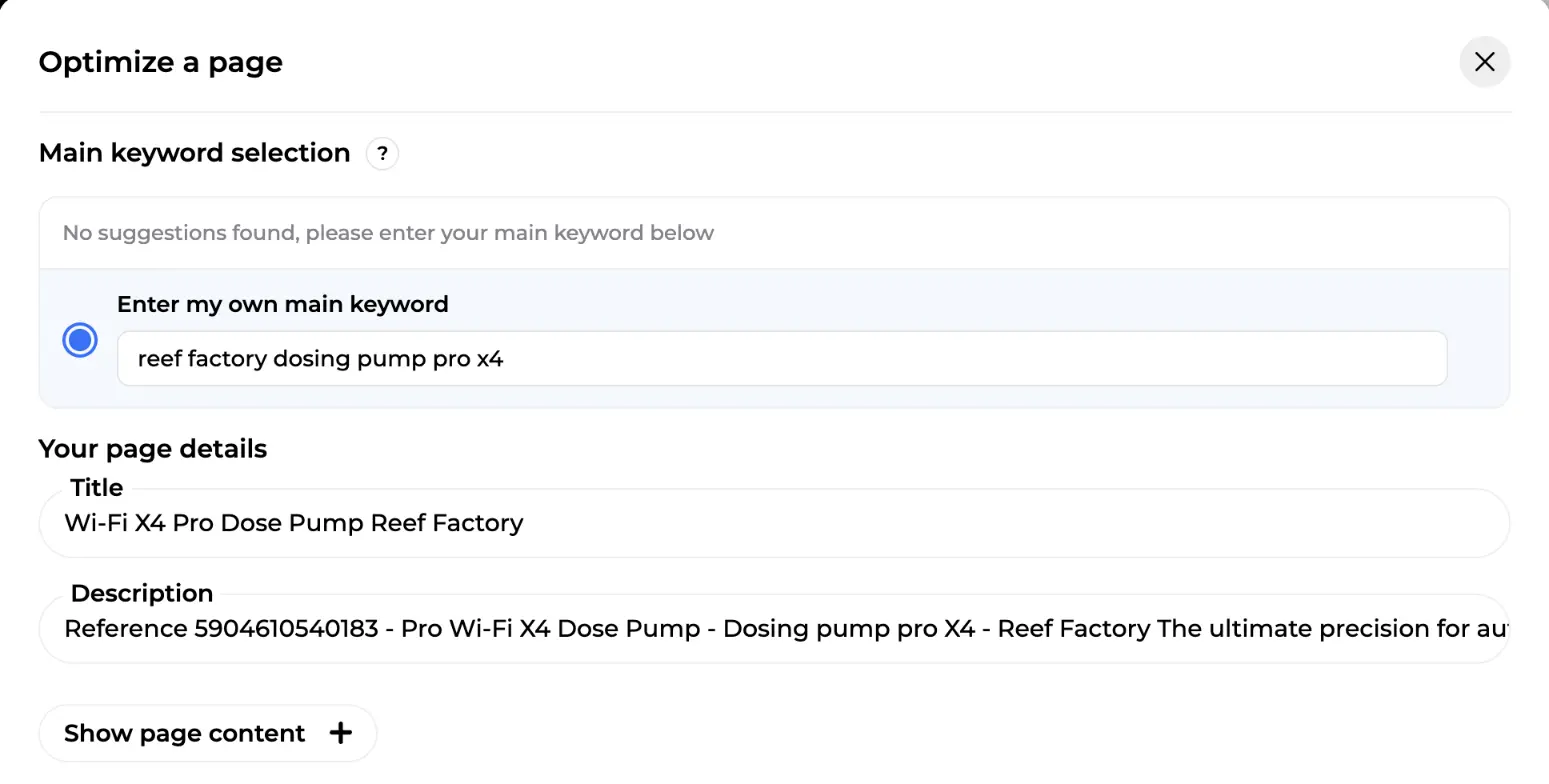
Here, a Reef Factory dosing pump has no suggested intent yet, so the merchant enters "reef factory dosing pump pro x4" as the main keyword; the title and description are rewritten for that intent, then exported straight back to the store. For the method itself, see how to choose your SEO keywords.
2. Unique copy and collections that work
Never copy supplier descriptions: when fifty stores publish the same text, Google shows only one of them, and it's rarely yours. Add what the supplier doesn't say: use cases, compatibilities, feedback from your own customers.
The most under-exploited lever: collections, your real category pages, with a worked title, a useful introduction and links to your flagship products. Online Store 2.0 allows alternate templates per collection so you can add editorial content; metafields bring structured fields (specifications, product FAQs) without code, and metaobjects bring standalone page types (guides, brands). That structured data also feeds AI shopping assistants, which read attributes, not prose.
3. Images and ALT tags
Shopify's CDN already converts your images to WebP or AVIF and resizes them on the fly: don't buy an app for that. What remains on your plate is the initial compression of heavy files and above all the ALT tags, for accessibility and Google Images. Across hundreds of SKUs, this is a batch job:
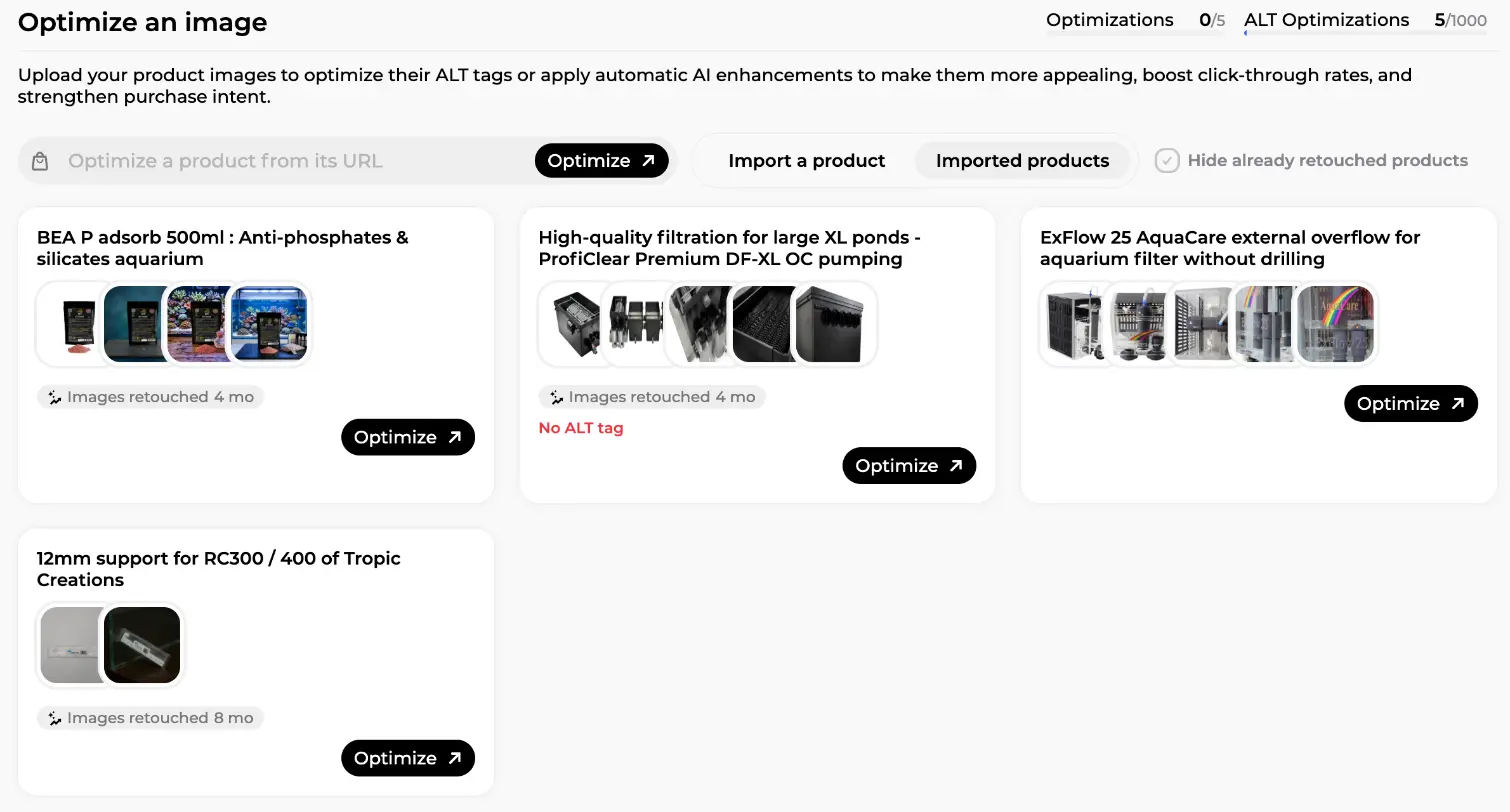
On this Sedestral screen, plugged into a real aquarium supplies store, each imported product arrives with its photos; ALT tags are generated and AI retouches applied where needed (several products show "Images retouched 4 mo" or "8 mo", and one carries a red "No ALT tag" warning), then everything ships back to the store.
4. Structured data: native is no longer enough
Dawn, Horizon and most modern themes emit JSON-LD natively: Product, Organization, BreadcrumbList. But this markup is incomplete for Google's merchant listings: it typically lacks brand, reliable gtin/sku values, reviews (aggregateRating) and above all shippingDetails and hasMerchantReturnPolicy, shipping and returns. Three requirements:
- The JSON-LD must sit in the HTML returned by the server: apps that inject it with JavaScript are not guaranteed to be taken into account.
- The values must match what the user sees (price, stock).
- No duplicates: theme + review app + schema app = duplicate Product blocks, which Google may ignore. Audit with the Rich Results Test.
The Merchant Center bridge completes the picture: the product feed (the Google & YouTube app) drives Shopping, and the on-page markup validates and reinforces it; Google recommends both, kept consistent with each other. In 2026 the GTIN requirements have tightened, and Google's UCP protocol (Phase 4) connects feed, structured data and checkout: inconsistent data disqualifies you. Our guide to structured data for SEO details every schema. Outdated beliefs while we're here: FAQ rich results were removed from Google's results on May 7, 2026, HowTo has been dead since September 2023, and meta keywords never worked in the first place.
Phase 3: Content and authority
1. The Shopify blog and its limits
The native blog is structured as "blogs" (URL /blogs/tips) containing articles, with no subcategories, a non-removable /blogs/ prefix and an editor that has stayed basic compared with WordPress: no assisted internal linking, limited scheduling, a single displayed author. Which is why the editorial strategy is often driven by an external tool that publishes into the native blog (Phase 6).
The model that works is still the topic cluster: a pillar page ("how to choose your aquarium"), satellite articles answering specific questions, satellites linking to the pillar, the pillar linking to collections and products. That topical authority is what Google and the AI models both reward. When Sedestral optimises an existing piece of content, it starts from the page's current score, then works through the steps: competitor analysis, search intent interpretation, strategic keywords, SEO and AI best practices, text humanisation, and a final technical audit.
2. Customer reviews and link building
93% of French shoppers check online reviews before choosing a business (IFOP and Guest Suite, 2026). Reviews produce fresh content in your customers' real vocabulary, feed your aggregateRating and fuel AI assistants' recommendations; since the native review app was retired in 2024, a third-party app is unavoidable (Phase 6). On external authority, link building remains decisive: press relations, real partnerships, mentions in your sector's buying guides, which are also the pages AI assistants cite. To structure the acquisition, see our backlink campaigns guide.
Discover Sedestral's Shopify integration
Phase 4: AI search: making your store citable and buyable
1. What changed in 2026
- AI Overviews and AI Mode reached France on July 22, 2026, two years after the United States, as part of the European rollout. On informational queries with an AI Overview, Seer Interactive measures organic CTR falling from 1.76% to 0.61%, a 61% drop; Ahrefs measures -34.5% on average.
- Transactional queries remain relatively spared, but the gap is closing: their AI Overview coverage has grown steadily since 2024 according to industry studies, and "best X" queries show an AI Overview 83% of the time (BrightEdge).
- AI-assisted buying has reorganised itself: ChatGPT's Instant Checkout, launched in late 2025 with Stripe, had been adopted by only a handful of Shopify merchants by early 2026; OpenAI redirected it in March 2026 towards ChatGPT Apps. The dominant model: discovery in the AI, purchase at the merchant's.
2. Agentic Storefronts: the setting to know
On Shopify's side, the official channel is called Shopify Catalog: a global, structured catalogue of eligible products (attributes, prices, stock, policies), formatted for AI models. With the Agentic Storefronts from the Winter Edition 2026, rolled out progressively to all stores from late March 2026, this catalogue is published to ChatGPT, Perplexity and Microsoft Copilot: the customer can ask questions, compare and buy inside the conversation. The setting lives in the admin under the AI visibility channel, with an opt-out available: check that it's active, then polish what feeds it (exact titles, attributes, stock levels, policies). The ecosystem is lining up: Copilot Checkout launched in January 2026 with Shopify, and the Universal Commerce Protocol (UCP), announced by Google on January 11, 2026 and co-developed with Shopify, connects catalogues and checkout to Search, AI Mode and Gemini (United States first).
3. What makes a store citable
Visibility in AI answers is binary: cited or absent. The levers: complete structured data and an exact product feed (assistants parse data, not prose), factual buying guides and comparisons built to be extracted (tables, lists, numbered specs), off-site presence (third-party reviews, forums, press, the corpora LLMs lean on massively) and entity consistency. The llms.txt file remains a standard that no major LLM provider had confirmed honouring by early 2026: a cheap bet, not a given. Practitioners recommend about 70% of the effort on classic SEO and 25% on GEO. Full method in our guides to generative engine optimization and AI visibility.
Phase 5: Going international with Shopify Markets
Shopify Markets offers three architectures per market: subfolders (yourdomain.com/fr/, recommended because they pool your authority), subdomains, or dedicated domains (the strongest local signal). The hreflang tags are generated automatically for every market with its own domain, subdomain or subfolder, with language-region codes and an x-default, updated whenever the settings change. Each language version carries its own self-referencing canonical, crawlers are excluded from geographic redirects, and the per-market sitemaps include the hreflang annotations: submit each international domain in Search Console. Everything is configured in Settings > Markets, with the free Translate & Adapt app for translations; on Advanced, 3 localised markets are included, then about $59/month per additional market.
Phase 6: The toolkit: apps and beyond
Type "seo" into the Shopify App Store and measure the problem:
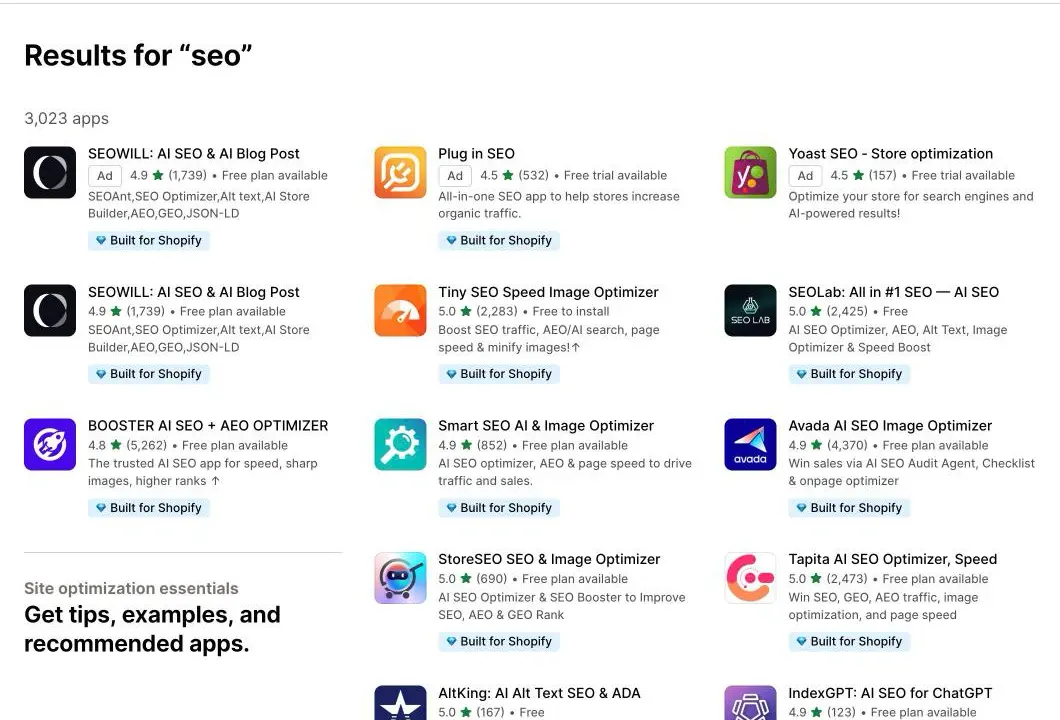
3,023 apps answer the query, almost all of them rated between 4.5 and 5 stars: you can spot Booster AI SEO + AEO Optimizer (4.8, more than 5,200 reviews), Avada AI SEO Image Optimizer, Tapita AI SEO Optimizer, Smart SEO & Image Optimizer, StoreSEO, SEOWILL and even Yoast SEO. The ratings settle nothing: choose by need, with the prices checked in August 2026.
- All-in-one suite: Booster SEO & Image Optimizer (free, Pro at $39/month, Premium at $69/month), the biggest review volume in the category, with its AutoPilot mode; Avada SEO Speed Image Optimizer (a genuinely usable free plan, Pro around $35/month); Tapita or Smart SEO (from $9.99/month) on a small budget. One suite is enough.
- Structured data: JSON-LD for SEO (Ilana Davis), the reference at $399 per year, with server-side injection built for merchant listings; or Schema Plus as a subscription.
- Customer reviews: Judge.me (a very complete free plan, Awesome plan at $15/month), Shopify-exclusive since January 2026; Loox (from $9.99, Convert at $49.99/month) for photo and video reviews; Okendo, Stamped or Yotpo at the top end.
- Images: TinyIMG (free for 50 optimisations/month, then about $14/month) for the initial compression and bulk ALT tags.
Keep the list of pointless apps in mind: sitemap generator, redirects, "canonical fixer", robots.txt, WebP conversion, hreflang in a standard setup: all of it is native. Run from ghost promises ("guaranteed ranking boost", meta keywords, FAQ rich snippets, dead since May 2026). And remember Phase 1: every app adds its JavaScript, and a full stack quickly reaches $70 to $150/month.
Sedestral: the strategy, run from outside the store
The App Store apps share a structural limit: they live inside the store and see nothing but the store. They fix fields, but they do no strategy, no content, no external measurement. That's the ground Sedestral covers, connected to Shopify through a native integration: a continuous technical audit seen from the outside (broken canonicals, duplicate schema, indexed facets, internal linking), optimised articles published directly into the store's native blog (the article lands in /blogs/... with no copy-paste, closing Shopify's main blind spot), optimisation of product pages and collections with export back to the store, rank tracking (which Shopify's SEO apps don't ship), backlink campaigns, and tracking of your visibility in ChatGPT, Gemini, Perplexity, Google AI Overviews and AI Mode. All of it without adding a single line of JavaScript to the storefront.
Honesty about scope: speed belongs to your theme, reviews and image compression to dedicated apps; Sedestral takes on strategy, content, authority and measurement. There is a free plan, then paid plans from €119 per month (shown in your local currency).
Create your account and connect your store
Phase 7: Measure to steer
- Google Search Console: submit the sitemap, follow the Core Web Vitals report (CrUX data) and the crawl stats, which will tell you whether your facets are still devouring crawl. Our Google Search Console guide details every report.
- Google Analytics 4: tie organic traffic to revenue by landing page, collections and product pages first.
- PageSpeed Insights and Shopify's speed report (Online Store > Themes): the lab to diagnose, the real-user data to judge.
- Rankings and AI citations: rank tracking remains indispensable, all the more so because CTR by position changes on queries with an AI Overview; Sedestral tracks both.
Your 6-week Shopify SEO action plan
- Week 1: Audit and foundations. Set up GSC and GA4, submit the sitemap. Audit the theme: canonicals,
| within:links, duplicate schema, leftover code from uninstalled apps. - Week 2: Crawl. Create robots.txt.liquid: block the
filter.*facets and the sort orders, make an explicit decision on AI crawlers. Take an app inventory, purge the unjustified ones. - Week 3: Money pages. Titles and meta descriptions for the homepage, your 5 main collections and 10 flagship products, built from real queries. Collection introductions, unique descriptions, ALT tags.
- Week 4: Product data. Complete the theme's JSON-LD for merchant listings (GTIN, brand, shipping, returns), keep it consistent with the Merchant Center feed, activate the AI visibility channel.
- Week 5: Content. First topic cluster: a pillar page built as a buying guide, direct answers at the top of each section, links to collections and products.
- Week 6: Authority and measurement. First satellite article, 3 link building partners identified, and a dashboard: GSC, GA4, rank tracking and AI citation tracking.