A well-built HTML structure can do a lot for your visibility in search results. Let's look at how to tidy up your HTML code for stronger organic search performance (SEO).
Why HTML directly affects your SEO
HTML is the structural backbone of every web page. Before a single visitor lands on your site, search engine crawlers (Google, Bing and the newer AI engines) read your HTML code first to work out what the page is about. That reading decides how your page gets indexed, ranked and, sometimes, reused in AI-generated answers.
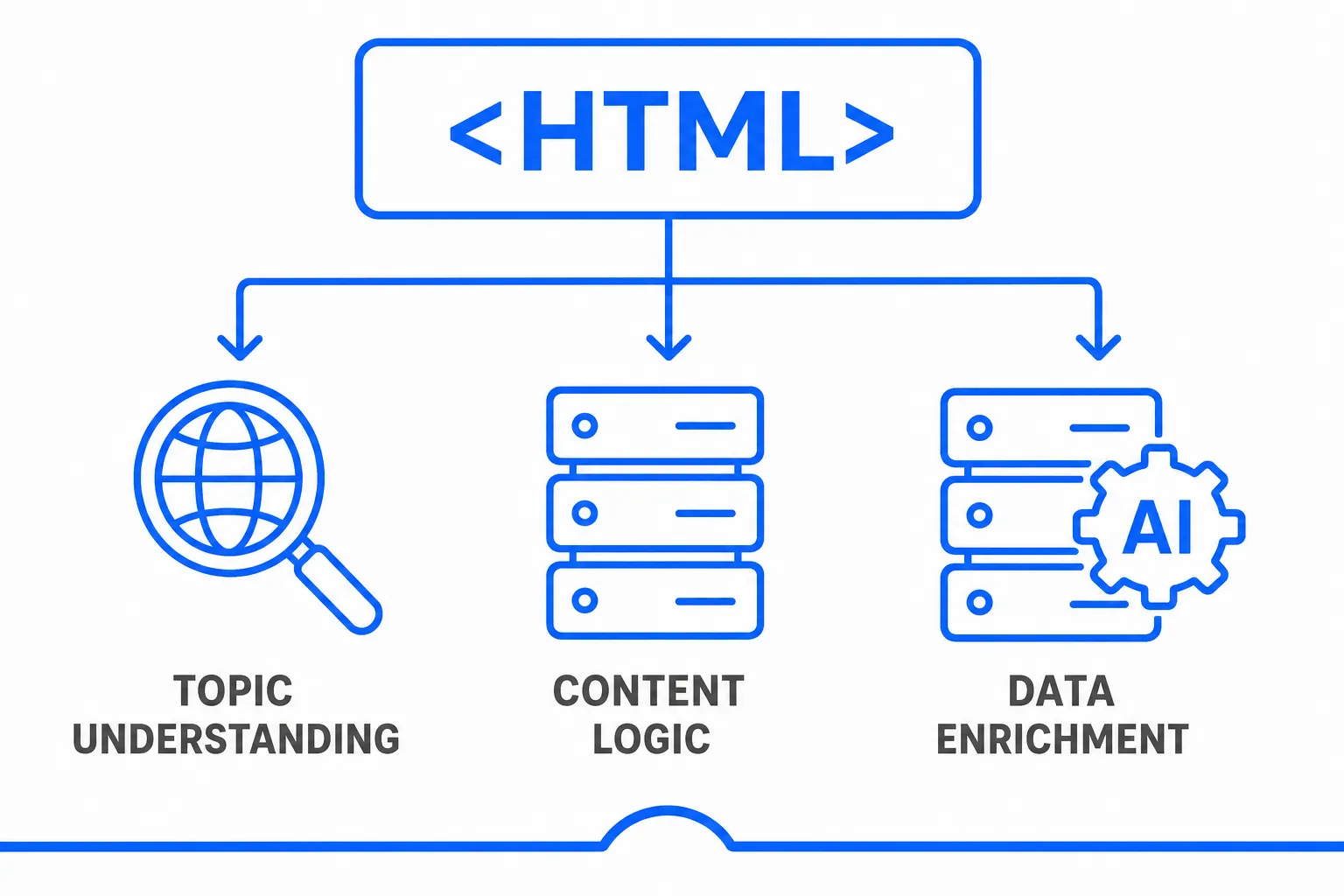
A clear, consistent, semantic HTML structure gives you several key advantages:
- It points search engines at your main topic through a relevant title tag, an accurate meta description and a well-defined content hierarchy.
- It organises your text logically with distinct sections and HTML5 semantic tags that give meaning to the content.
- It makes your data easier to parse through structured markup, so engines can show important elements directly in the SERP.
The AI shift: generative search
With the rise of AI-powered engines such as Google's AI Overviews and AI Mode, Microsoft Copilot or ChatGPT search, a new form of optimisation has emerged: GEO (Generative Engine Optimization).
Where traditional SEO optimises a page for search results, GEO aims to make your content easy for AI systems to understand, summarise and reuse. In that context, HTML matters more than ever:
- Well-organised HTML code lets AI systems extract information more easily.
- Generative AI favours well-structured content when building summaries, fact sheets or precise answers.
- Rich data and semantic tags increase your chances of being cited as a trusted source in automated answers.
Properly marked-up content no longer just ranks well: it can now become the answer itself inside AI search interfaces. Your page doesn't only show up in the SERP. In some cases, it is the answer, quoted word for word to someone who never typed a query into Google at all.
Why semantic SEO matters
A well-organised HTML structure is now a key advantage for your visibility: it lifts your position in organic search results (classic SEO) while making your content far more likely to be picked up by AI systems (GEO), which is changing how people consume information altogether.
Optimising your HTML code now means improving the readability and clarity of your content so that it's interpreted correctly by traditional engines (Google, Bing) and by assistants like ChatGPT or Gemini alike. In an era where AI is taking over online search, well-structured HTML is as vital for being found as it is for being presented well.
The essential HTML tags for SEO
Good SEO always starts with a clean, consistent, semantically rich HTML structure. Whether it's a classic engine or a new generative system, every one of them reads your HTML code first to grasp its meaning.
This technical guide explains how different elements, from HTML tags (H1/H2 headings, title tag, meta tags) to URL architecture, the robots.txt file, the sitemap.xml, internal links and page speed, directly affect indexing and ranking on Google. You'll also learn how to audit your site to spot technical errors, with practical fixes for each one. Finally, tools like Google Search Console or PageSpeed Insights will help you measure your progress, bearing in mind that a solid technical base always needs quality content on top.
Read the complete technical SEO guide (HTML, performance, indexing)
Below are the 7 most important HTML tags, ranked by their impact on traditional SEO and GEO (Generative Engine Optimization):
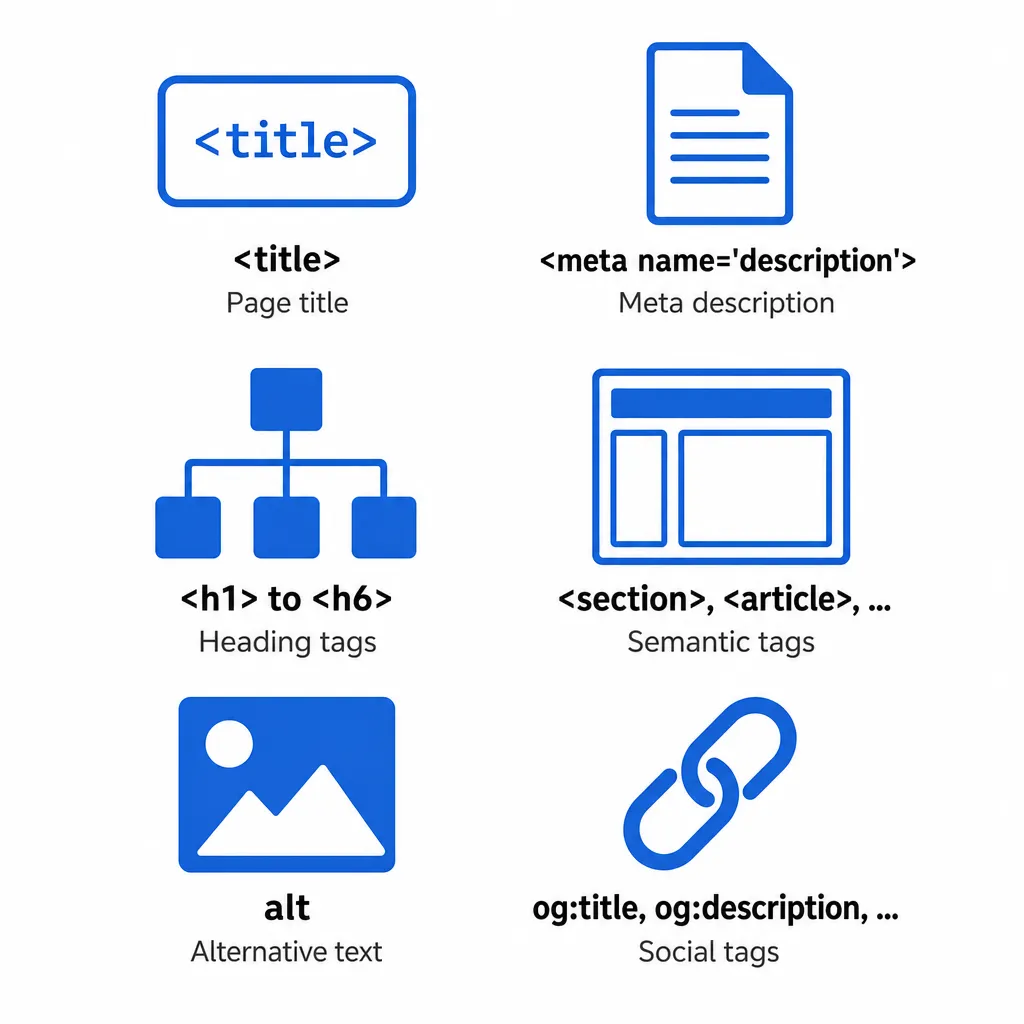
The title tag: the key element for ranking a page
Absolutely essential, this is the first tag search engines look at to determine what your page is about. The title tag also appears as the clickable headline in the SERP, which makes it critical both for ranking and for how attractive your result looks.
- Every title must be unique to its page
- It must contain the main keyword, ideally placed at the start
- It should stay short enough to display in full: Google sets no character limit and truncates titles to fit the device width
Best practices for optimising the <title> tag:
Go for precise, meaningful wording
Example: Pike Lures for River Fishing: Fish & Field Guide
Avoid vague or generic titles
Steer well clear of titles like "Home" or "Our products" that give visitors no useful information and no reason to click.
Work in a secondary keyword or a relevant selling point when it makes sense.
Real-world example: 2026 Buyer's Guide: High-Performance Fishing Reels - Fish & Field
Choose discreet separators such as the hyphen - or the pipe | that structure the information without hurting readability.
Well-written example: Predator Fishing Techniques | The Right Tackle & Expert Tips
Add your brand only when it's needed, mainly on your homepage or your strategic URLs.
Effective template: Sea Fishing Tips - The Fish & Field Experts' Blog
Ban all-caps titles, which are hard to read and hurt your organic SEO.
❌ Avoid: NEW PIKE LURES - HUGE SALE NOW ON
Always test how it displays in the SERP with tools like serpsimulator.com to check that your title tag stays fully visible.
Meta tags: description and CTR optimisation
The meta description is the punchy summary that appears under your title in search results. It doesn't directly influence indexing, but it plays a major role in improving your CTR and shaping how users perceive your page... Google rewrites it whenever it thinks it can do better, so give it a good reason not to.
Best practices for optimising the meta description:
Write copy that makes people want to click, like a sharp marketing pitch.
Well-crafted example: River pike lures: a selection tested by our expert anglers. Results guaranteed!
Use the active voice, an energetic tone, and highlight a concrete benefit for the user (savings, expertise, exclusivity...)
Avoid duplicate content: every meta description must be strictly original and true to its page.
Add strategic synonyms to improve topical consistency (essential for traditional SEO and AI optimisation)
Open with a strong hook: skip generic phrases like "Discover our page..."
Avoid keyword stuffing: readable copy always beats over-optimised SEO text.
Heading hierarchy: h1 and h2 tags for structure
Heading tags organise your content for your visitors as much as for crawlers. Essential for readability and accessibility, they make the semantic structure clear. Whether you're targeting organic search or AI engines, a well-thought-out architecture is non-negotiable. Skip it and you're asking the crawler to guess what matters on the page.
- Each page should contain only one <h1> tag, which clearly sums up the page's main theme
- Subheadings (
<h2>,<h3>,...) must follow a logical, consistent hierarchy - This structure helps search engines understand how your content is organised, recognise the key points and grasp the relationships between your ideas
Best practices for structuring your headings:
- The
<h1>tag must include the main keyword of the topic - Use
<h2>for major sections and<h3>for subsections - Respect the hierarchy (never skip a level)
- Write headings that are clear, informative and natural, with no over-optimisation
- Remember that a well-planned structure lets AI systems analyse your content better
Real-world example: blog post for a fishing tackle shop
<h1>The best lures for river pike fishing</h1>
<h2>Why adapt your lures to the river?</h2>
<h3>Understanding pike behaviour in moving water</h3>
<h3>Common mistakes to avoid</h3>
<h2>Top 5 recommended lures</h2>
<h3>1. The soft shad</h3>
<h3>2. The spinnerbait for snaggy areas</h3>
<h2>Tips to get more from your fishing sessions</h2>
<h3>Picking the right time of day</h3>
<h3>Adjusting your retrieve speed</h3>
SEO & GEO tip: A well-planned hierarchy lets AI engines generate relevant summaries, build extracts such as "FAQs" or tutorials, and better understand how your page answers a given search intent.
HTML5 semantic tags for a better structure
HTML5 semantic tags let you organise your text in a logical, meaningful way. Unlike plain <div> elements, they spell out the role of each section, which is essential for traditional SEO... and even more so for generative search (GEO).
These tags don't just improve readability or accessibility: they directly affect how AI systems evaluate, rank and use your content.
- They help AI engines such as Google AI Overviews, Microsoft Copilot or ChatGPT easily spot every useful part (guides, tips, callouts, definitions)
- They make it easier to generate summaries or automated answers from your page
- They let AI tell the main content apart from secondary elements, which avoids out-of-context citations
Best practices for HTML5 semantic tags:
- Use
<section>to structure the major parts of an organised document - Choose
<article>for any self-contained content (blog post, product presentation) - Reserve
<nav>for essential navigation (main menus, indexes) - Use
<aside>for supplementary information (tips, suggestions, sidebars) - Add
<header>and<footer>to each important piece of content, not just the whole page
Real-world example: blog post on a fishing website
Here's the best way to organise an article on fishing techniques:
<article> <header> <h1>Top 5 lures that work for pike in murky water</h1> <p>Published 26 June 2026 by Fish & Field</p> </header> <section> <h2>Why adapt your lures to murky water?</h2> <p>Pike react differently depending on visibility. It's essential to go for visual or noisy lures.</p> </section> <section> <h2>Our lure selection</h2> <p>Here's our top 5, tested in real conditions.</p> </section> <aside> <h3>Pro tip</h3> <p>In murky water, go for fluorescent colours and strong vibrations.</p> </aside> <footer> <p>Share your feedback in the comments or contact our team for personalised advice.</p> </footer> </article>
Why this is strategic for AI (GEO):
AI systems analyse your pages in a fundamentally different way from humans: they examine the structure of your HTML code directly to understand its meaning.
Semantic tags like <section>, <article> or <aside> help algorithms immediately spot the important sections, grasp their logic and automatically produce:
- Extracts in the SERP (such as featured snippets)
- Summaries for voice assistants
- Related content suggestions
Bottom line: without a clear semantic organisation, your text stays invisible to AI, however good it is. With the right markup, you massively improve your chances of being ranked, cited and showcased by intelligent systems.
The alt attribute: alternative text for images
The alt attribute (alternative text) is there to describe an image when it doesn't load or for assistive technology. It's also a pillar of SEO, because it lets search engines put the visual elements of your page in context.
With the growth of generative engines (GEO), it's becoming even more useful: AI systems rely on this description to interpret images and include them in enhanced results or richer interfaces.
- The
altattribute must describe the image accurately, with no keyword stuffing - It must add genuinely useful information in relation to the main content
- It's crucial for ranking in image search engines
- Some AI systems use it to create illustrations or enrich their text
Best practices for optimising the alt attribute:
- Give a clear, relevant description of the image using vocabulary suited to the topic
- Avoid simply repeating the product name or the page title; provide real descriptive value instead
- Use a natural, conversational tone, as if you were describing the image to a friend
- Include SEO keywords where relevant, without slipping into keyword stuffing
- Always fill in the alt attribute, except for purely decorative images (in that case, use
alt="")
Real-world example on a fishing website:
<img src="pike-lure-murky-water.jpg" alt="Fluorescent orange pike lure designed for fishing in murky river water">
Social tags to improve sharing
Open Graph tags (Facebook, LinkedIn, Pinterest...) and Twitter Card tags let you control how your link appears when it's shared. They have no direct impact on organic rankings, but they're essential for improving visibility, driving more clicks and strengthening your online presence.
- They guarantee that your posts display a catchy title, a relevant image and an engaging description
- They make sharing easier and encourage interaction with your content
- They keep your web strategy consistent with your social media communication, which reinforces your brand image
Best practices for social tags:
The must-haves:
og:title(the title that will be displayed)og:description(a concise, appealing description)og:image(a representative, high-quality image)og:url(the exact URL of the page)
For X (Twitter): add twitter:card (usually summary_large_image), twitter:title, twitter:description, twitter:image
- Write copy specifically tailored to social media, punchier than your classic SEO tags
- Choose high-quality images in optimised formats
- Always test with tools like the Facebook Sharing Debugger or the LinkedIn Post Inspector
Why this is strategic for SEO and GEO:
Even though these tags don't directly influence Google's algorithm, they can help increase your organic traffic through social networks. That link back to your site:
- Increases the time visitors spend on your site, a factor that improves your behavioural signals for search engines.
- Helps your content spread, which encourages natural backlinks.
- Generates positive social interactions, sometimes visible in rich results (especially for very popular brands or products).
- On top of that, some AI systems and advanced search engines take this social engagement into account when judging how popular and current a piece of content is, particularly in "trending" or "popular on the web" rankings.
Link quality with rel attributes
These HTML elements let you define precisely what kind of external link search engines are looking at. Their job is to tell Google (and the other engines) whether a link should pass "link juice" or not, and in what context it sits. They're essential for staying within optimisation guidelines and avoiding penalties for artificial or spammy links.
The three main values:
rel="nofollow": tells engines not to count this link and not to pass it any SEO value.
Use it for links to unverified sources, external services, or to limit their impact on indexing.
rel="ugc": flags that the link comes from user-generated content (UGC), such as a comment or a customer review.
Particularly useful for telling Google that this link isn't under your direct responsibility.
rel="sponsored": reserved for paid or advertising links, including sponsored content, partnerships and affiliate programmes.
Required to comply with Google's transparency requirements and keep your SEO healthy.
Best practices:
- Always use
sponsoredfor any link that generates revenue: affiliate links, paid product placement, etc. - Prefer
ugcfor interactive areas such as forums, comments or user reviews. - Don't overuse
nofollow: keep it for justified cases (questionable links or areas you don't control).
These attributes can be combined:
<a href="https://example.com" rel="nofollow sponsored">Partner product</a>
Real-world example on a fishing blog:
In an article that links to a commercial partner or an affiliate product:
<a href="https://fishing-affiliate.co.uk/pike-lure" rel="sponsored">Check out this pike lure on sale</a>
For a comment posted by a reader:
<a href="https://fishing-forum.co.uk" rel="ugc">My review of this lure here</a>
Essential technical tags for indexing
Beyond the tags visible in your content, there are other technical elements that are crucial for optimising how search engines index your pages. Placed in the document's head tag, they guide crawlers precisely and help you avoid duplicate content problems.
The canonical tag to avoid duplicate content
The canonical tag tells search engines which version of a page should be treated as the primary one when several URLs carry similar content. It's essential for good rankings and for avoiding penalties linked to duplicate content.
Syntax:
<link rel="canonical" href="https://example.com/main-page" />
Common use cases:
- Product pages reachable through different navigation paths
- Pages with URL variants (sorting, filters, pagination)
- Separate mobile and desktop versions
- URL variations (with/without www, HTTP/HTTPS)
Meta robots tags to control indexing
Meta robots tags give search engines precise instructions on how to handle a specific page. Unlike robots.txt, which works at the site level, these tags give you granular control, page by page, without touching anything else on the site.
Syntax:
<meta name="robots" content="noindex, nofollow" />
Main directives:
index/noindex: controls whether the page gets indexedfollow/nofollow: controls whether links are followednoarchive: no longer used by Google Search, since the cached page link has been removednosnippet: removes snippets from the results
Hreflang tags for multilingual SEO
For multilingual sites or sites targeting different regions, hreflang tags help search engines serve the right version based on the visitor's language and location.
Syntax:
<link rel="alternate" hreflang="en-US" href="https://example.com/us/page" />
<link rel="alternate" hreflang="en-GB" href="https://example.com/en-gb/page" />
<link rel="alternate" hreflang="x-default" href="https://example.com/page" />
Best practices:
- Use standard language codes (such as en, fr, de)
- Add the country code when needed (e.g. en-AU for Australian English)
- Include an x-default version for visitors who aren't targeted
- Make sure each language version references all the others
Testing and validating your HTML markup: the essential tools
Clean HTML structure matters, but rigorous validation is essential. A simple syntax error, an unclosed tag or a broken heading hierarchy can hurt the quality of your code... and how search engines and AI systems interpret it. Fortunately, several free tools let you check and optimise your HTML code effectively, and none of them take more than a few minutes to run.
W3C Markup Validation Service
The W3C validator remains the gold standard for checking that your HTML complies with web standards.
Its strengths:
- Identifies every syntax error, missing tag or bad nesting
- Checks the correct use of HTML attributes (such as
altorrel) - Flags structural problems that affect accessibility and SEO
Our recommendations:
- Fix every error without exception, even the most trivial ones
- Always test your code after each significant change
Lighthouse built into Google Chrome DevTools
Google provides this comprehensive tool to analyse performance, accessibility, SEO and web best practices.
How to use it:
- Right-click → "Inspect" → "Lighthouse" tab → run the analysis
- Pick the device (mobile/desktop) and focus on the SEO category
What you'll learn:
- Whether your <title> tags, meta description, h1 and alt attributes are implemented correctly
- Whether the main content is properly identified by search engines
- Precise advice to improve structure and accessibility
SERPsim: SERP preview simulator
An ideal tool for previewing how your <title> tag and meta description will look in search results.
Its benefits:
- Prevents your titles from being truncated in Google
- Lets you optimise clarity and appeal to increase your click-through rate
- Lets you test several versions and pick the most effective one
HTML_CodeSniffer for accessibility
This solution (online or as a browser bookmarklet) specifically examines the accessibility of your HTML tags.
- Detects problems with structure, readability, contrast, text alternatives, etc.
- Essential for meeting WCAG standards and avoiding the SEO downsides of poor accessibility
Why careful HTML markup has become an SEO priority
Building an effective website goes well beyond simply publishing content: you now need to design web pages that are both intuitive for users and perfectly readable by search engine crawlers. Every HTML tag plays a crucial role in that optimisation, whether it's the title, the meta description, the alt attribute or the h1 tag that accurately sums up the page content.
With the arrival of artificial intelligence, HTML markup directly influences your ranking in classic search results (SERP), but also in automated answers. Search engines and tools like ChatGPT systematically examine your HTML code to extract information, detect keywords, understand the semantics and generate relevant answers.
Strategic use of the fundamental HTML tags, such as <title>, <meta name="description">, <h1>, the HTML5 semantic tags (<article>, <section>) and, of course, the social tags (og:title, twitter:card), is now the foundation of a sound SEO strategy and of optimal compatibility with AI. Even a simple image with well-written alternative text (via the alt attribute) can significantly strengthen your content and boost its visibility.
Don't neglect a single head tag, because elements like <meta robots> or <link rel="canonical"> actively contribute to optimal indexing. Think about schema.org markup too, to enrich your structured data and give search engines precise context.
A complete HTML audit must analyse these essential SEO tags, checking their hierarchy, their consistency and how well they match search intent. A well-structured web page with rigorous semantic markup isn't just more accessible, it's also easier for AI to interpret and cite.
This shift towards more technical SEO brings new requirements. Search engines now favour sites that comply with modern web standards, use HTML5 tags wisely and deliver an optimal user experience. Your text must rest on logical markup that makes automated reading easier, while every link must be correctly qualified to keep the engines' trust.
The takeaway: well-organised HTML markup is no longer optional. It's the non-negotiable condition for appearing in the SERP and in tomorrow's answers. The good news? Every tag in this guide can be fixed in an afternoon.
Let AI Handle Your Content Publishing
Alya researches keywords, writes and publishes content directly to your CMS, WordPress, Shopify, Wix and more, on autopilot.