Your WooCommerce store is running, the catalogue is online, and organic traffic still refuses to follow? You're not alone: most guides recycle advice from 2019 and every plugin promises everything, which makes it genuinely hard to know where to start.
The ground has rarely moved this fast. WordPress 7.0 "Armstrong" (May 20, 2026) brought AI into the core of the CMS, WooCommerce 11.0 (August 2026) pushed its performance work further, and Google's AI Overviews and AI Mode reached France on July 22, 2026, after most of Europe: on the queries they touch, the organic click drops by 58 to 61%. Automattic is already preparing agent-driven commerce: WordPress 6.9 added the Abilities API to core, and WooCommerce 10.3 introduced an MCP integration in developer preview.
What follows is a complete 7-phase methodology, grounded in what WooCommerce 11 and WordPress 7.0 actually do, with plugin pricing verified in August 2026 and outdated beliefs dismantled along the way.
Phase 1: The technical foundations of WooCommerce
1. Hosting and TTFB: everything starts at the server
WooCommerce is a dynamic PHP application: no plugin rescues an undersized server. The 2026 baseline is PHP 8.3 minimum (roughly 23% more throughput than PHP 7.4), OPcache, Nginx or LiteSpeed, HTTP/2 or 3, a CDN, and 2 to 8 GB of RAM depending on traffic. Aim for a TTFB under 300 ms: Google's "good" threshold of 800 ms is a tolerance, not a target. As soon as your catalogue and sessions grow, a Redis object cache removes 60 to 80% of database queries.
2. Permalinks: should you remove /product/ from your URLs?
The setting lives in Settings > Permalinks, under "Optional": four product bases to choose from (/product/ by default, shop base, shop base with category, custom base), plus the /product-category/ and /product-tag/ bases.
The myth to bury: "removing /product/ boosts your SEO". No ranking benefit has ever been demonstrated, and removal is not possible natively: the official developer documentation spells out the risks of the workarounds, namely more expensive URL resolution, slug collisions between a product, a page and a post, and 404s on your old links. The real trade-off:
- Existing store: keep your bases. Your backlinks and your history are worth more than a shorter URL.
- Brand new store: shortening is defensible, with a plugin such as Permalink Manager Pro handling the 301 redirects.
- In every case: keep slugs short and descriptive, and avoid the "shop base with category" option, which exposes one product under several paths.
3. Cart, checkout, account: what Woo already handles
WooCommerce natively applies noindex to the cart, checkout and my-account pages: never remove it. Complete the job on the crawl side in your robots.txt with Disallow: /cart/, /checkout/, /my-account/ and above all /*add-to-cart=*, because the "add to cart" links in your listings waste an enormous amount of crawl. One nuance: robots.txt controls crawling, not indexing, so never block a URL you're waiting to see dropped through noindex, since Google would no longer read the tag. The Shop page itself is indexable and is often your root category: give it a real title, meta description and copy. In Search Console, keep an eye on ?add-to-cart=, /order-received/ and /lost-password/.
4. Sitemap: the native one and its replacement
Since WordPress 5.5 a native sitemap sits at /wp-sitemap.xml, but with no fine-grained exclusions, no images and an unreliable lastmod. The major SEO plugins (Yoast, Rank Math, SEOPress, AIOSEO) all replace it with their own, and that's the recommended approach for a store. Submit the sitemap once in Google Search Console.
5. Speed and Core Web Vitals
The thresholds in force: LCP ≤ 2.5 s, INP ≤ 200 ms (INP replaced FID in March 2024, so anything still discussing FID is out of date) and CLS ≤ 0.1, measured at the 75th percentile of real users (CrUX). On the ranking side, this confirmed signal separates comparable pages without ever compensating for weak content; the direct effect shows up in conversion and in crawl. Here's the real report for a live WooCommerce store, Barefoot Buttons:
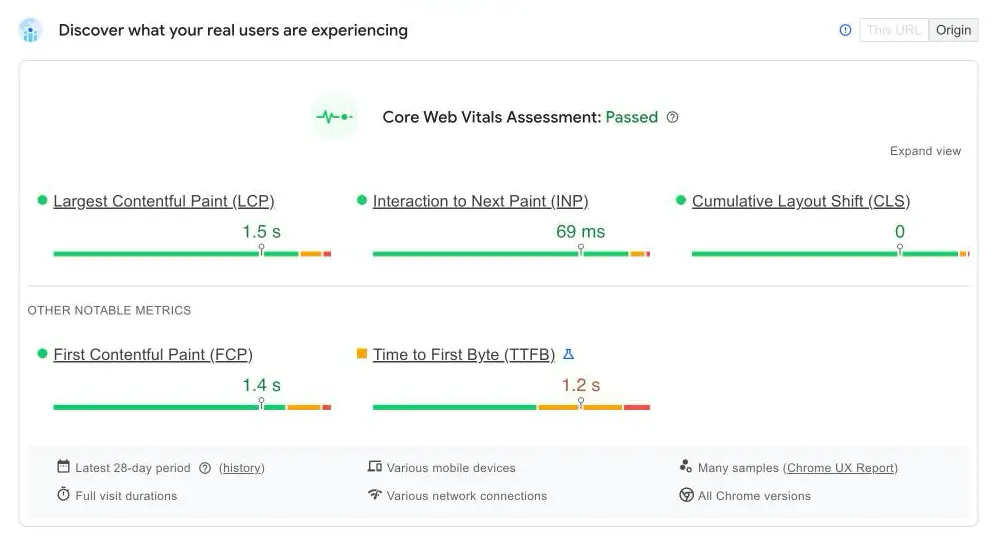
Core Web Vitals assessment: passed. LCP at 1.5 s, INP at 69 ms, CLS at 0, all three green over 28 days of field data. The lesson: a well-kept store passes the Core Web Vitals without acrobatics, and it's the plugin-bloated store that fails. Note the remaining headroom too: TTFB at 1.2 s sits in orange, far from the 300 ms target, and that's a server job, not a plugin job.
The recent levers live in the core: speculative loading since WP 6.8 (preloading the pages a visitor is likely to open), AVIF since WP 6.5 (20 to 50% lighter than WebP), and client-side media processing in WP 7.0. As for HPOS (dedicated order tables, the default on new installs): orders are created up to 5 times faster and searched up to 40 times faster, but there is no direct ranking effect. The SEO benefit is indirect, since a lighter postmeta table speeds up the whole site. To go deeper, read our guide to technical SEO.
Phase 2: On-page optimisation for your store
1. One SEO plugin only: the honest comparison
A search for "seo woocommerce" in the official directory returns 2,468 plugins. Sorting is unavoidable:
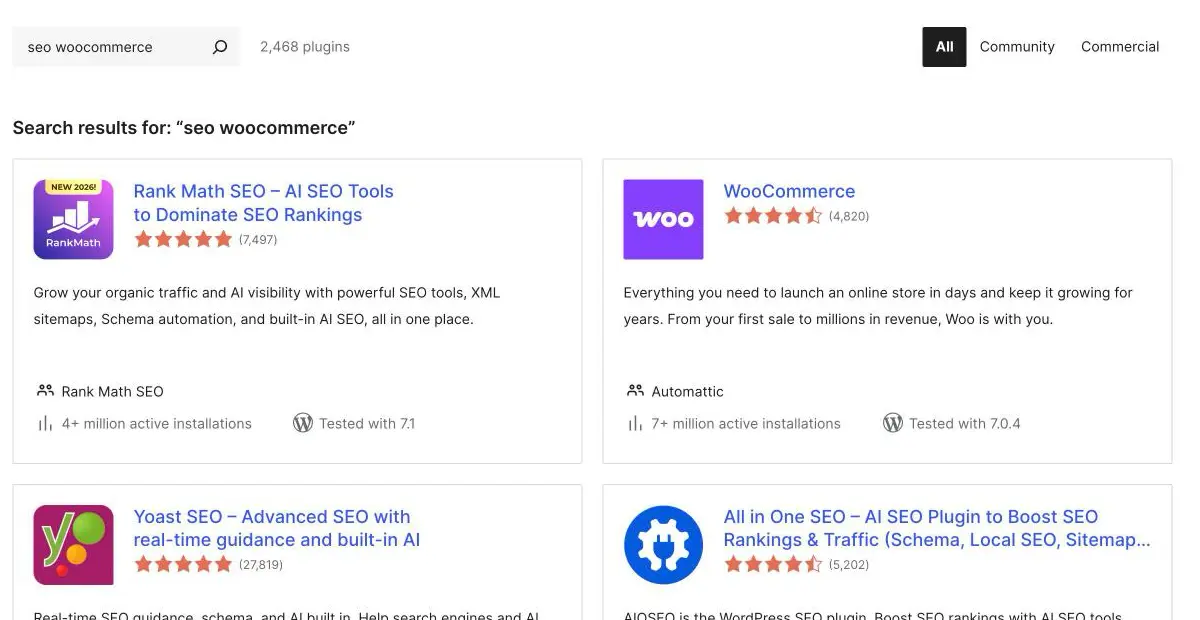
In this directory screenshot, Rank Math passes 4 million active installations (7,497 reviews, tested with WordPress 7.1), Yoast SEO totals 27,819 reviews, All in One SEO 5,202, and the WooCommerce plugin itself shows more than 7 million installations. What the listings don't tell you is the real pricing, checked in August 2026.
- Yoast SEO: a solid free version; the store product is the Yoast WooCommerce SEO bundle at €178.80 excl. VAT per year (Premium included), which brings enriched Product schema (price, stock, GTIN, mapping of brand, colour or size attributes), a sitemap stripped of non-commercial pages, and bulk generation of product titles and meta descriptions.
- Rank Math: the best scope for the money. Pro at €8.99 per month billed annually (€107.88 per year excl. VAT, with a first-year discount often available) for unlimited personal sites, 1,000 tracked keywords, with the WooCommerce SEO PRO module included in every paid plan.
- SEOPress: new pricing since August 1, 2026: $49 per year for 1 site, $59 for 5, $149 unlimited, with the same features everywhere and WooCommerce SEO included. French publisher.
- All in One SEO: Basic at $49.50 for the first year, renewing at the full $99, which is worth planning for.
The absolute rule: one active SEO plugin. Two plugins living side by side produce duplicate meta tags, duplicate sitemaps and duplicate schema, with rich results as the first casualty.
2. Titles, metas and product categories
The title tag (around 60 characters) remains the most important on-page factor: [Exact product] | [Key feature] | [Brand]. The meta description (around 155 characters) is your sales pitch in the results. Start from the real queries in Search Console rather than from intuition: our guide on how to choose your SEO keywords lays out the method. Editing still happens in the classic product screen: the block-based product editor was removed from the core in WooCommerce 11.0.
Product categories are your SEO backbone: they're what rank on generic queries. Each one accepts a description, displayed by most themes, so put the content that differentiates it there. Tags, on the other hand, create indexable archives that are often thin: use them sparingly. On breadcrumbs, the native BreadcrumbList is only emitted if your theme displays the WooCommerce breadcrumb; SEO plugins ship their own, which is more controllable. Keep exactly one.
3. Attributes, variations and duplicate content
A selected variation adds parameters to the URL (?attribute_pa_colour=blue). Without a canonical, authority scatters: crawl analyses report 40 to 67% duplicate pages on variable catalogues. The fix is a canonical from parameterised URLs to the clean product URL, which SEO plugins do by default. Only enable attribute archives (Products > Attributes) when you intend to turn them into genuine landing pages.
Two core additions are worth exploiting: the native GTIN field (since Woo 9.2, in the Inventory tab), now the pivot of Merchant Center synchronisation, and the Brands taxonomy (Products > Brands, active by default since Woo 9.6). A verified trap: the core brand does not make it into the native structured data, so you need an SEO plugin or a filter.
4. Faceted navigation: half of your crawl problems
Gary Illyes (Google) attributes roughly 50% of reported crawl problems to faceted navigation. On WooCommerce, the native widgets generate ?filter_colour=, ?orderby= and ?min_price=: 4 facets with 10 values each already exceed 10,000 URL combinations.
Google's doctrine has changed: for the bulk of filter URLs, block in robots.txt rather than noindex, because noindex still consumes crawl and a canonical is only a hint. The 2026 method is facet-by-facet triage, opening only single-facet combinations with proven search demand to indexing. Warning sign: more than 40% of Googlebot hits landing on parameter URLs. Filter plugins carry symmetrical traps: FacetWP or FiboFilters produce pretty indexable URLs by default, which industrialises duplication, while a fully AJAX filter with no URL creates no rankable page at all.
On pagination: rel="next"/"prev" has been dead since March 2019, and you must never noindex pages 2, 3 and beyond, nor canonicalise them to page 1. The rule is a self-referencing canonical, pagination links in crawlable HTML, and 24 to 48 products per page.
5. Structured data: the minimal native set, and what's missing
WooCommerce natively emits Product JSON-LD: name, description, image, SKU, an offer with price, currency and availability, plus ratings if native reviews are enabled. An honest foundation for a small store, with verified limits:
- Variable products get a single aggregated block with a price range; no
ProductGroup, nohasVariant, no per-variation GTIN, even though Google documents that markup for variants. - No
brand, noshippingDetails, nohasMerchantReturnPolicy: precisely the fields Google is pushing for merchant listings in 2026. - "Valid" doesn't mean "eligible": the native markup passes validation while missing the enhancements.
Any serious store therefore completes it through its SEO plugin or a schema extension, checking in the Rich Results Test that a single Product block is output per page: duplicate schema is the number one cause of missing rich results. Two formal constraints apply: the markup must be in the server-rendered HTML, and it must strictly match what the user sees. This data also makes your Merchant Center feed more reliable (Phase 6). One last warning: FAQPage markup has produced no rich result since May 7, 2026. It stays machine-readable, but nothing shows in the SERP. Our guide to structured data for SEO covers each schema in detail.
6. Customer reviews: Google's July 24, 2026 policy
On July 24, 2026, Google tightened its review snippet documentation with an explicit ban on fake reviews and undisclosed incentivised reviews, both on the page and in the markup, with disclosure required to be "clear and conspicuous". The possible penalty is a manual action and a page made ineligible for rich results. Stores are on the front line, caught between review tools that reward customers with discount codes and ratings marked up without the corresponding reviews on the page. The 2026 standard: purchase-verified collection, and markup that reflects the reviews actually visible.
More broadly, a store falls under YMYL pages and will be judged on trust. E-E-A-T is neither a ranking factor nor a score: it's the framework of the Quality Rater Guidelines (182 pages, version of September 11, 2025), whose dominant pillar is Trust. In practice: complete legal and contact information, honest return policies, HTTPS, and "About" pages with real people behind them.
Phase 3: Content and authority, the decisive WordPress advantage
This is where WooCommerce pulls away from closed platforms: your store lives inside a full publishing CMS, with a native blog on the same domain as the catalogue. The model that works is still the topic cluster: a pillar page in the shape of a buying guide, satellite articles answering each specific question, and internal links from satellites to pillar, then from pillar to categories and products. That architecture builds the topical authority both Google and AI models reward; our guide to the content pillar sets out the method. The blog's mission has changed: informational queries are the ones most absorbed by AI Overviews (Phase 4), so judge it less on clicks than on the authority it builds and the citations it earns. At catalogue scale, production needs a tool to steer it. Here's a real article in the Sedestral editor:
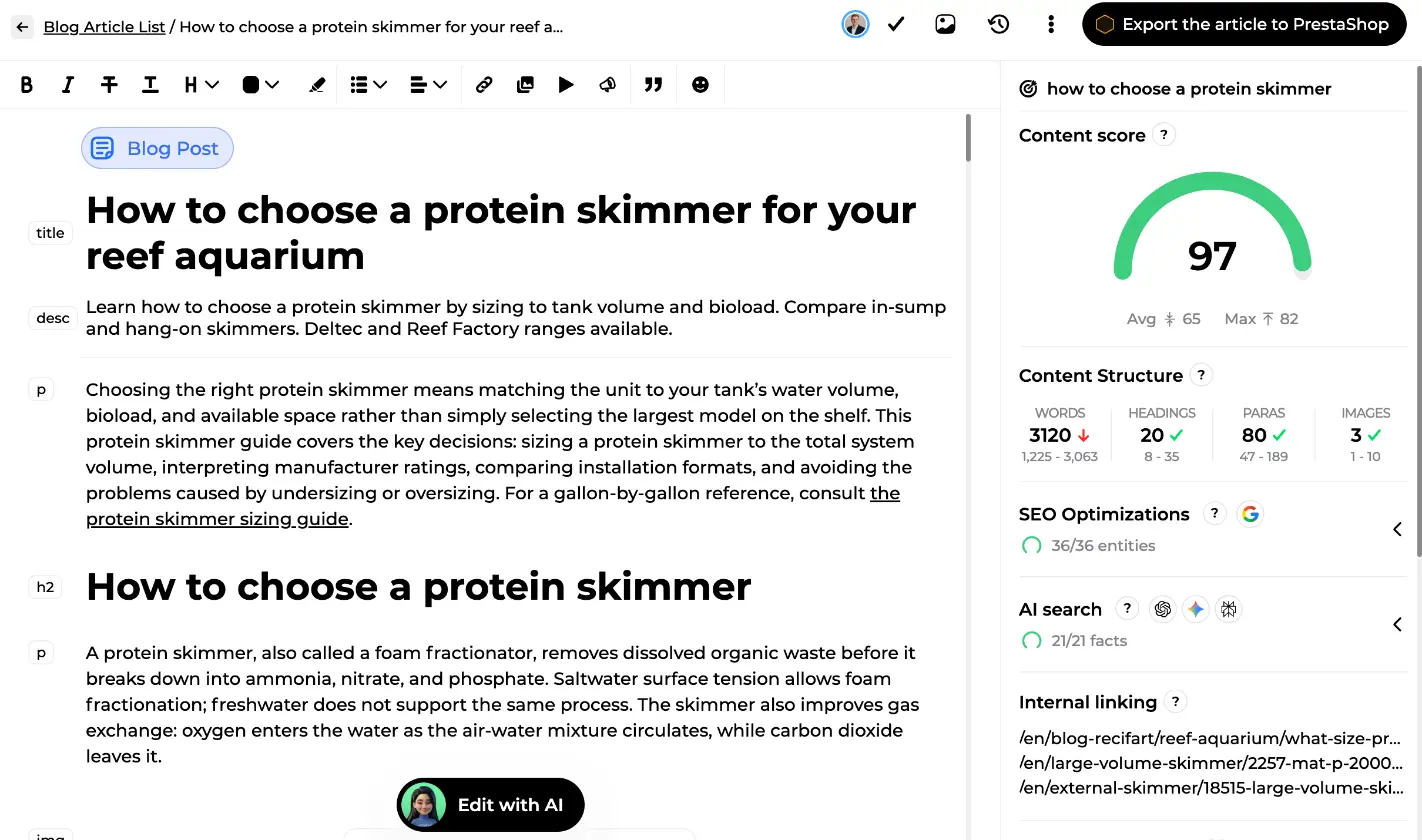
The article, a buying guide for reef aquarium protein skimmers, is published with a content score of 97 against an average of 65 on the target query: 3,120 words, 20 headings, 80 paragraphs, 36 SEO entities covered out of 36, 21 facts out of 21 verified for AI search, and the internal linking listed in the right-hand panel. Exactly the supporting content that feeds your categories and product pages.
Connect your WordPress store to Sedestral
That leaves external authority, in other words link building. Domain authority remains decisive both in the SERP and in AI answers, which readily cite the buying guides and trade media of your sector. To structure acquisition, see our backlink campaigns.
Phase 4: AI search, numbers, protocols and citations
1. What the numbers actually say
- France has been served since July 22, 2026: AI Overviews and AI Mode, on mobile and desktop, with France the last large Western European market to open, complete with opt-out and neighbouring-rights compensation.
- Clicks are falling: CTR in position one drops 58% when an AI Overview is present (Ahrefs, 300,000 keywords); Seer Interactive measures 0.61% organic CTR on queries with an overview against 1.62% without (September 2025); on overview queries, CTR fell 61% from 1.76% in June 2024.
- But the picture is moving: Seer records a rebound in early 2026 (1.3% in December 2025, 2.4% in February 2026), and it's informational queries that take the hit. Transactional ones are far less affected, even though AI Mode is shifting product discovery towards conversation.
2. Agentic commerce: WooCommerce is out in front
Automattic has published an official "Agentic Commerce" page. MCP shipped with WordPress 6.9 and WooCommerce 10.3: AI assistants can read products, orders and settings, with the Abilities API declaring what the store can do. Announced as coming soon: the Stripe Agentic Commerce Suite (WooCommerce is a launch partner, built on the open source ACP protocol from Stripe and OpenAI) and Google UCP, which leans on structured data.
On the OpenAI side, March 2026 brought a pivot: integrated Instant Checkout was dropped in favour of product discovery. Merchants submit a product feed (images, prices, availability, descriptions, reviews), allow the OAI-SearchBot crawler in robots.txt and apply to the merchant programme, with a self-service portal announced for late 2026. On WooCommerce, a feed plugin such as Product Feed PRO already offers the ChatGPT channel (Phase 6). Being "agent-buyable" comes down to accurate product data, complete server-side schema and up-to-date feeds.
3. What makes a store citable
Language models are fact extractors: they cite pages with specific, verifiable data (numeric specifications, comparisons, direct answers), not paragraphs of adjectives. GEO studies measure up to 40% more visibility in generative answers for content that includes citations and statistics, and AI traffic to US retail sites jumped 4,700% year on year (July 2025). One guardrail: GEO does not replace SEO, since AI Overviews mostly cite pages that already rank. SEO foundations first, factual specificity second. Which still leaves the question of whether you're being cited at all:
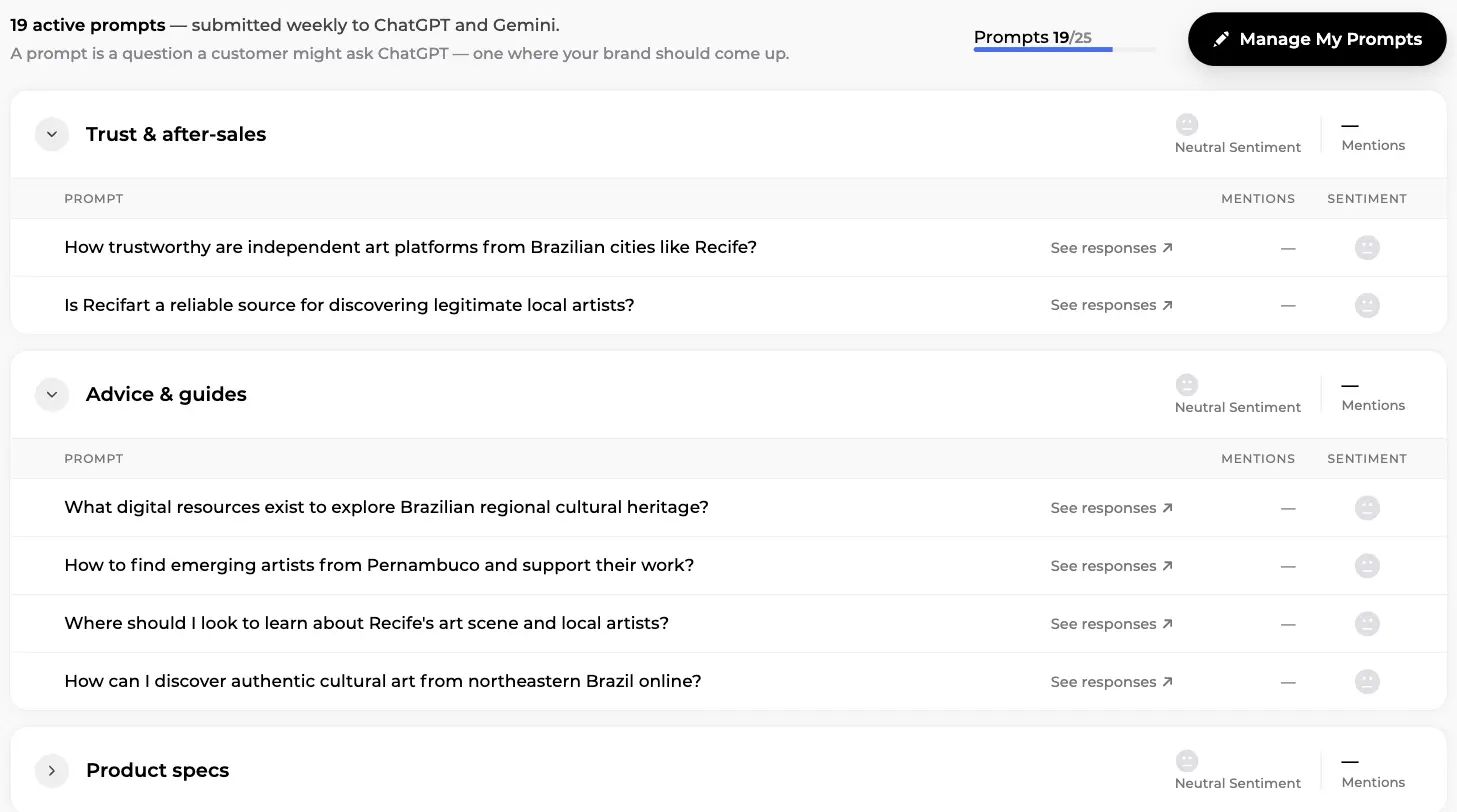
On this screen from Sedestral's AI visibility module, 19 active prompts are submitted weekly to ChatGPT and Gemini, grouped into themes such as trust and after-sales, advice and guides, or product specs. Each prompt is a question a customer might ask an assistant, and each row tracks whether the brand is mentioned and in what sentiment. For the method, read our guide to generative engine optimization and our approach to AI visibility tracking.
Phase 5: Selling in several languages
WordPress is not multilingual out of the box: you need a translation plugin, and a subfolder structure (yourstore.com/en/, yourstore.com/es/) consolidates authority on a single domain. The rules that prevent damage: reciprocal hreflang between every version, an x-default for the fallback, one language per URL, and a translation that covers slugs, titles, metas and category descriptions rather than product pages alone. Never noindex a translation: different languages are not duplicate content.
Phase 6: The toolkit, plugins and platform
Pricing verified in August 2026. The anti-bloat rule comes first: every plugin you add must answer the question "which precise setting do I not already have?". Your SEO suite already covers sitemap, redirects, breadcrumbs and basic schema.
- Page cache: WP Rocket (€49.95 per year for 1 site, €99.95 for 3, €249.95 for 50) with Delay JS, Remove Unused CSS and automatic exclusion of cart and checkout, but no object cache. LiteSpeed Cache is free if your server runs LiteSpeed: server-level caching, ESI to keep the cart dynamic, Redis integration. FlyingPress suits advanced users. Never stack two cache plugins, and never stack one on top of a managed host's own optimisations.
- Merchant Center feed: Google for WooCommerce (official, free, under the
Marketingmenu) syncs prices, stock and promotions through the API in real time, and reads the native GTIN. For multi-channel, Product Feed PRO (AdTribes) is free with no product limit, covers more than 100 channels including the OpenAI/ChatGPT feed, and runs on over 90,000 stores; the alternative is CTX Feed with 220+ templates. The 2026 criterion: a feed plugin that already handles AI channels. - Dedicated schema: only if your SEO plugin doesn't cover the need, typically variants as ProductGroup (Schema Pro) or per-variation GTIN (WPSSO). One source of schema truth, always.
Sedestral: the growth engine, outside the admin
Plugins optimise the page from inside the admin: tags, schema, sitemap, cache. They don't do strategy, production or external measurement. That's Sedestral's ground, connected natively to WordPress and WooCommerce:
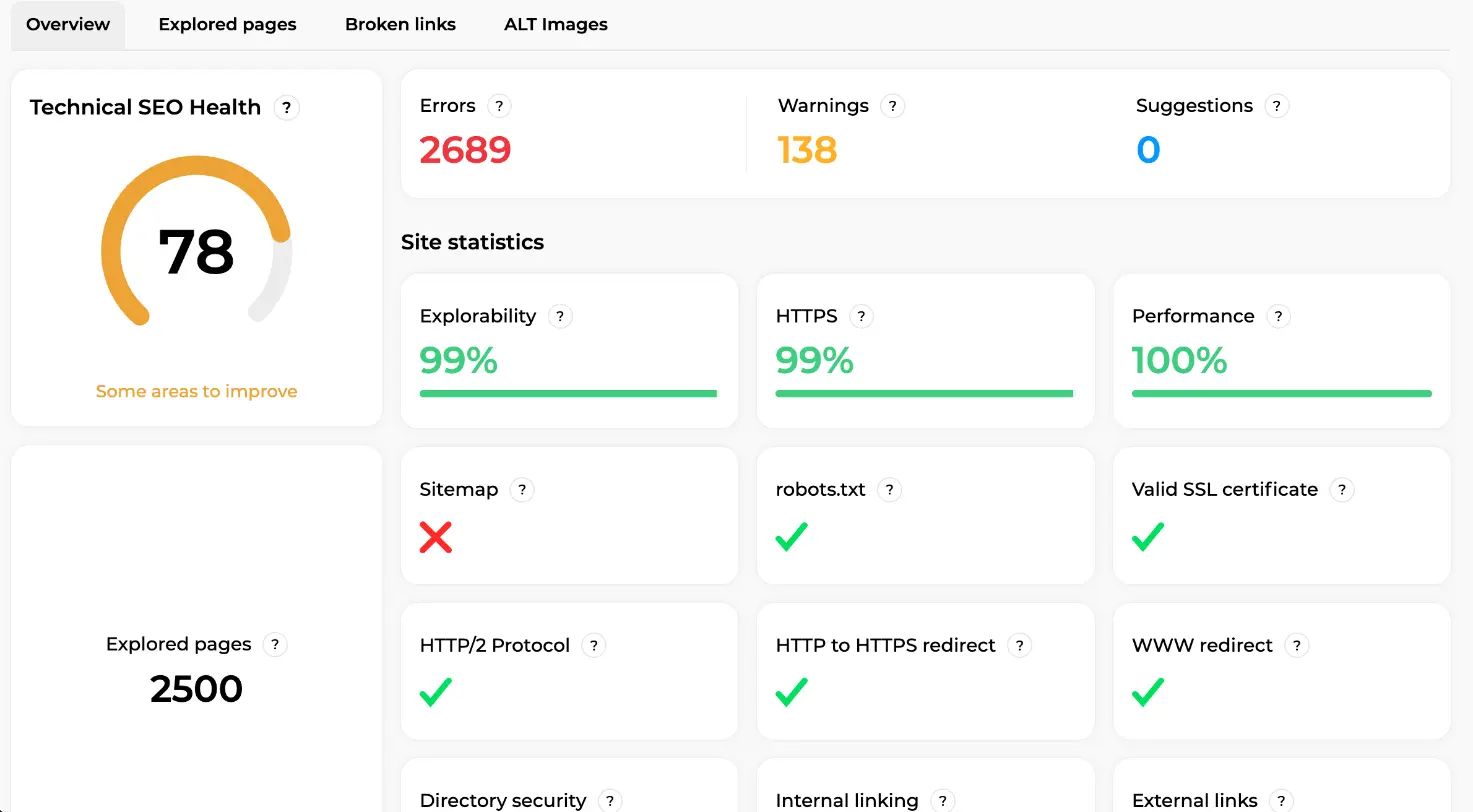
This audit crawls the site from the outside, the way Googlebot does: a health score of 78 across 2,500 explored pages, 2,689 errors and 138 warnings identified, explorability and HTTPS at 99%, performance at 100%, robots.txt, SSL certificate, HTTP/2 and both the HTTPS and WWW redirects validated, and a missing sitemap flagged in red. This is the view no plugin has: a plugin only sees the pages it generates, not the facets, the real canonicals or the 404s Google runs into.
Beyond the audit: content writing and optimisation with direct publishing into WordPress, rank tracking with no ceiling tied to a plugin licence, backlink campaigns, and monitoring of your visibility in ChatGPT and AI Overviews, all out of a plugin's reach. Honest about scope: caching, image conversion and Merchant Center feeds remain the business of the dedicated plugins above. Internal plugin for on-page hygiene, external platform for growth: the two coexist. Sedestral has a free plan, then paid plans from €119 per month (shown in your local currency).
Create your account and connect your store
Phase 7: Measure to steer
- Google Search Console: your real queries page by page, indexing status (parameter URLs, "Crawled, currently not indexed" pages) and crawl stats, to confirm your facets have stopped eating the crawl.
- Google Analytics 4: tie organic traffic to revenue, and build a segment for AI assistant referrals.
- PageSpeed Insights: the lab for diagnosis, the CrUX field data (the ones in the Phase 1 screenshot) for judgement.
- Rankings and AI citations: track both. A page climbing the SERP without being cited has a factual specificity problem, not a ranking problem.
Your 6-week WooCommerce action plan
- Week 1: Foundations. Search Console and GA4 set up, versions verified (WooCommerce 11.0.1, PHP 8.3), HPOS enabled, SEO plugin sitemap submitted, a decision made on AI crawlers with
OAI-SearchBotunderstood. - Week 2: Crawl. Robots.txt completed (
/cart/,/checkout/,/my-account/,/*add-to-cart=*), facet doctrine applied filter by filter, variation canonicals and pagination checked. - Week 3: Money pages. Titles and metas for the homepage, the Shop page, your 5 main categories and 10 best sellers, written from GSC queries. Category descriptions drafted.
- Week 4: Product data. GTINs filled in (Inventory tab), brands assigned, schema completed through the SEO plugin (brand, shipping, returns), a single Product block verified, Google for WooCommerce feed enabled.
- Week 5: Content. First topic cluster: pillar page as a buying guide, direct answers at the top of each section, links out to categories and products.
- Week 6: Authority and measurement. First satellite article, 3 link building targets identified, GSC dashboard, GA4 segment for AI referrals, rank and citation tracking.