You've put time and money into your PrestaShop store, but the traffic just isn't showing up? You're not imagining it: the game got harder. PrestaShop 9 changed how your URLs, filters and robots.txt behave, and AI answers now sit between your store and a growing share of your shoppers.
This guide isn't another list of recycled tips. It's a complete methodology built for the PrestaShop ecosystem in 2026, checked against what the platform actually does in versions 8.2 and 9.x, and against what Google officially documents today. Some of it contradicts what most PrestaShop guides still repeat, deliberately: the doctrines on faceted navigation, FAQ markup and Core Web Vitals have changed, and the 2018 playbook now costs you crawl budget and rankings. One note before we start: PrestaShop 8.2.x has been in extended support since July 2025 (security fixes only), while 9.x ships real SEO changes. Wherever the two behave differently, this guide says which version does what.
Phase 1: Technical foundations on PrestaShop 8 and 9
Every strategy collapses without a healthy technical base. The good news: most of these points only need fixing once.
1. Speed and Core Web Vitals: read the report like Google does
The three Core Web Vitals thresholds are unchanged in 2026: LCP ≤ 2.5 s (loading), INP ≤ 200 ms (responsiveness, the metric that replaced FID in March 2024) and CLS ≤ 0.1 (visual stability). What most guides skip is how Google evaluates them: at the 75th percentile of your real Chrome users, over a rolling 28-day window, which is why a great lab score can still leave you failing. Here's a real report for a live PrestaShop store, and it teaches the exact lesson you need:
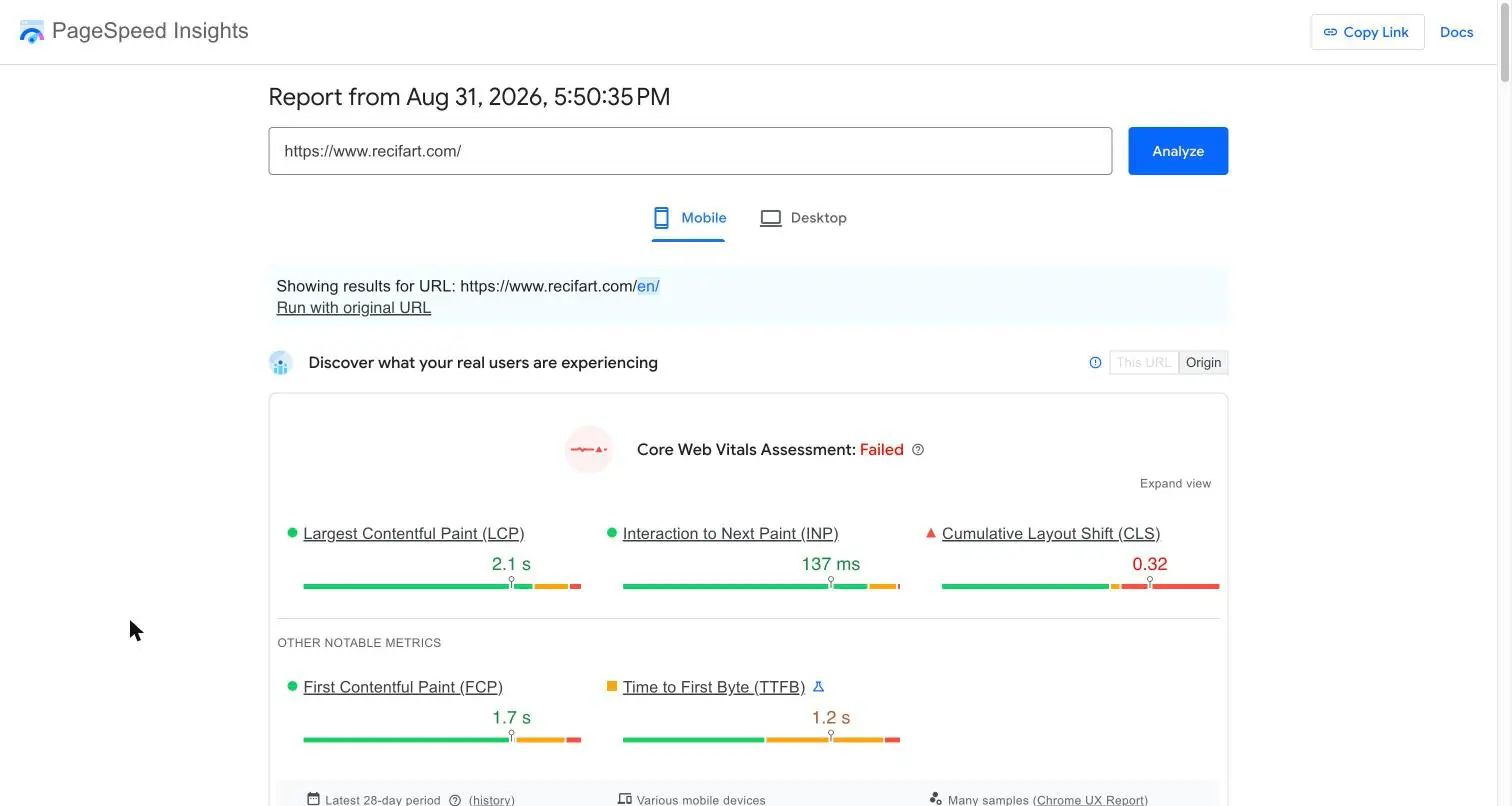
LCP comes in at 2.1 s (pass) and INP at 137 ms (pass), yet the assessment reads "Failed" because CLS sits at 0.32, three times the threshold. One bad metric fails the whole assessment. On a PrestaShop store, a CLS like that usually comes from banners, sliders or product images loading without reserved dimensions. Fix the one failing metric instead of chasing a higher global score.
Keep the ranking impact honest, though: Google retired its "page experience system" in April 2023, and Core Web Vitals remain a lightweight signal, never a substitute for relevance. The stronger argument is conversion: a store that shifts layout under the shopper's thumb loses sales before it loses rankings. For a deeper dive, read our complete technical SEO guide.
2. URLs: what PrestaShop 9 changed, and the migration trap
Enable friendly URLs in Shop Parameters > Traffic & SEO > SEO & URLs if you haven't already. Then know your version:
- PrestaShop 8.2 builds product URLs with the category by default:
{category:/}{id}-{rewrite}.html. - PrestaShop 9 removed the category (and the EAN13) from the default route:
{id}-{rewrite}.html. Shorter URLs that survive category moves.
And a myth to bury: removing the ID from URLs is not possible natively in either version, only third-party modules do it, and Google ranks URLs with IDs perfectly well. Don't treat it as a priority.
The 8 to 9 migration trap: after upgrading, your old category-based product URLs return 404 with no automatic redirect (confirmed by the PrestaShop team in issue #40063). Every indexed URL, every backlink, every Google Shopping link breaks silently.
Your migration checklist: either restore the old scheme by adding {category:/} back in "Schema of URLs", or embrace the short URLs and build a full 301 map before switching. Then enable "Redirect to the canonical URL: 301" and watch the 404 report in Google Search Console daily for the first weeks. Also worth knowing: the core already redirects more than most merchants think. An offline product can natively 301/302 to a category or another product, serve a 410, or stay visible as discontinued; since 9.0, disabled categories support 301/302 too. A redirect module is only needed for arbitrary URL-to-URL rules.
3. robots.txt: use the generator, then decide about AI crawlers
Don't write your robots.txt by hand. PrestaShop generates it natively: a "Generate robots.txt file" button sits at the bottom of the SEO & URLs page. The generated file blocks technical directories, sensitive controllers (cart, order, account) in every active language, and crawl-wasting parameters like ?order=, ?search_query= and ?tag=. A hand-written file loses those per-language rules every time you add a language. Version difference that matters: PrestaShop 9 also blocks ?q=, the faceted navigation parameter; PrestaShop 8 does not, so on 8.x add your filter parameter disallows after regenerating.
Two rules on top: never block CSS or JavaScript (Google needs them to render your pages), and remember that robots.txt manages crawling, not indexing: a blocked URL that earns links can still be indexed without content.
New in 2026, robots.txt is also where you decide who feeds AI answers: GPTBot and OAI-SearchBot (ChatGPT), PerplexityBot, and Google-Extended (Gemini training; blocking it does not remove you from AI Overviews, which use Googlebot). For a store, being visible where shoppers ask for recommendations usually beats content protection. Make it a conscious choice, not a default.
4. HTTPS: yes. HSTS: security, not SEO
Your store must answer only over https://, with every http:// request 301-redirected. HTTPS itself is a confirmed but "very lightweight" ranking signal; its real value is trust and conversion. Add the HSTS header as a security best practice, but know that security headers are not ranking factors, whatever some checklists claim.
Phase 2: On-page optimisation for your PrestaShop SEO
1. Title tags and meta descriptions: optimise for the click
- The
titletag (~60 chars): still the most important on-page element. Products:[Exact Product Name] | [Key Feature] | [Brand]. Categories:Buy [Product Type] Online | [Brand]. - Meta description (~155 chars): your sales pitch in the results. Lead with your USPs: free shipping, warranty, stock availability.
Writing these one by one across a full catalogue is where most merchants give up. Sedestral solves exactly that: it pulls your PrestaShop products, categories, blog posts and CMS pages into one place and lets you work page by page or queue up to 100 at once.
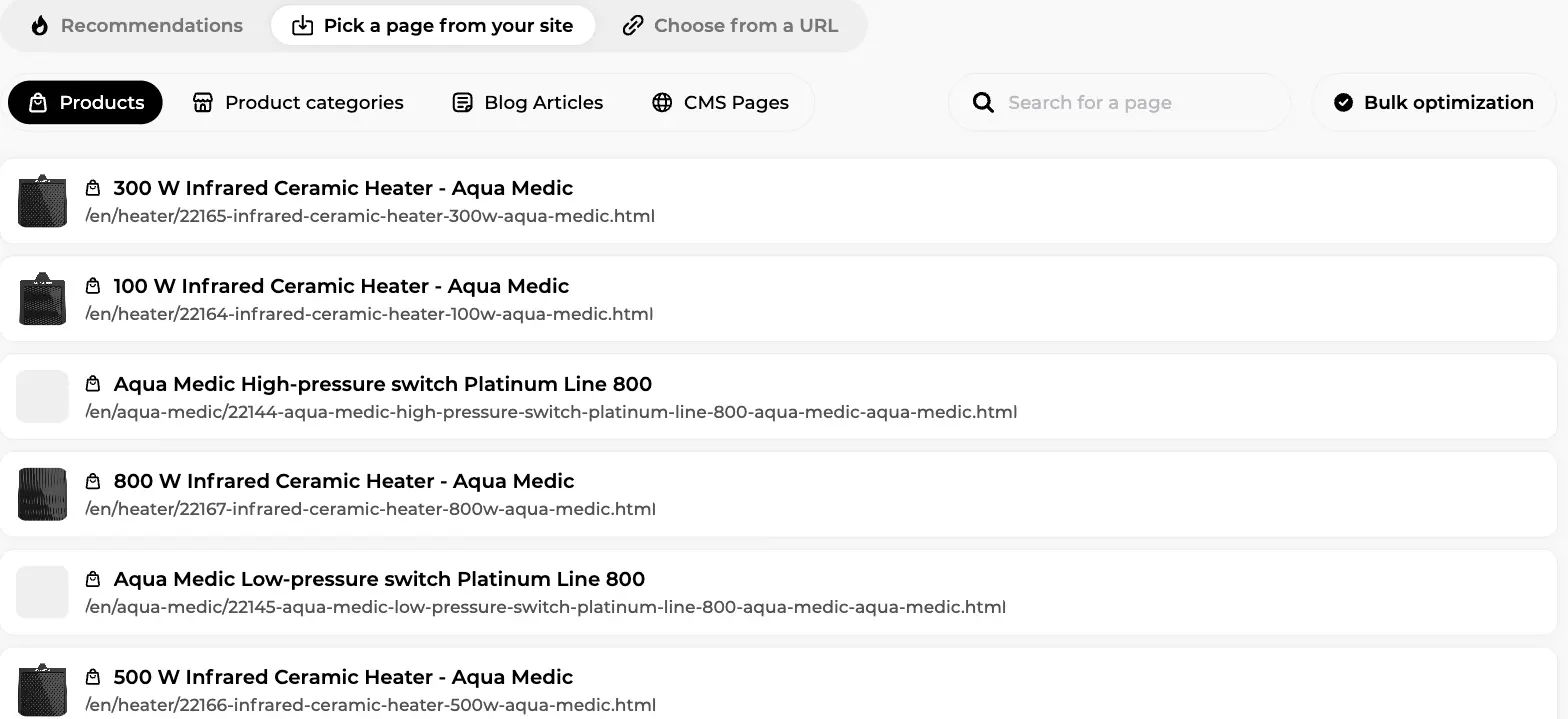
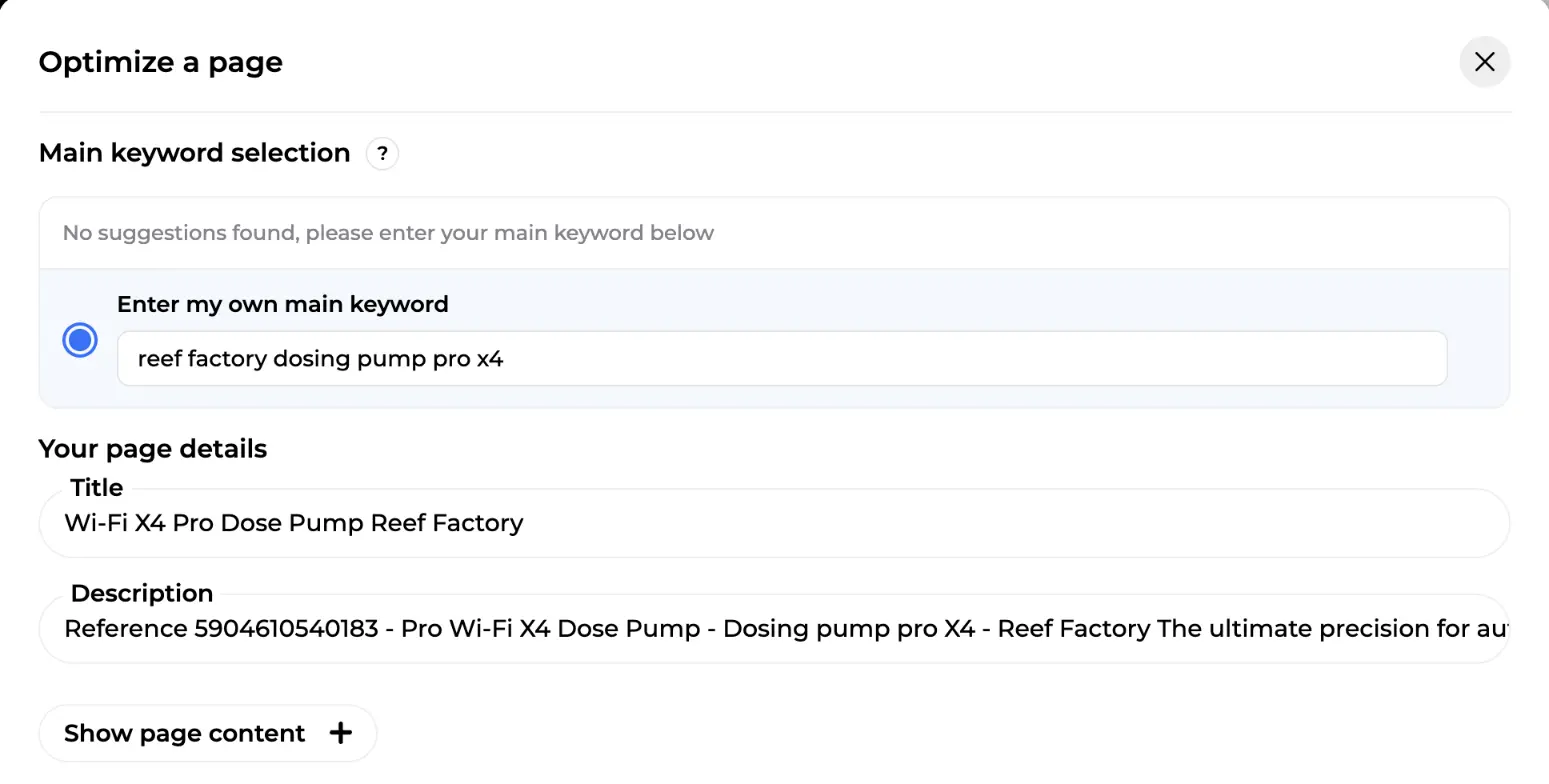
For each page, you confirm the main keyword and review the title and description before anything ships, then export the result straight back to PrestaShop:
2. Product copy: unique or invisible
Never paste supplier descriptions. Not because of a "duplicate content penalty" (that penalty doesn't exist as such), but because of something quieter: when fifty stores publish the same text, Google picks one version to show, and it's rarely yours. Your page isn't punished; it's filtered out. Unique descriptions with real usage advice and honest limitations are the only way to exist on the query, and they're also what AI assistants quote.
3. Images: file names and ALT attributes
Name files descriptively (long-blue-evening-dress.jpg) and fill the alt attribute with a factual description. It matters for accessibility and Google Images, and missing ALTs are among the most common findings in store audits. At catalogue scale this is another batch job: Sedestral imports your product images, flags the ones without ALT tags, generates the missing descriptions and can retouch product photos before sending everything back to your store.
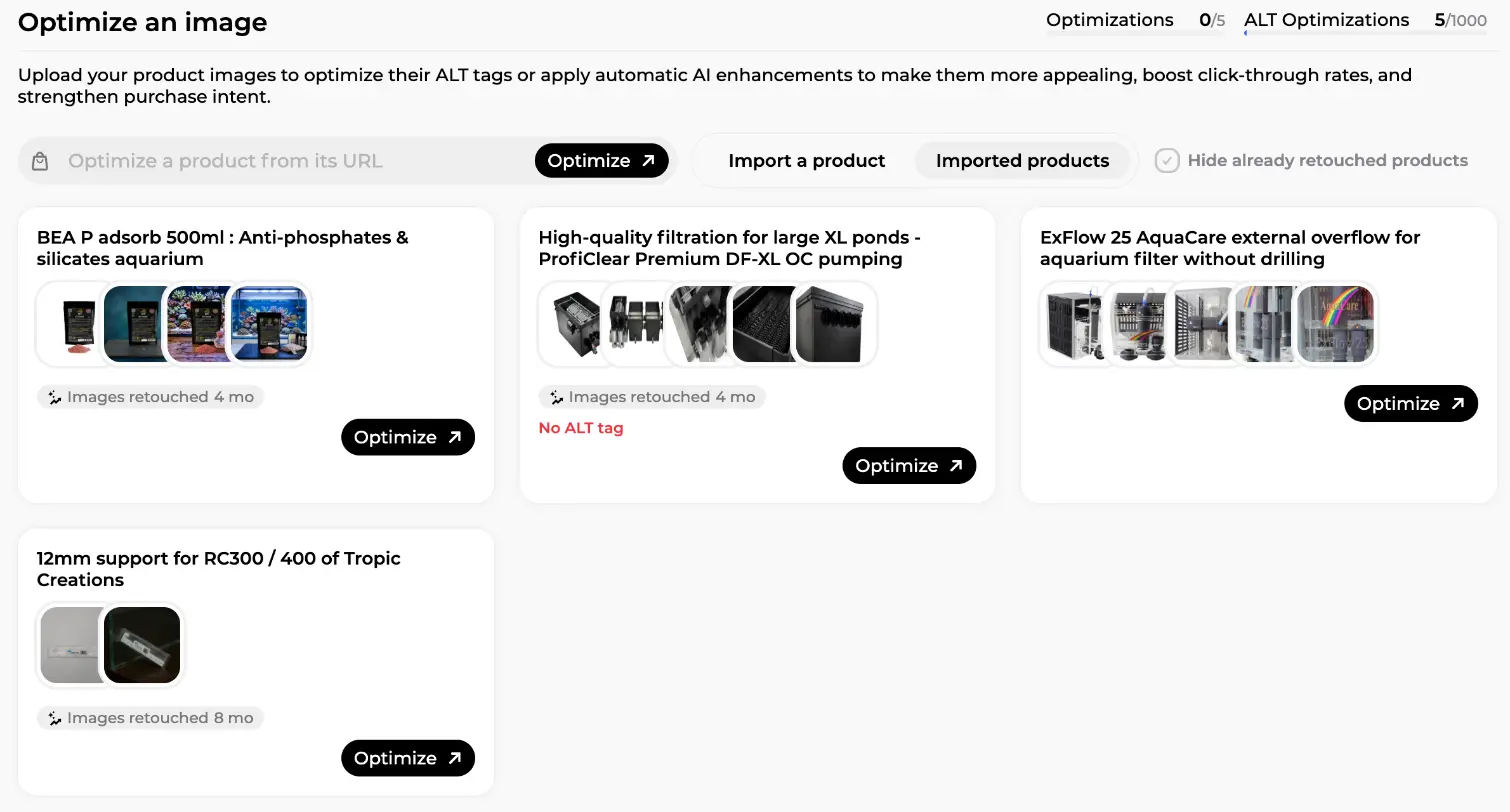
In the screen above, one product shows a red "No ALT tag" warning while others display when their images were last retouched: that's the visibility you want over a few thousand SKUs. For the display side (WebP conversion, lazy loading), see Phase 6: native in PrestaShop 9, module territory in 8.
4. Structured data: what PrestaShop already emits, and what's missing
Here's what almost no guide tells you: since PrestaShop 8, the Classic and Hummingbird themes emit complete JSON-LD natively. Your product pages already carry Product with price, currency, availability, brand and GTIN (from the EAN13 field), plus BreadcrumbList, Organization and WebSite markup; aggregateRating appears only if the Product Comments module supplies actual reviews. So don't buy a module to add what your theme already does. Verify it with Google's Rich Results Test, then fill the real gaps:
-
ProductGroupfor your combinations: supported by Google since February 2024, it describes a product and its size/colour variants as one group. PrestaShop's native markup doesn't emit it. - Shipping and returns:
shippingDetailsandhasMerchantReturnPolicyare absent from the native Offer, yet Google highlights both in merchant listings. Good news: you can declare your standard return policy once at Organization level instead of on every product. - The Merchant Center bridge: a free Merchant Center feed (GTIN, price, live stock) feeds Google's Shopping Graph, which powers both Shopping results and AI answers. Your on-page markup acts as the verification layer: when feed and markup contradict each other, both lose trust. Keep them consistent.
One promise to drop: FAQ rich results are gone. Google restricted them in August 2023 and removed them for everyone on May 7, 2026. FAQPage markup is still harmless and machine-readable, but nobody gets Q&A snippets under their result anymore, whatever a module's sales page says.
5. Faceted navigation: the 2026 doctrine
Filters are the number one crawl killer in e-commerce, and the standard advice ("noindex, follow plus a canonical to the category") is exactly what Google's current documentation walks away from. The faceted navigation doc (December 2024) recommends robots.txt first for filter URLs you don't want indexed, because noindex doesn't save crawl budget: Googlebot must crawl a page to read its noindex. And never combine noindex with a canonical to another page; those are contradictory signals.
On PrestaShop, sort your facets into two groups:
- Facets with real search demand (e.g. "red dresses"): give them clean, indexable URLs with a stable filter order, and return a 404 when a filter combination has no results.
- Everything else: block the filter parameters in robots.txt. On PrestaShop 9 this is handled for you: the core natively applies noindex to any listing with
?q=or?order=in the URL, and the generated robots.txt blocks?q=. On PrestaShop 8, neither exists: add the disallow rules yourself.
One subtlety if facet URLs are already indexed: a URL blocked in robots.txt can't have its noindex read, so let Google process the noindex first and add the block once they've dropped out. Also check the Faceted Search module: each attribute has an "Indexable" flag, best left off unless the facet has demand.
6. Pagination: simple and settled
Paginated category pages (?page=2) need a self-referencing canonical: Google explicitly says not to canonicalise page 2 to page 1. No noindex on the main sequence, real <a href> links between pages, never fragment-based page numbers. Your theme still emits rel=prev/next; Google ignores it, other engines may not, leaving it is fine.
Watch Out
Publishing Content Before Fixing Technical Errors
Creating new pages on a site with unresolved crawl or indexing issues is unlikely to improve your rankings, use a technical audit tool like Nox to clear blockers before scaling your content output.
Phase 3: Content and authority
The topic cluster model still works: a pillar page ("How to choose running shoes") surrounded by cluster articles answering specific questions, all interlinked, with links flowing to your categories and products. The blog attracts and qualifies; the store converts. What changed is the blog's KPI, covered in Phase 4.
On authority: every quality backlink from a topically relevant site remains a vote of confidence. What works in 2026 is digital PR, real partnerships and product mentions in specialist press and buying guides, which pay twice since those third-party pages are exactly what AI assistants cite. What's newly risky: Google's site reputation abuse policy has turned bulk "sponsored posts on big media" into a documented hazard, and any paid link needs rel="sponsored". Our link building guide and backlink campaigns guide go deeper.
Phase 4: AI search: make your store citable
This phase didn't exist in older versions of this guide, and it's now the one that decides whether your traffic curve bends. AI Overviews and AI Mode have rolled out across Google's major markets (reaching France, PrestaShop's biggest market, in July 2026). The measured impact is brutal: on queries with an AI Overview, organic CTR drops from 1.76% to 0.61%, a 61% fall (Seer Interactive, 25M+ impressions). Meanwhile ChatGPT's shopping widget went from appearing in 8.3% of shopping answers in October 2025 to 87% by February 2026.
Now the nuance that should shape your strategy: AI Overviews still appear far more often on informational queries than on transactional ones. Your product and category pages are relatively safe; it's your blog's top-of-funnel traffic that gets absorbed. So the blog changes mission: less a click harvester, more a citation machine. Write comparison guides to be the source the answer quotes: direct answers at the top of each section, original data, your brand in the text.
What actually makes a store citable:
- No magic markup exists. Google's official position: pages need to be indexed, snippet-eligible and genuinely helpful. The
nosnippetandmax-snippetcontrols that limit snippets also limit AI visibility. - Machine-readable product data. Product pages cited by assistants overwhelmingly carry complete structured data. Your Phase 2 schema work plus an accurate Merchant Center feed is the ticket; Perplexity's free Merchant Program accepts the same feed.
- Third-party presence. ChatGPT's answers mostly cite third-party sources rather than the merchant's own site. Reviews, forum threads and press mentions weigh as much as anything on-page.
- Don't chase gadgets. OpenAI launched Instant Checkout in September 2025 and pulled it in March 2026, partly because scraped prices and stock were wrong. The durable asset is accurate, exposed product data.
Since June 2026, Search Console includes "Search Generative AI" performance reports showing impressions (not clicks) in AI Overviews and AI Mode: watch them monthly, and track assistant referrals (chatgpt.com, perplexity.ai) in GA4. For the full method, read our generative engine optimization guide.
Phase 5: Going international with PrestaShop
Subfolders (yourstore.com/en/, yourstore.com/de/) remain the best structure: one domain, consolidated authority. Since 9.0 you can even drop the prefix for your default language.
The classic guides get this backwards: they show you hreflang code to paste, when PrestaShop emits hreflang tags natively as soon as two languages are active on the same store. Your real job is different:
- Check your language codes in International > Localization > Languages: PrestaShop outputs whatever is configured, so a Belgian store set to
nl-NLinstead ofnl-BEships wrong hreflang sitewide. - Add
x-defaultyourself (theme override or module): it's the one genuinely missing piece. - Multistore on multiple domains is the only case where a dedicated hreflang module is truly necessary: native tags link languages within one store, never across stores.
Phase 6: The toolkit: modules that earn their keep
Every module here was verified on the Addons marketplace on August 31, 2026, with exact names and compatibility; similar-sounding names are often unrelated products.
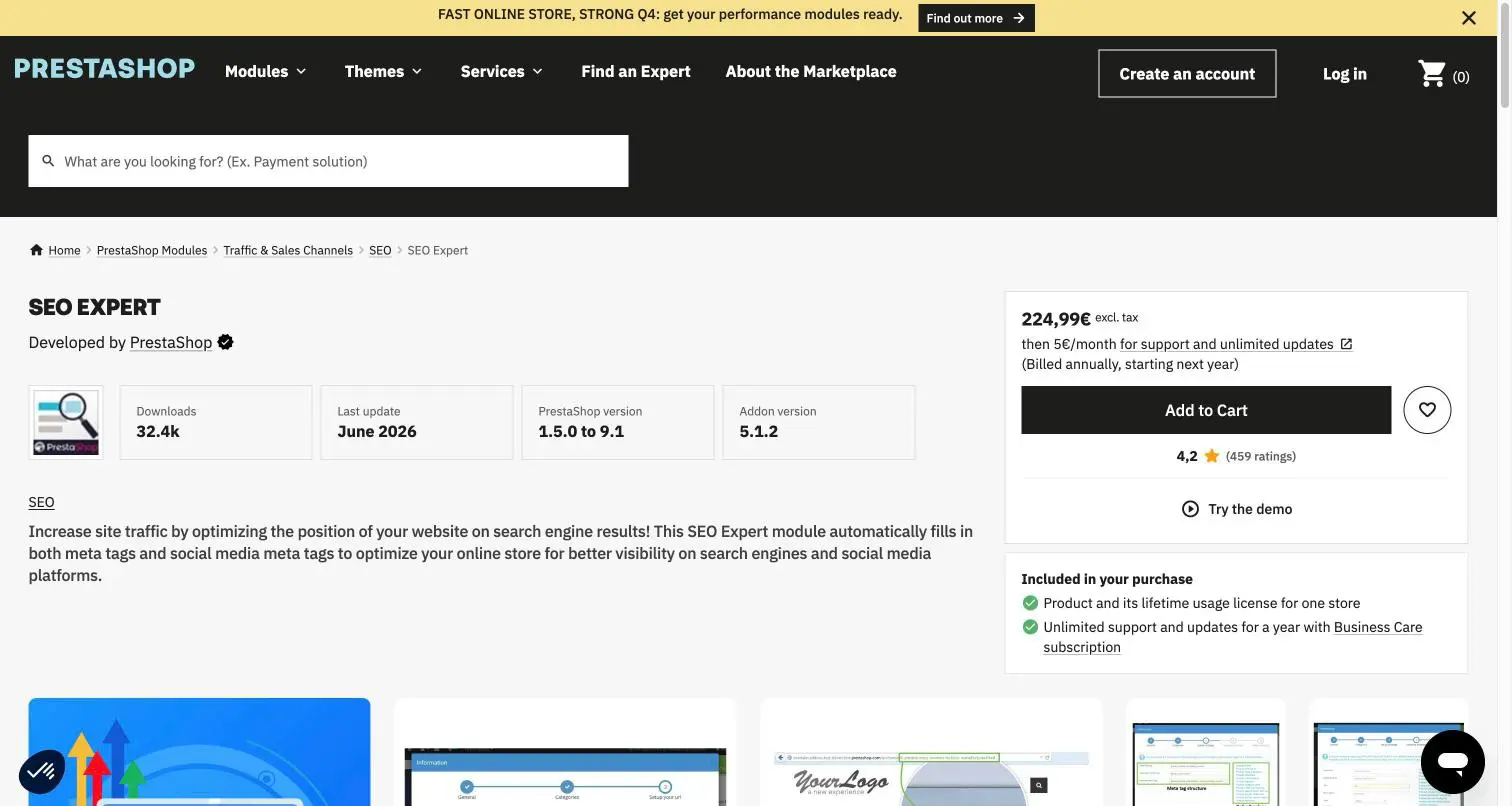
- Meta tag automation: "SEO Expert" (published by PrestaShop itself, v5.1.2, June 2026, compatible 1.5.0 to 9.1, €224.99). It auto-generates meta tags and social meta at catalogue scale from templates; it does not remove URL IDs and won't write unique copy for you.
- Redirects: "Redirections Manager - Manage 301 / 302 and 404 urls" (Verified+, 4.8/5) for the arbitrary redirect tables the core doesn't cover, especially during migrations.
- Cache: "Page Cache Ultimate" (JPresta, v11.0.3, October 2025, 1.5.0 to 9.1), the long-standing full-page cache reference. Test cart, customer-specific prices and stock after enabling any cache: a misconfigured one breaks dynamic blocks.
- Images: "Image Optimization: AI Generation, SEO, AVIF, WebP, Zoom, Lazy Load" (v4.2.1, July 2026, PS 8.0 to 9.1). Check what you still need first on PrestaShop 9, where WebP and AVIF are native; the module keeps earning its place for lazy loading and compression on 8.x.
- Sitemap: the official free "Google sitemap" module (v5.0.0, November 2025, requires PS 8.2+), one sitemap per language, multistore-aware; the core still generates no sitemap at all. The v5 removed the Google "ping", dead since 2023: submit once in Search Console, then let an accurate
lastmodcarry the freshness signal (Google ignorespriorityandchangefreq). - Server side: recent PHP 8 with OPcache and a real cache does more for your Core Web Vitals than stacking modules; Cloudflare adds edge caching and modern compression on top.
Security is SEO: in June 2026, CVE-2026-54159 exposed a remote code execution flaw in the Faceted Search module (fixed in 4.0.4, shipped with 9.1.4 and 8.2.7). A hacked store gets deindexed. Updating your modules is ranking protection.
Where Sedestral fits
The modules above handle the technical layer inside the store. Sedestral covers the layer no Addons module does, connected to PrestaShop through its module (v1.0.121): optimisation of product pages, categories and CMS pages with direct export to your store (the Phase 2 workflow), product images retouched and re-exported with generated ALT tags, blog articles written and published natively on your PrestaShop blog, a technical audit with fix guides written for your site, indexing tracking, keyword tracking on your Search Console data, backlink campaigns on a marketplace of real sites, and weekly AI visibility checks (is your brand cited on ChatGPT, Gemini, Perplexity, Google AI Overviews and AI Mode, in what sentiment, against which competitors). There is a free plan, then paid plans from €119 per month (shown in your local currency).
And to keep it honest, the reverse list: full-page caching, redirect tables, theme-wide WebP conversion and sitemap generation remain the business of the dedicated modules above. Sedestral audits and measures those areas; it doesn't replace them.
Phase 7: Measure to steer
- Google Search Console: impressions, clicks, CTR and positions, plus everything recent: the 24-hour view, the native "Recommendations", AI-configured report filters (brand vs non-brand, December 2025) and the "Search Generative AI" reports (June 2026). Setup covered in our Google Search Console guide.
- GA4: tie organic sessions to revenue, and build a segment for AI assistant referrals.
- PageSpeed Insights: lab diagnosis; the GSC Core Web Vitals report remains the field truth.
- Crawl stats and server logs (advanced): the only way to see whether your facet rules actually stopped the crawl waste.

Automate Your SEO With AI Agents
Sedestral connects six AI agents to your website to handle content, audits, rankings and backlinks, without the manual grind.
Your 6-week PrestaShop SEO action plan
One focused step a week beats a heroic weekend you never repeat.
- Week 1: Foundations. Set up GSC and GA4. Regenerate robots.txt and decide your AI crawler policy. Install the official sitemap module and submit. Run PageSpeed Insights and note which metric fails.
- Week 2: Version and crawl hygiene. On PS8: plan the migration to 9 with its 301 map, and add the facet parameter blocks robots.txt lacks. On PS9: verify the URL scheme choice and the native noindex on filtered pages. Update every module (Faceted Search first).
- Week 3: Money pages. Rewrite titles, metas and descriptions for the homepage, your 5 main categories and 10 best sellers. Fix missing ALT tags. Check the native JSON-LD in the Rich Results Test.
- Week 4: Product data. Set up the Merchant Center feed and align it with your markup. Add return policy markup at Organization level. Plan ProductGroup for your combinations.
- Week 5: Content. Keyword research for your first topic cluster; write the pillar page with direct answers at the top of each section; link it to categories and products.
- Week 6: Authority and AI. Publish the first cluster article. Identify 3 relevant sites for a first backlink push. Create the GA4 assistant-referral segment and check the GSC AI reports.