You know SEO matters. You also know what it costs: an audit here, a freelance writer there, a backlink quote you never followed up. Most site owners don't lack motivation, they lack the team. And a real SEO team is five different jobs, not one.
That's how Sedestral is built: SEO software organised as a team of six AI agents, each with a name, a job and a home screen in the panel. In this guide, the hub of our "With Sedestral" series, you'll meet the agents, see a first month with them screen by screen, and find the detailed guide for every feature.
Why SEO is a team job
Let's be honest about what "doing SEO" means for a shop or a small business. Somebody has to check the site is technically sound and indexed. Somebody has to find topics, then write them every week without drifting off-brand. Somebody has to bring the existing pages up to standard. Somebody has to earn links. And somebody has to read the numbers and tell you what to do next.
Five hats. One tired human. Usually one or two jobs get done and the others slide. Content without indexing gets no traffic. Reports without action are just charts.
Sedestral gives each job to a dedicated agent, plugs them all into the same site data (your CMS and your Google Search Console) and the same brand context, and lets you supervise. The agents propose and execute. You validate in the editor, undo what you don't like, and keep the last word on what goes live.
Meet the six agents
In the panel, the left menu is called "SEO team". Each entry opens an agent's home screen with a short written status of what they've found. Here's who does what.
Alya, Blog Strategy: expand your SEO
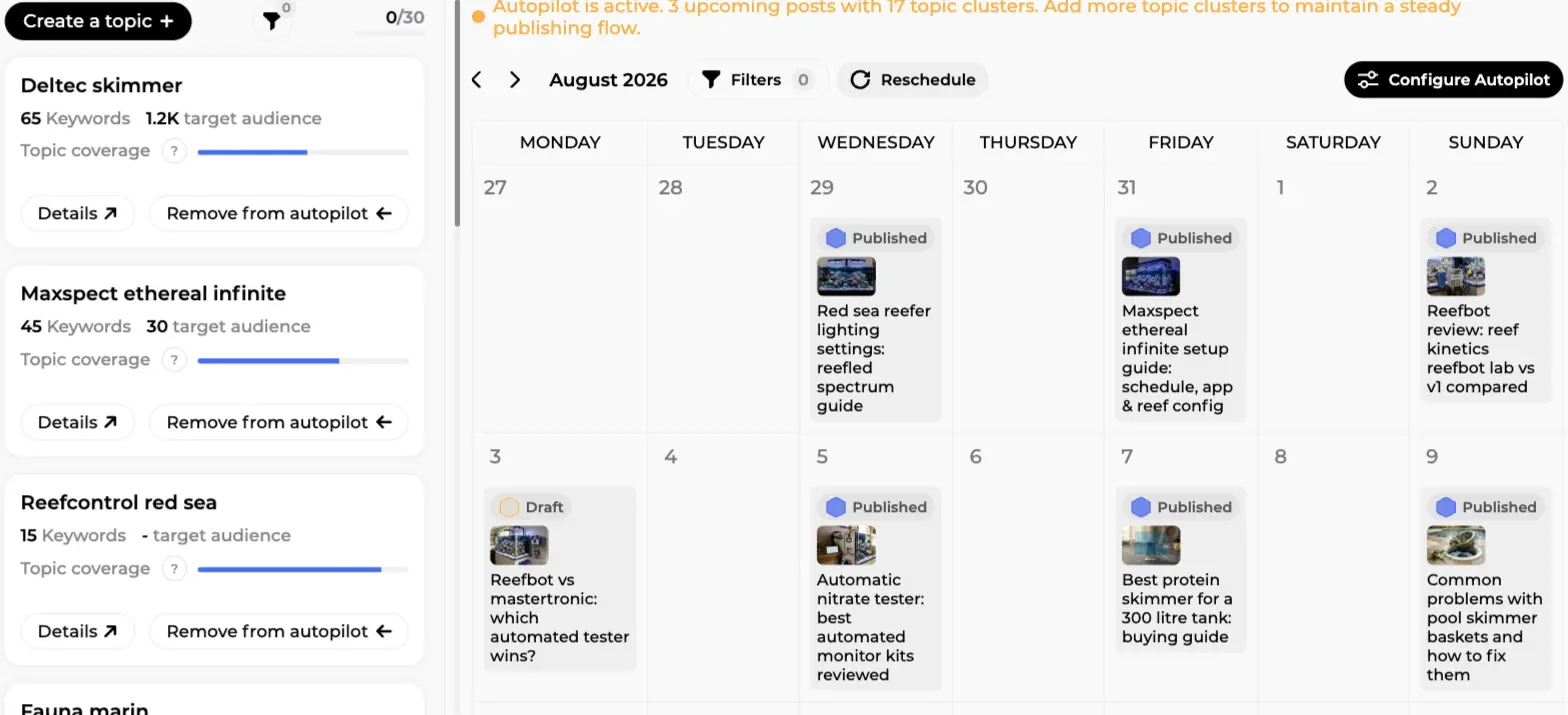
Alya owns your blog. She builds topics, clusters of keywords gathered from Google search and AI search, and lays them out on a topic map showing which subjects you cover and which are still empty. From there she fills an editorial calendar, on dates you pick or on autopilot (you choose the days and the number of articles per day, she does the rest).
On the Blog Strategy screen below, the left column lists the topics on autopilot with their keyword count and a "Topic coverage" bar. The right side is the month view: published articles with their cover image, one draft waiting for review, and a banner reminding you that autopilot is active with 3 upcoming posts.
Writing goes through seven phases with a quality-control loop, images in your image style, graphic elements in your brand colours, a FAQ and internal links, then publication to your CMS. The full walk-through is in SEO content strategy with Alya and, for a single article from proposal to publication, AI article writing.
Rémi, Optimization: improve your pages
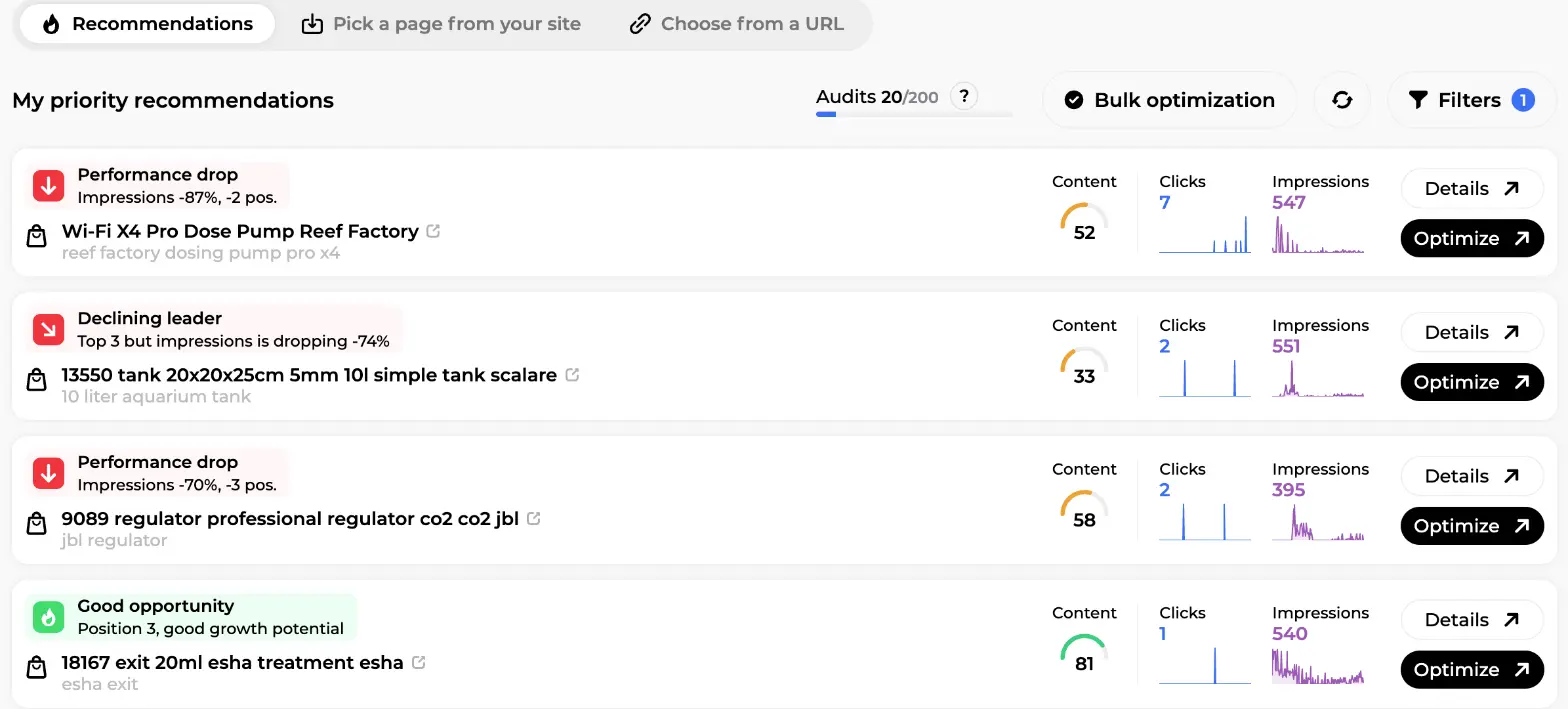
Rémi works on what you already have: product pages, categories, blog posts and CMS pages. His content audit gives each page a content score out of 100, crosses it with Search Console clicks, impressions and positions, and sorts the result into recommendations. Then he rewrites the pages you pick, one at a time or up to 100 in a bulk queue, without breaking your page builder layout (Elementor and Odoo are handled zone by zone).
His "Recommendations" tab is the screen you'll open most often. Each row is a page with a label ("Performance drop", "Declining leader", "Good opportunity"), its main keyword, the content score gauge, clicks and impressions sparklines, and two buttons: "Details" and "Optimize". The audit quota, a "Bulk optimization" button and filters sit above.
Two guides cover his work: SEO content audit for tracking and bulk optimisation, and SEO content optimization for the page-by-page flow.
Maya, Backlinks: boost your authority
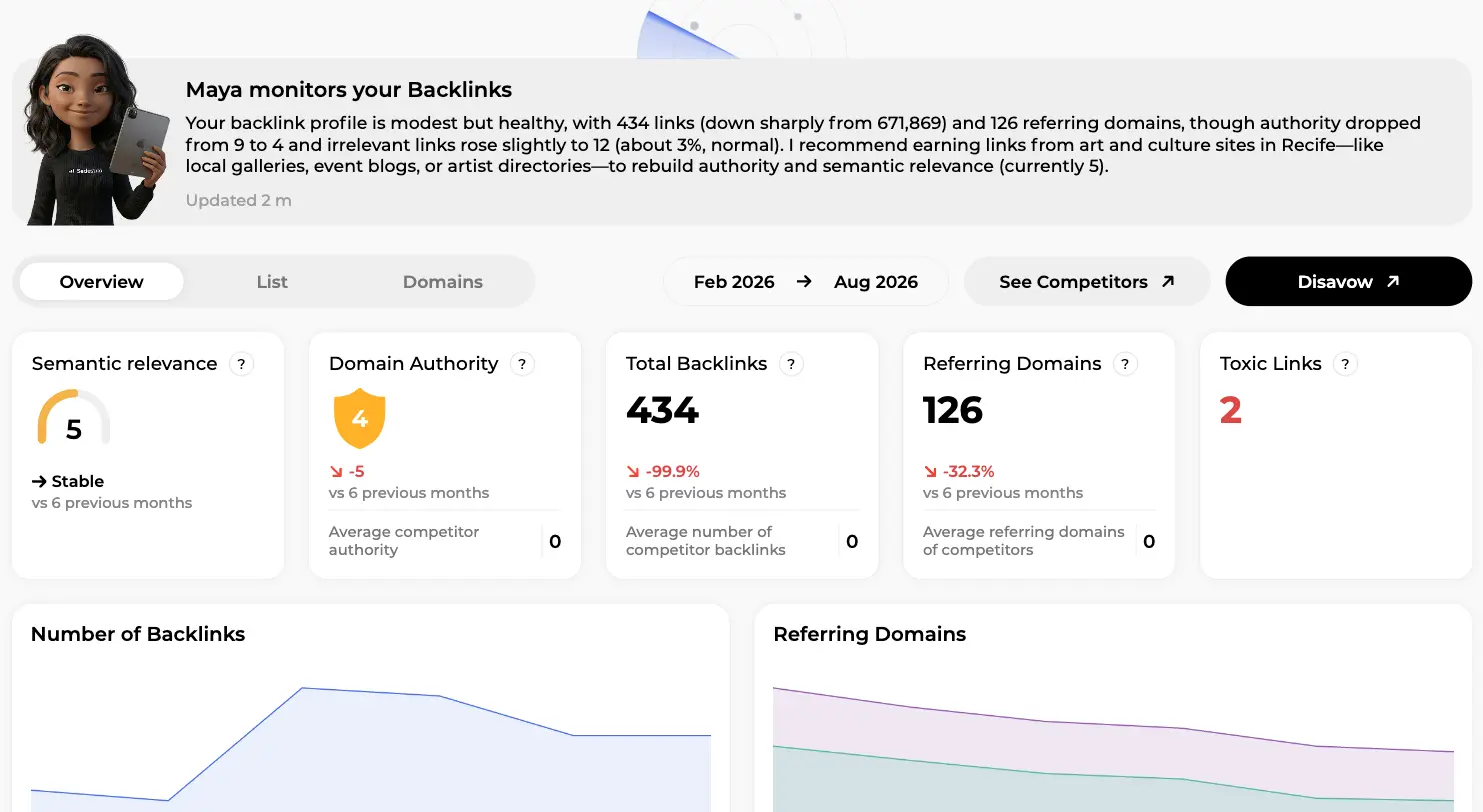
Maya looks after your authority. Her "My backlinks" overview tracks semantic relevance, domain authority, total backlinks, referring domains and toxic links over six months, and opens with a plain-English diagnosis of your profile. Two charts follow backlinks and referring domains over time, tabs switch to the full list and the domains view, and "See Competitors" puts your numbers next to theirs.
Then she does what most tools don't: she gets you links, from a marketplace of real sites (guest articles and ranked pages), through monthly campaigns where she picks the pages to boost and the anchors within your budget. More in Backlink campaigns with Maya.
Nox, Technical: manage your indexing
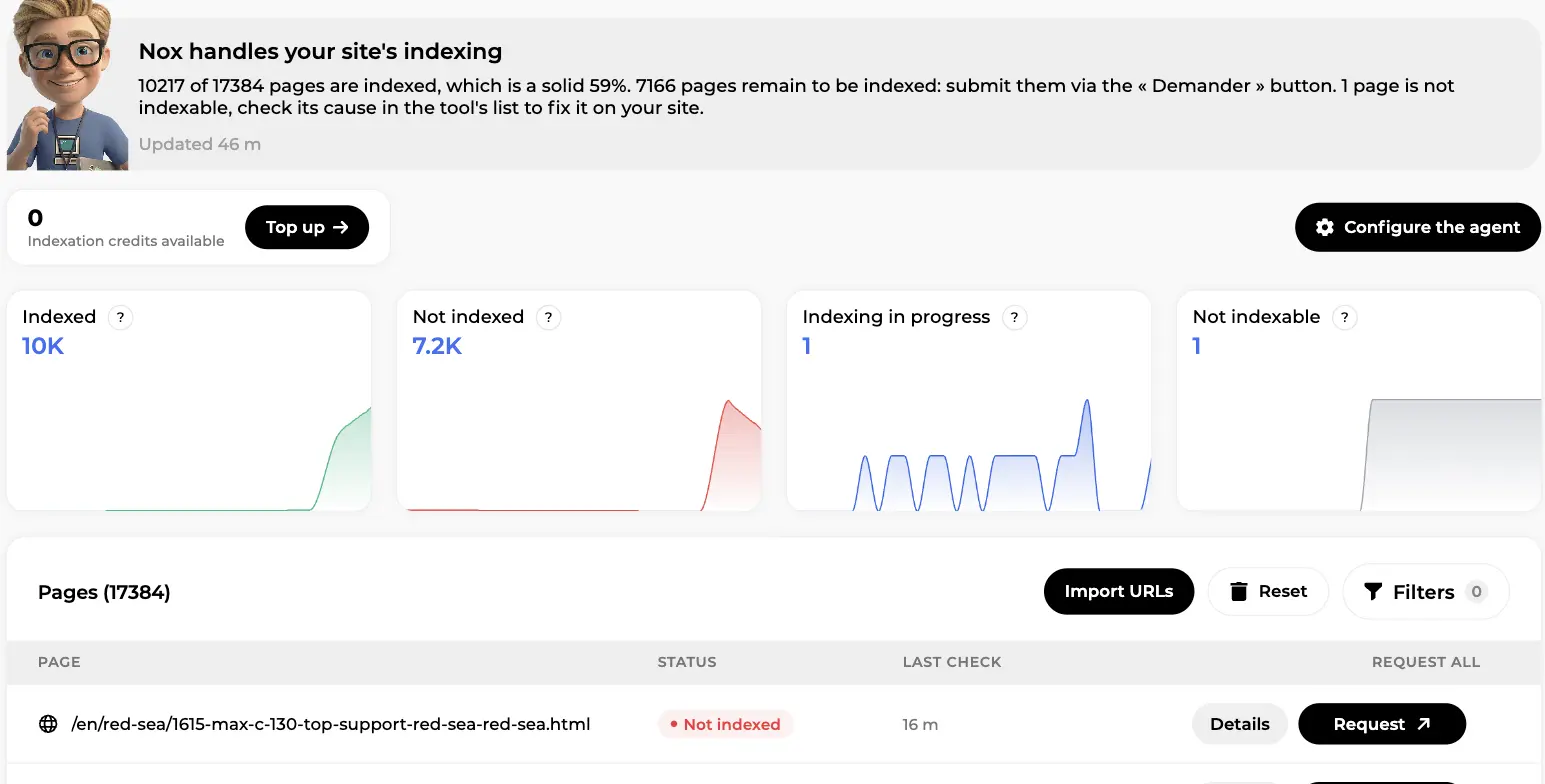
Nox is the engineer. He runs the technical audit (health score, errors, warnings and suggestions, with a fix guide for each issue type) and tracks your indexing: which pages Google has indexed, which it hasn't, which are in progress and which can't be indexed at all.
His indexing screen sums up the situation in one sentence ("10217 of 17384 pages are indexed"). Four cards show Indexed, Not indexed, Indexing in progress and Not indexable with a daily chart each. Underneath, every page has a status, a last check time and a "Request" button, with "Import URLs" to pull your sitemaps. "Configure the agent" (autopilot, daily limit, standard vs fast indexing per page type) sits above.
Everything Nox does is detailed in Technical SEO audit and indexing with Nox.
Marc, Competitors: capture their traffic
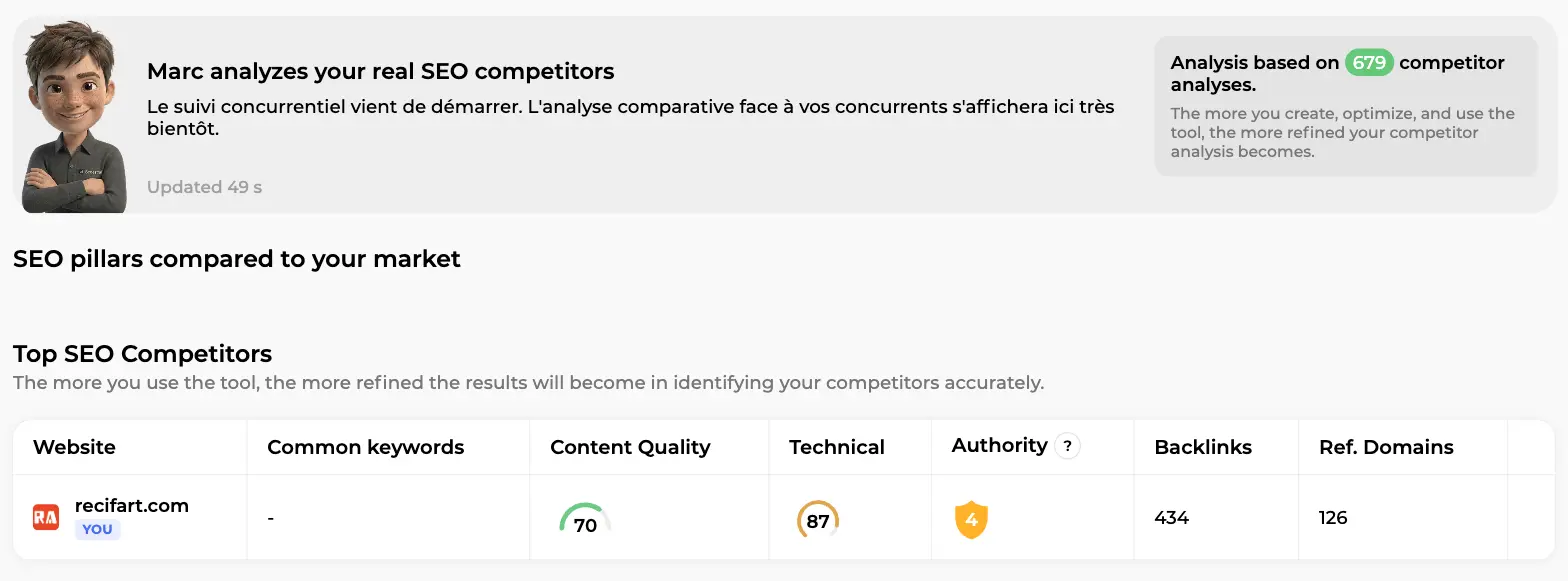
Marc reads the market. His overview compares your SEO pillars to the competitors that actually rank on your keywords: common keywords, content quality, technical score, authority, backlinks, referring domains. "Analyze a site" does the same for any URL you type in.
His home screen shows "SEO pillars compared to your market" and the "Top SEO Competitors" table, your own site on the first row (content quality 70, technical 87, authority 4 here). The analysis gets sharper the more you use the tool.
Marc also runs the "Results & insights" screens: SEO Visibility (clicks, impressions, CTR, position distribution, "My keywords", "My pages") and AI Visibility, which asks ChatGPT, Gemini, Perplexity, Google AI Overviews and Google AI Mode a set of prompts every week and checks whether your brand comes up, with what sentiment, and which competitors are cited instead. See SEO analytics with Marc and AI visibility tracking.
Around the agents, "Quick access" adds a Toolbox (keyword research, suggestions, cannibalisation detection) and "Edit images" (ALT tags, AI retouching), the workspace of Louise, the creative agent who also generates on-brand images and videos for your content, covered in The SEO toolbox.
A typical first month with Sedestral
What does working with the team look like? Here's the usual sequence: ten minutes of setup, then a few short sessions a week.
Day 1: connect your site and Search Console
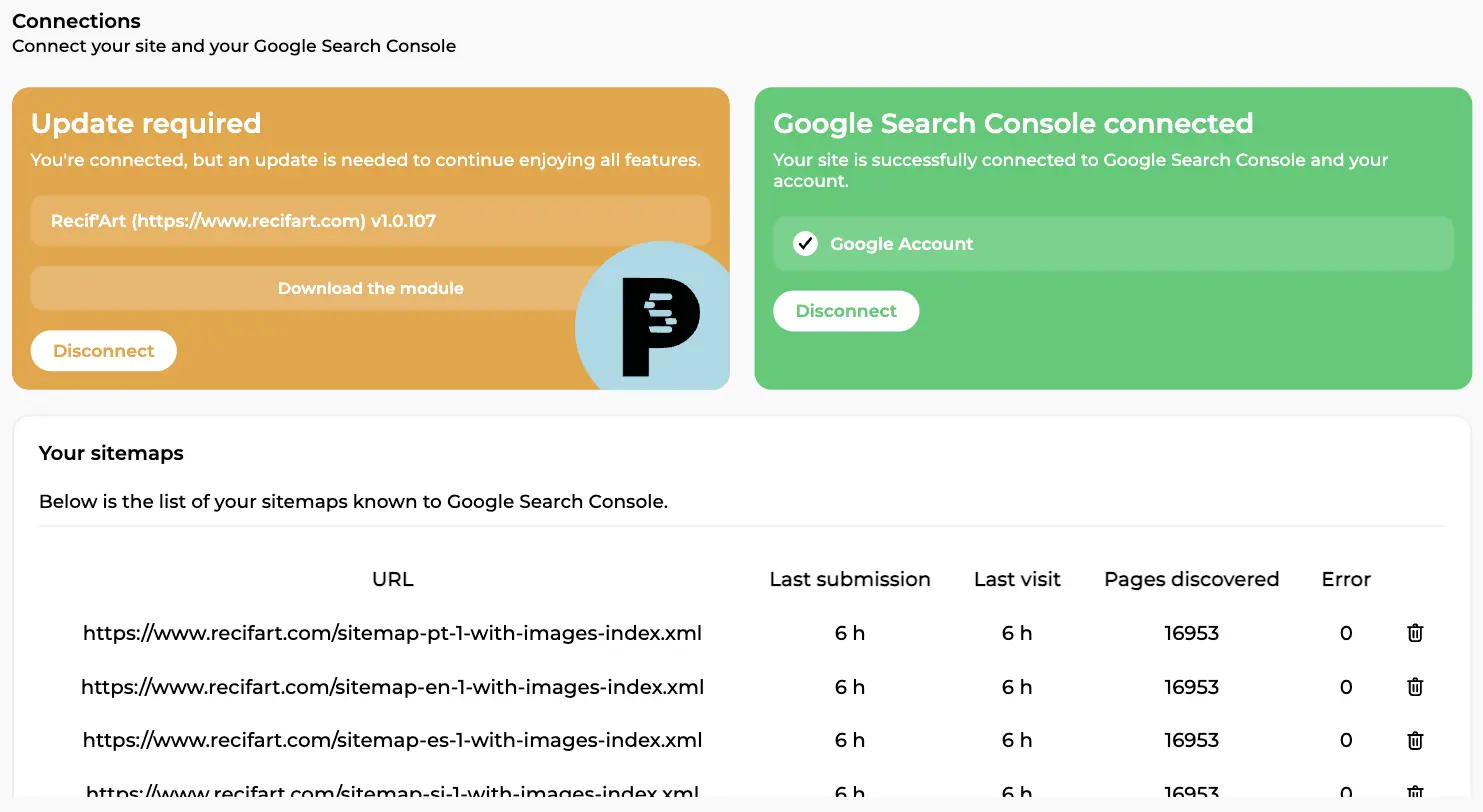
Sign up, create a workspace and add your site (one site = one domain + one language). Then open "Site configuration" in the top right, "Connections" tab. Two connections do the heavy lifting: your CMS (WordPress, WooCommerce, Shopify, PrestaShop, Webflow, Wix, Joomla, Odoo, or any site via API or export) so the agents can read and publish, and Google Search Console so they see your real positions, clicks and impressions.
The Connections screen shows both at a glance: the CMS card on the left (here a PrestaShop module flagged "Update required" with a "Download the module" button), a green "Google Search Console connected" card on the right, and below, "Your sitemaps" with last submission, last visit, pages discovered and errors for each sitemap.
Day 1, still: set the brand context once
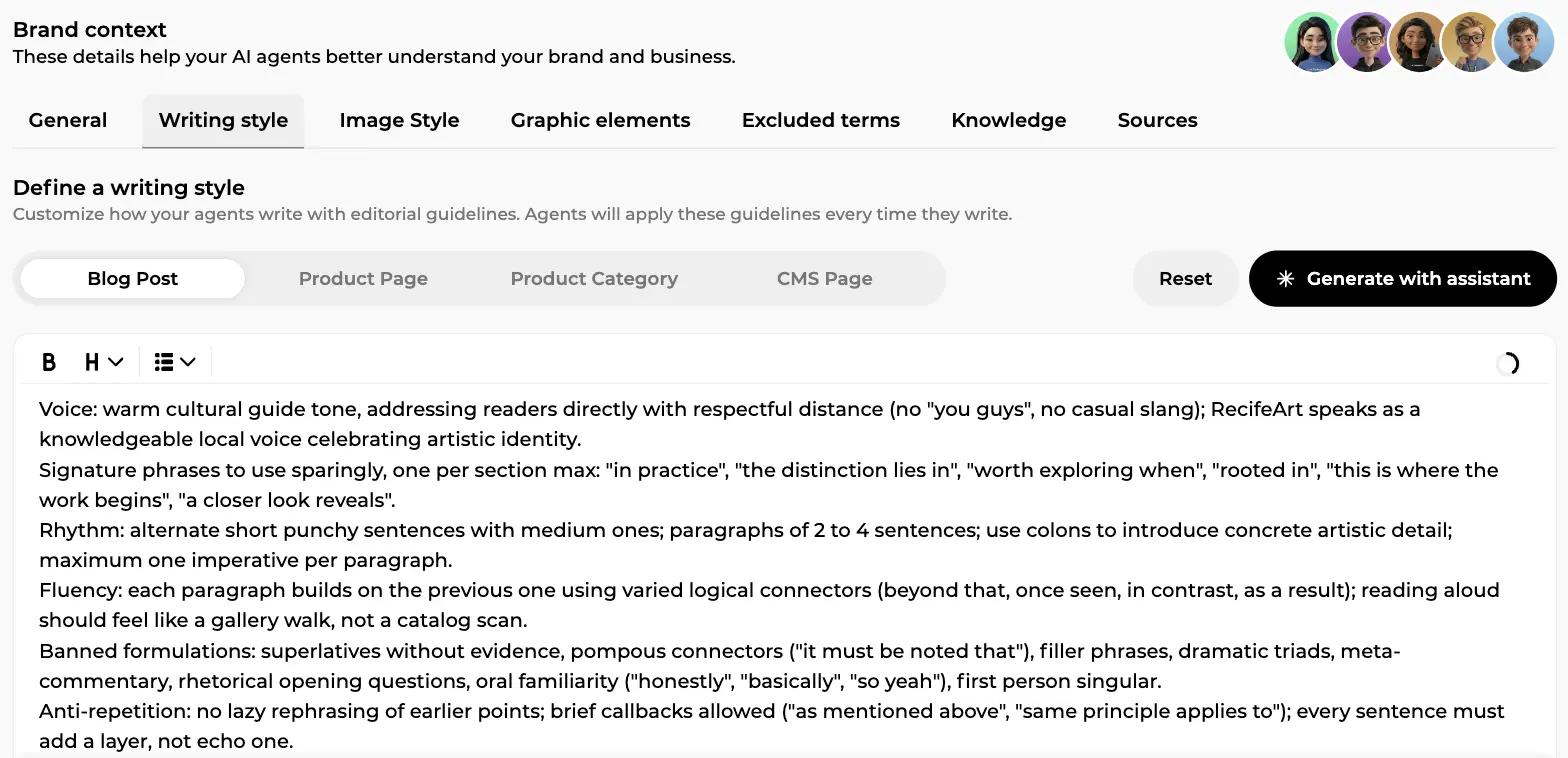
This is the step that separates generic AI text from content that sounds like you. The "Brand context" tab has seven sub-tabs: General (what you sell, to whom, values, geography), Writing style, Image style, Graphic elements, Excluded terms (words the AI must never use), Knowledge (links, files and texts the agents search while writing) and Sources (trusted sites they may cite).
The Writing style tab is worth your first fifteen minutes. One style per content type (Blog Post, Product Page, Product Category, CMS Page), written by you or produced by "Generate with assistant" after a few questions on tone, register and rhythm. The screen below shows a generated style: voice, signature phrases, sentence rhythm, banned formulations. Every agent applies it to every piece of text, including one-off edits in the AI chat.
The whole configuration, including graphic elements and team roles, has its own guide: Site configuration.
Week 1: audit everything
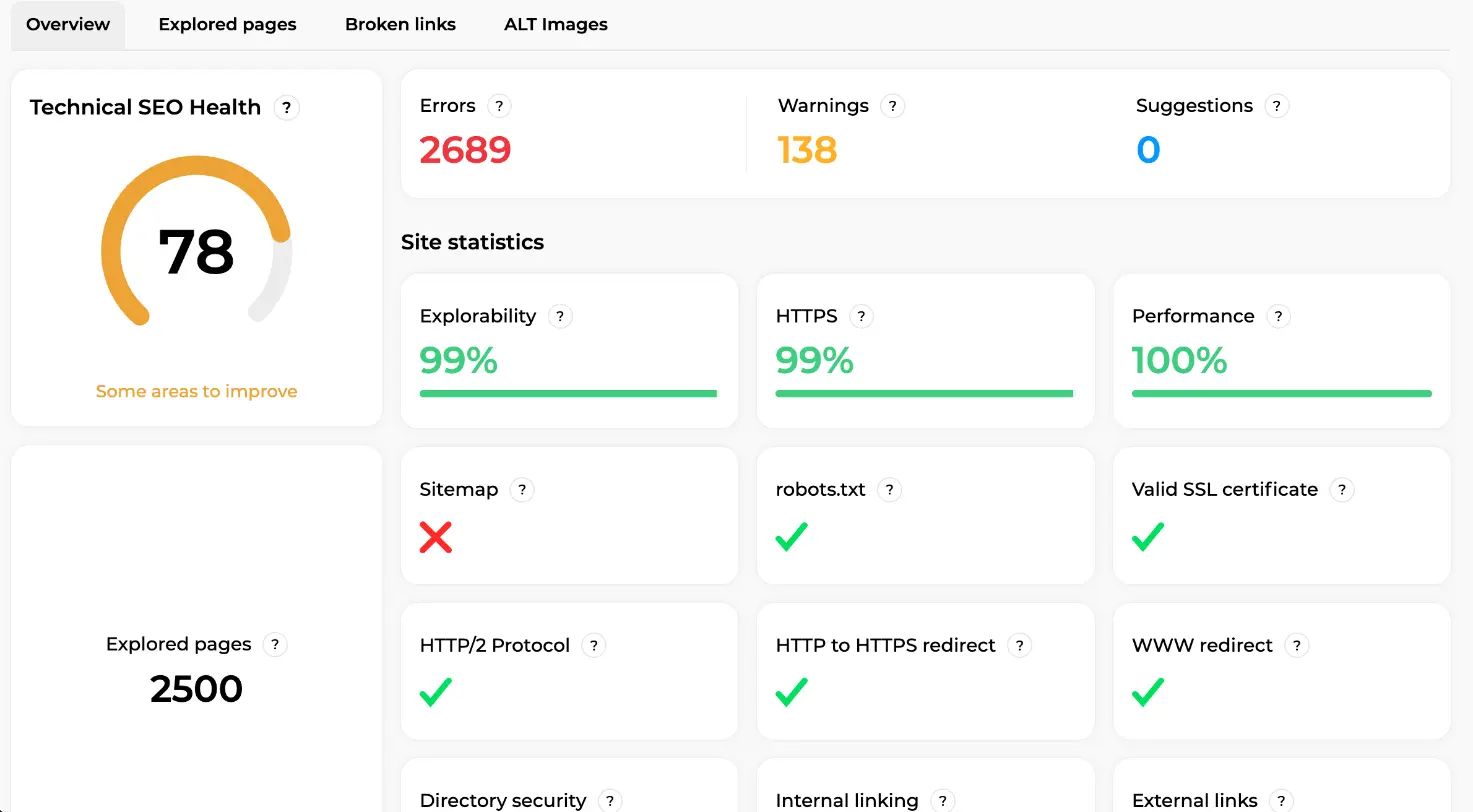
Nox and Rémi now work on their own. Nox crawls the site and produces the technical overview: a "Technical SEO Health" gauge (78, "Some areas to improve" here), counts of Errors, Warnings and Suggestions, explored pages, and a grid of checks (Explorability, HTTPS, Performance, Sitemap, robots.txt, SSL, HTTP/2, redirects) each with a tick, a cross or a percentage.
Rémi, meanwhile, builds the recommendations list you saw earlier. Your job in week 1 is to read, not to fix: which issues are urgent, which pages are quick wins (already ranking, low score, easy lift), which leaders are declining. Ten minutes and you have a plan for the month.
Week 2: first articles
Now Alya. Create a topic around a subject central to your business (not "marketing", not a single product reference, something in between), let her analyse Google and AI search for a couple of minutes, then open a cluster. The popup lists each keyword with monthly volume, difficulty and your current position ("Not referenced" if you don't rank yet), with two buttons: "Add to Autopilot" or "Create article without autopilot".
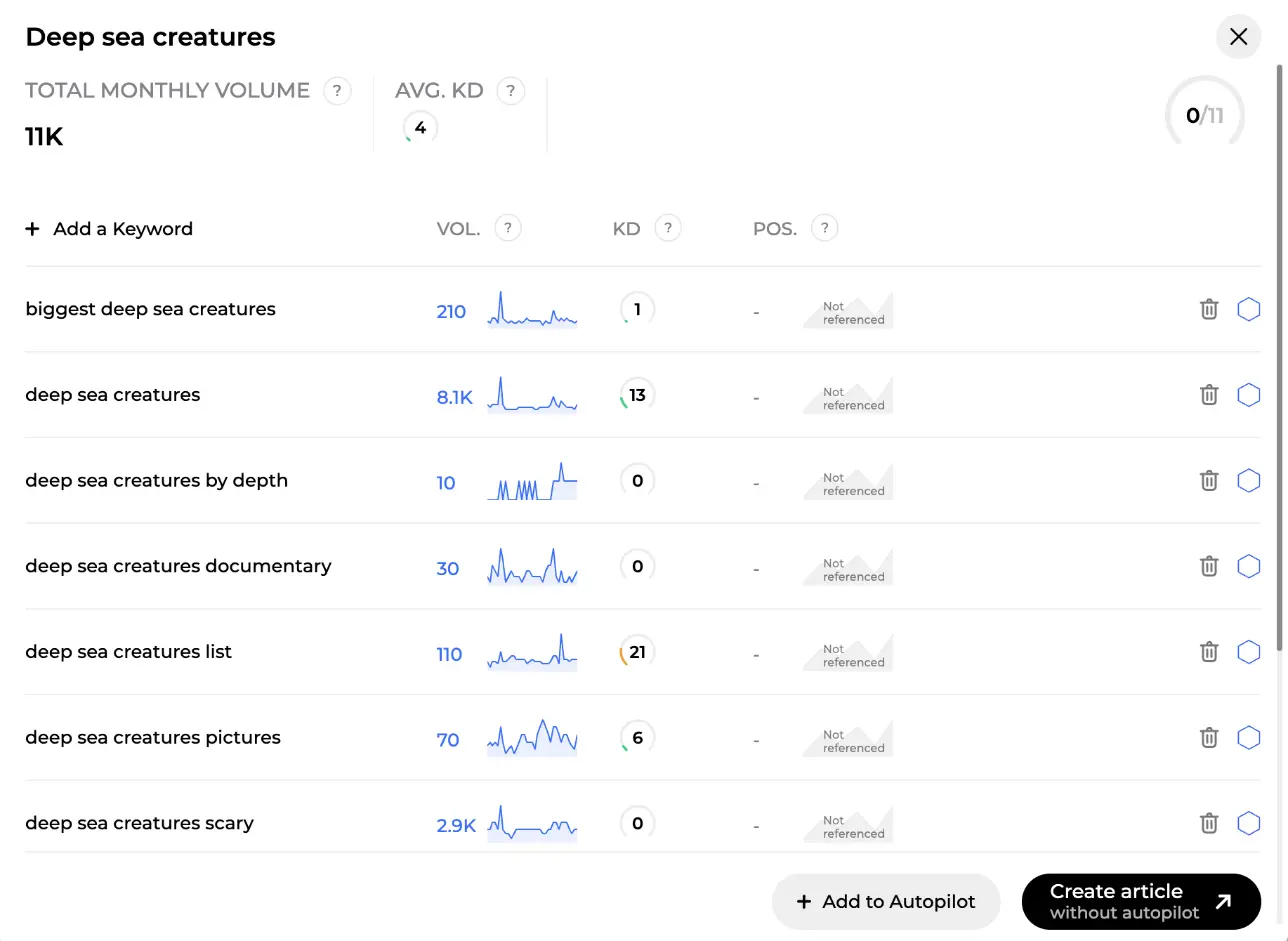
For the first two or three articles, do it by hand: pick a title proposal, check the outline, wait a few minutes. The result lands in the editor with the content score panel on the right. Below, a 3,120-word guide scores 97 out of 100, with 36 of 36 SEO entities placed, 21 of 21 AI-search facts covered and internal links suggested. The export button for your CMS is in the header, the "Edit with AI" pill at the bottom.
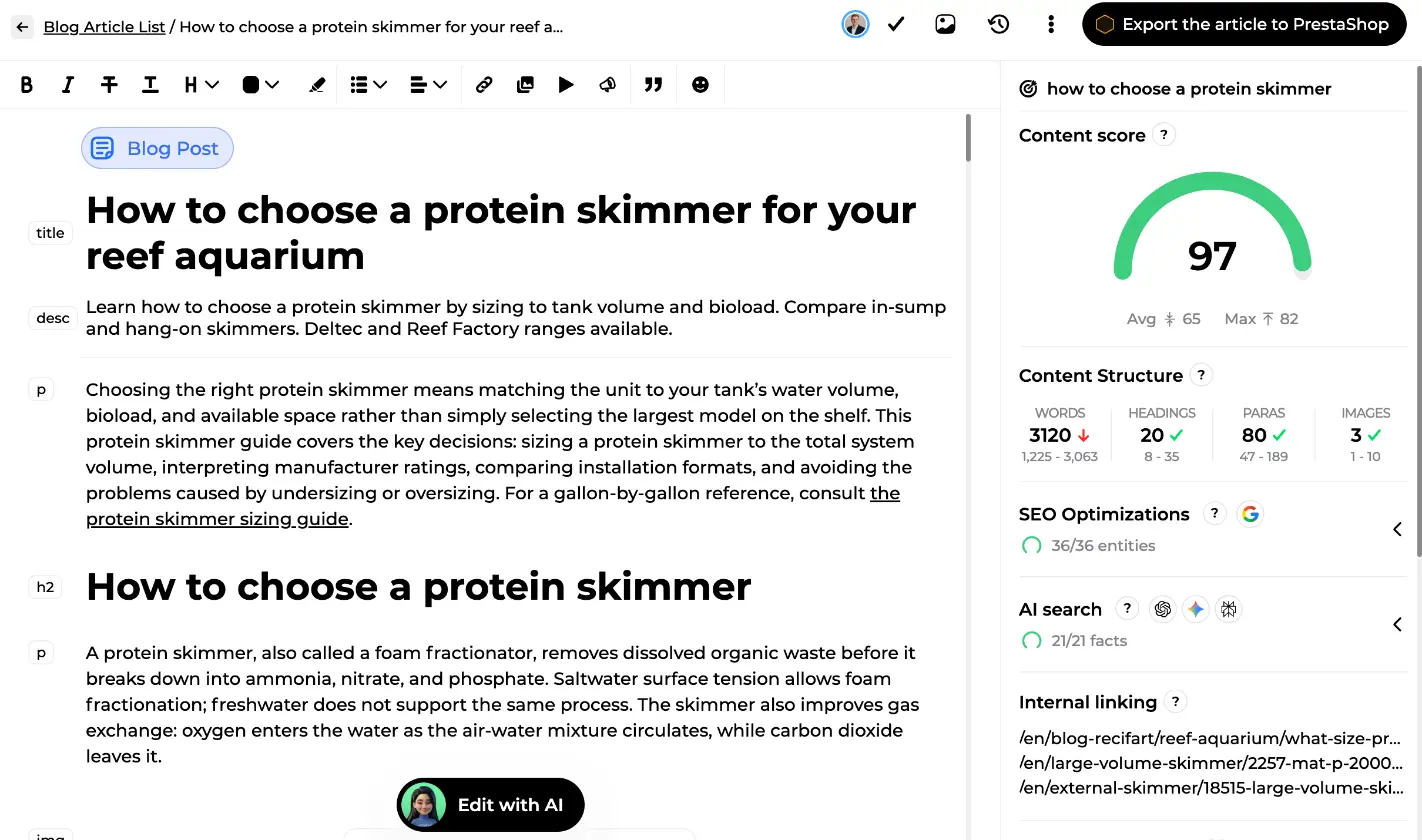
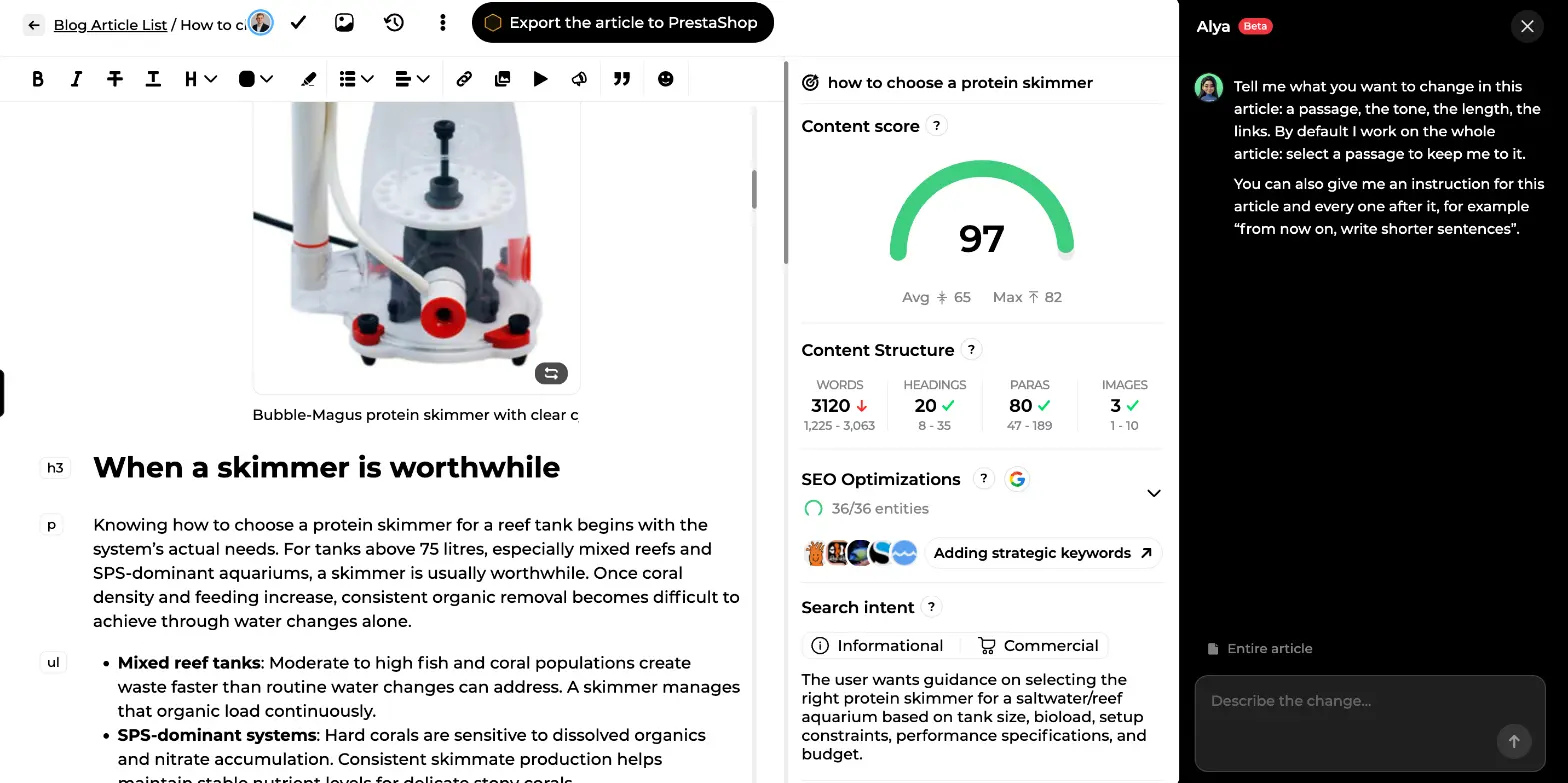
Read it like an editor: add an example, cut a paragraph, change a claim. Or ask Alya in the chat panel ("rephrase the introduction with a more direct tone", "add a three-question FAQ"): she applies it and shows a word-by-word diff you can undo change by change, without consuming credits. Once you trust the output, switch the topic to autopilot.
Week 3: optimise what already ranks
Back to Rémi. Take the quick wins from his list, click "Optimize", confirm the main keyword (he suggests up to four from Search Console), tick the terms you want integrated, and let him rewrite. The score before and after tells you whether it worked, the review step lets you compare, and nothing goes live until you publish. For hundreds of thin product pages, "Bulk optimization" queues up to 100 at once, each result waiting as a draft. If you'd rather write yourself, the score panel guides you term by term.
Week 4: backlinks and indexing
Two things now run in the background. Nox's indexing autopilot submits your new and optimised pages every day within the limit you set (standard mode leaves Google about two days to find a page itself; fast indexing submits it as soon as it's published). And Maya's first monthly campaign kicks off.
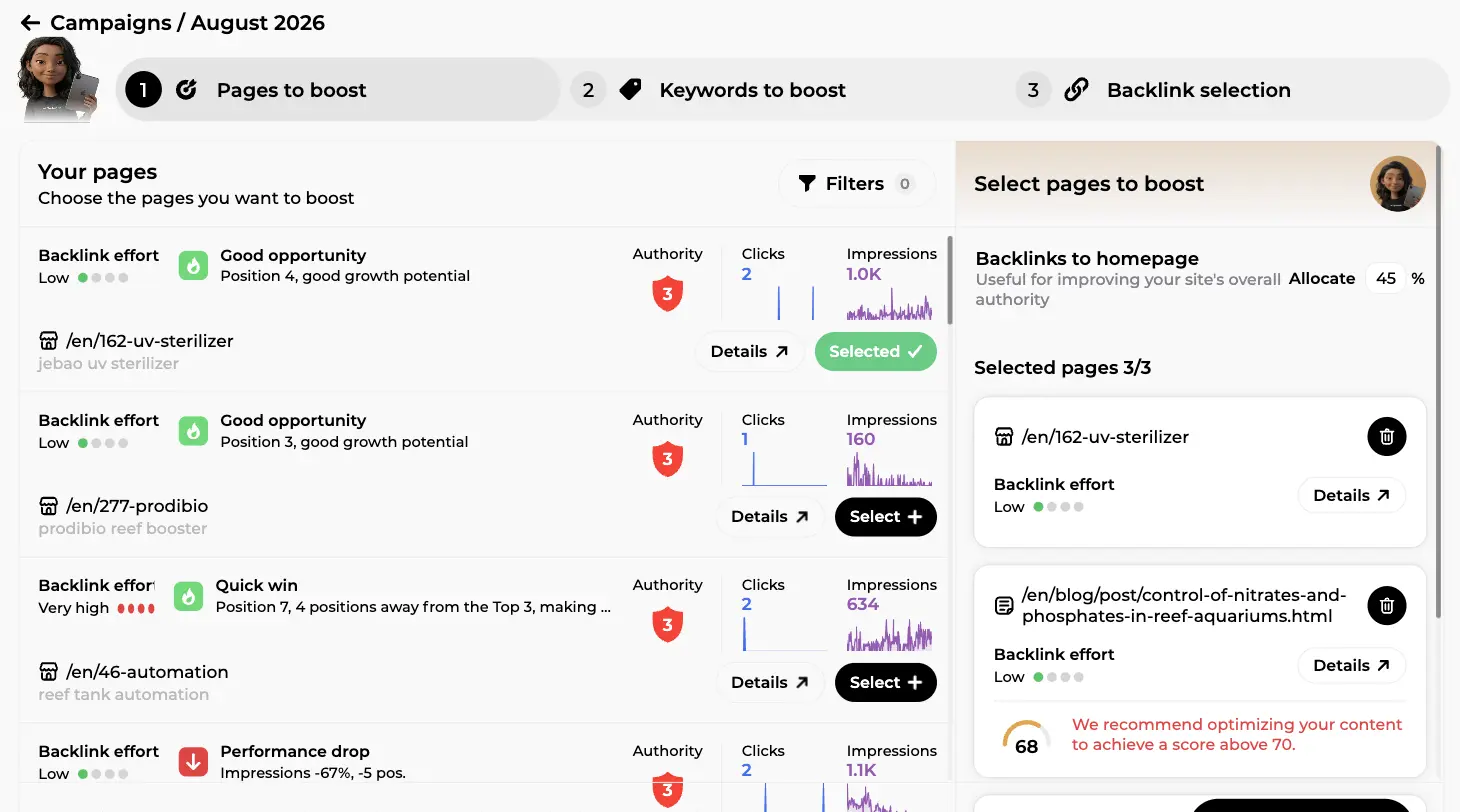
A campaign is three steps: "Pages to boost", "Keywords to boost", "Backlink selection". On step 1 she lists your pages with a backlink effort estimate, the same labels Rémi uses, authority, clicks and impressions, and you select the ones to push. A side panel shows the selection, lets you allocate a share of the budget to homepage links, and warns when a selected page's content score is under 70 and should be optimised first.
End of month: read the reports
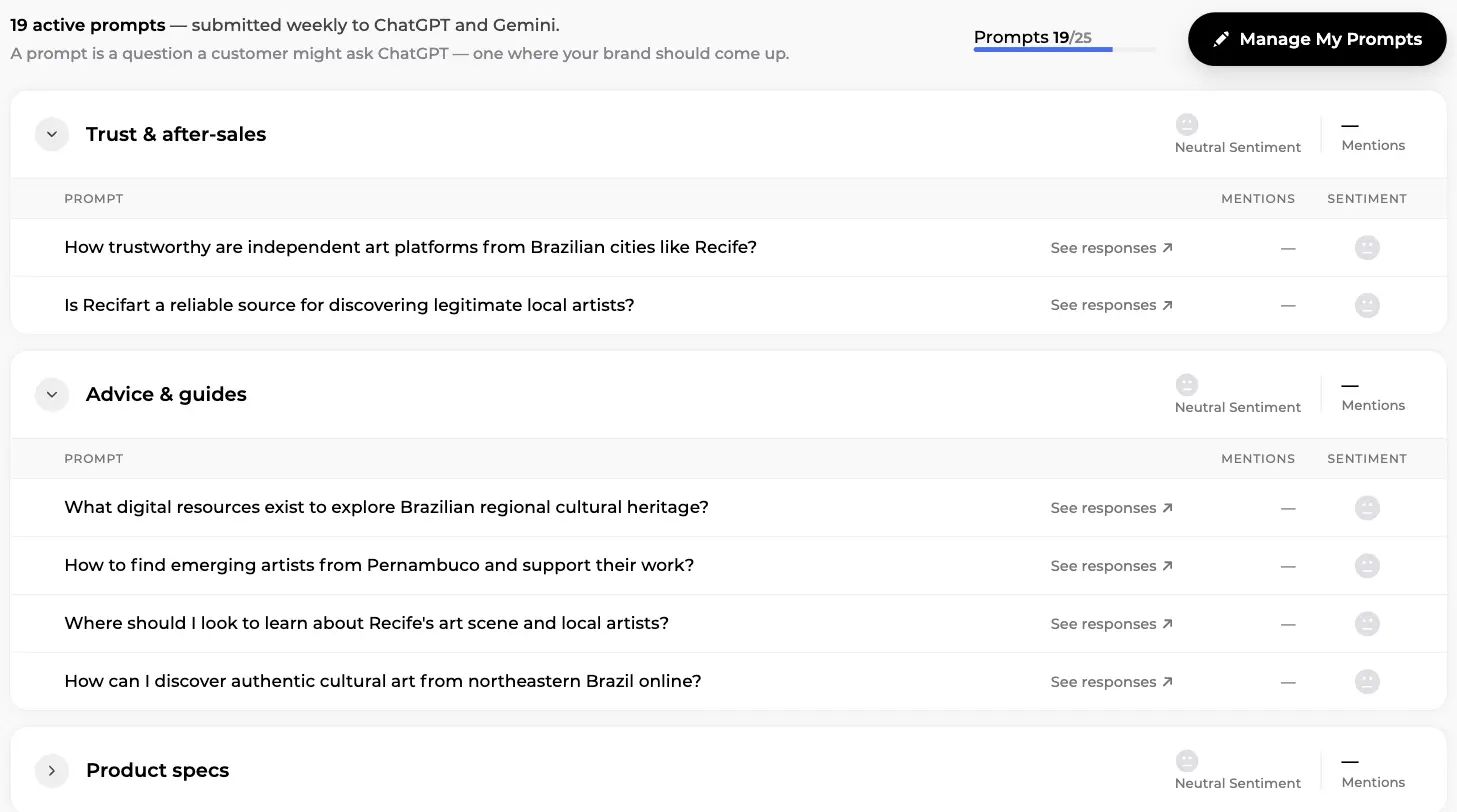
Open Marc's screens. SEO Visibility gives you clicks, impressions, CTR and position distribution, then "My pages" with the keywords each page ranks for. AI Visibility lists the prompts submitted weekly to ChatGPT and Gemini, grouped by theme (Trust & after-sales, Advice & guides, Product specs here), with mentions and sentiment per prompt and a "See responses" link to the actual AI answers.
Don't expect rankings to move in four weeks. Do expect a healthier technical base, a dozen pages in better shape, your first articles indexed, links in progress and a clear list for month two. SEO compounds; month one gets the machine running.
Tip: invite a colleague early. The Configuration tab has ready-made roles (Editor, Writer, Developer, Reader) and email invitations, so the person who knows your products can review Alya's drafts.
Who Sedestral is for
| You are | Your main pain | Where to start |
| An e-commerce store (Shopify, PrestaShop, WooCommerce, Odoo, Wix) | Hundreds of thin product pages, a blog nobody has time for | Rémi's bulk optimisation, then Alya on autopilot for buying guides |
| An SME or a service business | No in-house marketer, competitors that publish more than you | Brand context, one topic with Alya, Nox for indexing |
| An agency or a consultant | Several client sites, monthly reporting, execution that doesn't scale | One workspace per client, team roles, Marc's reports and Maya's campaigns as deliverables |
There's a free plan, then paid plans from €119 per month (shown in your local currency), with 30% off on annual billing and no commitment. The best way to judge is to create your account, connect your site and let the first audit run.
In short
- Sedestral is SEO software organised as a team of six AI agents: Alya (blog strategy and writing), Rémi (optimisation of existing pages), Maya (backlinks), Nox (technical audit and indexing), Marc (competitors, SEO and AI visibility) and Louise (images and videos).
- Setup is two connections (CMS and Google Search Console) plus a brand context every agent reuses: writing style, image style, graphic elements, knowledge.
- A first month: connect, configure, audit, write a few articles by hand, switch to autopilot, optimise quick wins, launch a backlink campaign, let indexing run, read the reports.
- You stay in control: content score before publishing, review step, word-by-word diff and undo in the AI chat, draft mode if you prefer to publish from your CMS.
- Each agent has its own guide in this series; start with Site configuration if you're about to sign up.
Frequently asked questions
Do I need SEO skills to use Sedestral?
No. Each agent explains what it found in plain language and every technical issue comes with a fix guide. Knowing your business and your customers matters more: that's what goes in the brand context, and it's what makes the content sound like you.
Which CMS platforms are supported?
WordPress and WooCommerce, Shopify, PrestaShop, Webflow, Wix, Joomla and Odoo connect natively, so the agents read your pages and publish directly. Any other site works through the API or an HTML export.
Does the AI publish without asking me?
Only if you tell it to. Autopilot can publish automatically, or you can disable automatic publishing in the site settings so everything arrives as a draft you approve from your CMS. In the editor, every AI edit shows a diff and can be undone individually.
How is Sedestral different from ChatGPT with a good prompt?
The agents work from data: your Search Console positions, the top results for each keyword, your competitors'backlinks, your sitemaps. They also act on the site (publishing, requesting indexing, running campaigns) and keep your writing style, image style and knowledge base across every task.
How long before I see results?
Technical fixes and quick-win optimisations can move a page within weeks, especially with fast indexing. A blog strategy is a longer game: count on several months of regular publishing before topics reach good coverage. Marc's SEO Visibility screens let you follow the trend week by week.
How much does it cost?
There's a free plan, then paid plans from €119 per month (shown in your local currency), and annual billing gives 30% off. Backlinks and indexing credits are bought on top as needed. The pricing page lists the current plans and their limits.