You know you should publish more. The last post went out "when you had time", and every keyword tool you open ends in a spreadsheet you'll never use. Sound familiar? The problem isn't motivation. It's that nobody handed you a plan: which subjects, which keywords, in what order, at what pace.
In this guide we show how Alya, the Blog Strategy agent in Sedestral, builds that plan for you. We'll go through topics and clusters, the Google and AI search keywords behind them, the topic map, the coverage rate, the editorial calendar and the autopilot that keeps it all moving. The writing of each article has its own guide, writing an article with AI; here we stay at the strategy level.
6
AI Agents Covering Every SEO Layer
What a content strategy looks like in Sedestral
A content strategy is a list of subjects your future customers actually search for, organised so that every article strengthens the others. In Sedestral that list has three levels.
- A topic is a subject central to your business, "marine fauna" or "protein skimmers" for an aquarium shop, "local SEO for restaurants" for an agency. One topic can hold hundreds of keywords.
- A cluster is a group of closely related keywords inside a topic. "Deep sea creatures", "biggest deep sea creatures", "deep sea creatures list": one cluster, one or two articles.
- A keyword is a real query with a monthly search volume, a difficulty score and a search intent.
Why bother with the structure? Because Google rewards sites that cover a subject thoroughly, not sites that publish one isolated post on it. Cover most of a topic's clusters and you build topical authority. The theory is in our guide on topic clusters; this page is the practice.
Everything happens in one screen. In the left menu, open Blog then Blog Strategy: topics on the left, the editorial calendar on the right, a Configure Autopilot button in the top corner. No more jumping between three pages to plan, schedule and check what went out.
Creating a topic
Click Create a topic, choose the topic type and type your theme. An informational topic is for blog content (guides, tutorials, "how to" questions); a commercial topic is for product pages, comparisons and buying guides. Keep the theme in the middle of the road: "marketing" is too broad, "optimise a Google Business Profile listing" too narrow.
Alya then works in the background for two to five minutes; you can close the window. Behind the scenes:
- Keyword collection: she scans the Google results for your theme, picks up the related searches and the "People also ask" questions, completes with Google Suggest, and gathers up to 800 keywords.
- AI search: she doesn't stop at Google. She writes natural questions a user might ask an AI assistant, submits them to several AI models and collects the queries those models run to answer. Those keywords join the topic, so you also cover what people ask AI assistants, not only what they type into a search bar. That's the GEO angle, explained in our introduction to GEO.
- Cleaning and clustering: duplicates removed, keywords sorted by relevance, then grouped into coherent clusters, each with one main keyword and several secondary ones.
- Enrichment: 12-month search volume, SEO difficulty and search intent for every keyword.
Open the topic and you land on the cluster view. On this screen you can see three cluster cards ("Deep sea creatures", "Endangered marine species", "Marine life zone examples"), each with its keyword count and total volume, an Add to Autopilot button, the first five keywords with a small hexagon showing their coverage status, and a Topical authority bar that fills as you publish. Top right, two buttons: Focus areas and Create a subtopic.
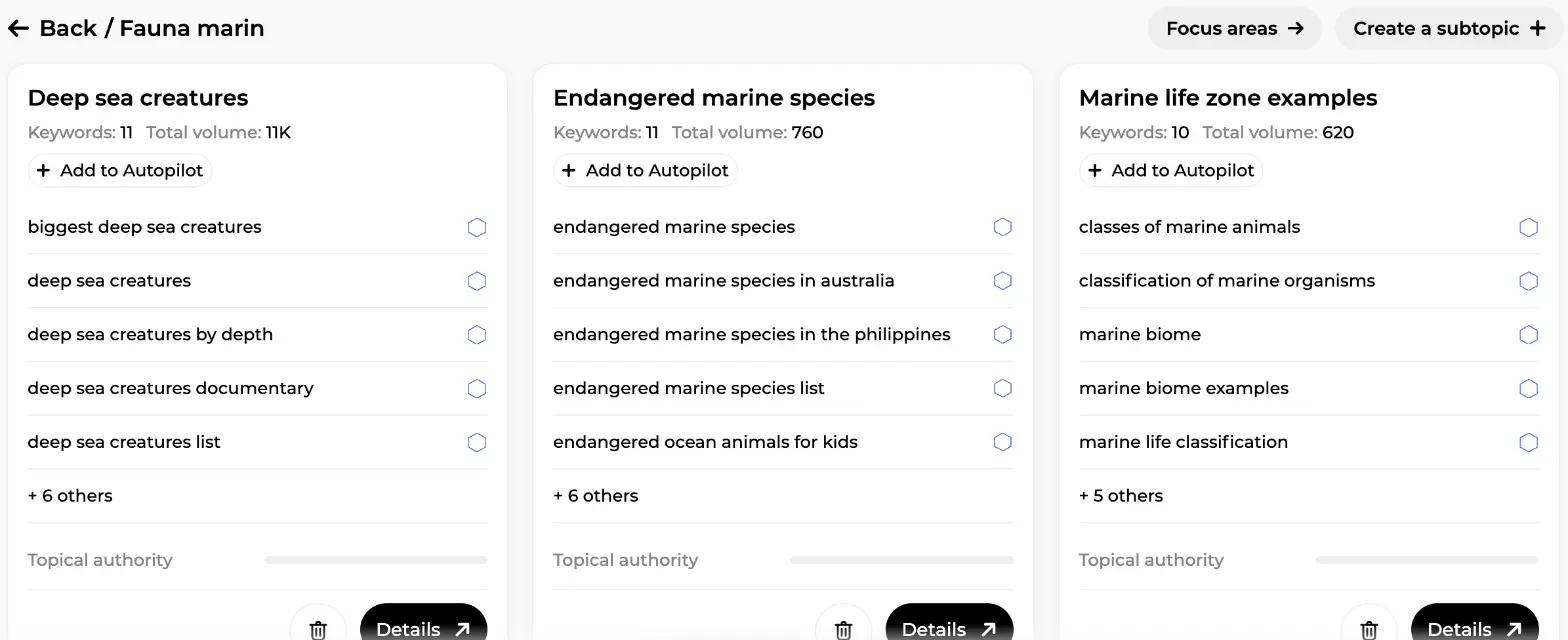
Tip: start with one topic at the heart of what you sell, and use Create a subtopic when a cluster grows too large. One topic well covered beats five opened and forgotten.
The topic map and focus areas
A topic with 100 keywords is hard to read as a flat list. Click Focus areas and a panel slides in on the left with the topic map: a table of contents Alya built for the whole subject, three levels deep. On this screen you can see the topic "Fauna marin" at the top with a 1/130 counter, then sections such as "Marine animal adaptations" with sub-entries like "How marine animals survive deep ocean pressure" or "Marine animal camouflage techniques", then "Marine ecosystem biodiversity". Click any entry and the clusters on the right are filtered to that focus area.
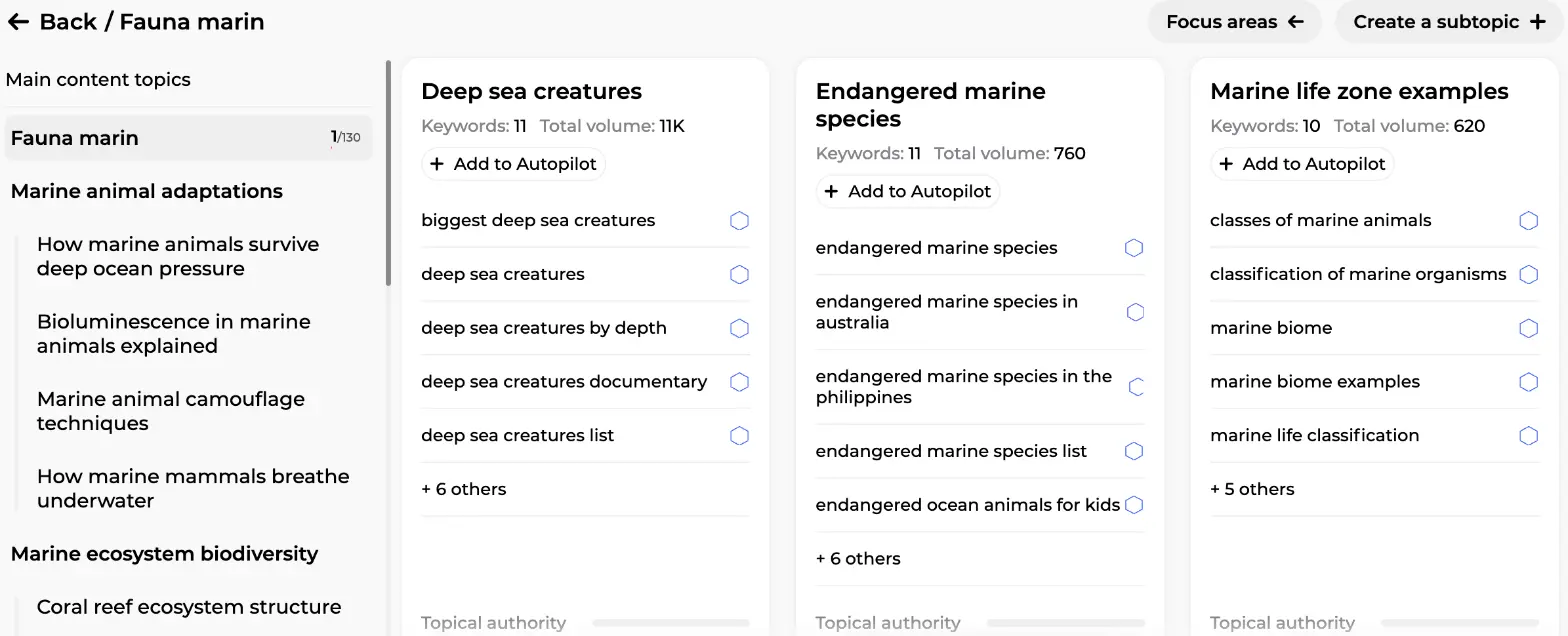
This is the view you decide from. Where are the gaps? Which section has volume but no article yet? The map makes the missing pieces obvious.
Reading a cluster
Click Details on a cluster and a pop-up opens with everything you need to judge it. On this screen you can see the cluster "Deep sea creatures" with its total monthly volume (11K), its average KD (keyword difficulty, here 4, which is very low) and a coverage ring reading 0/11. Below, one line per keyword: volume with a 12-month trend sparkline, KD in a small gauge, your current position (POS.) and a coverage label, "Not referenced" everywhere in this example because the site hasn't written on the subject yet. You can add your own keyword with Add a Keyword, delete one with the bin icon, and at the bottom choose between Add to Autopilot and Create article without autopilot.
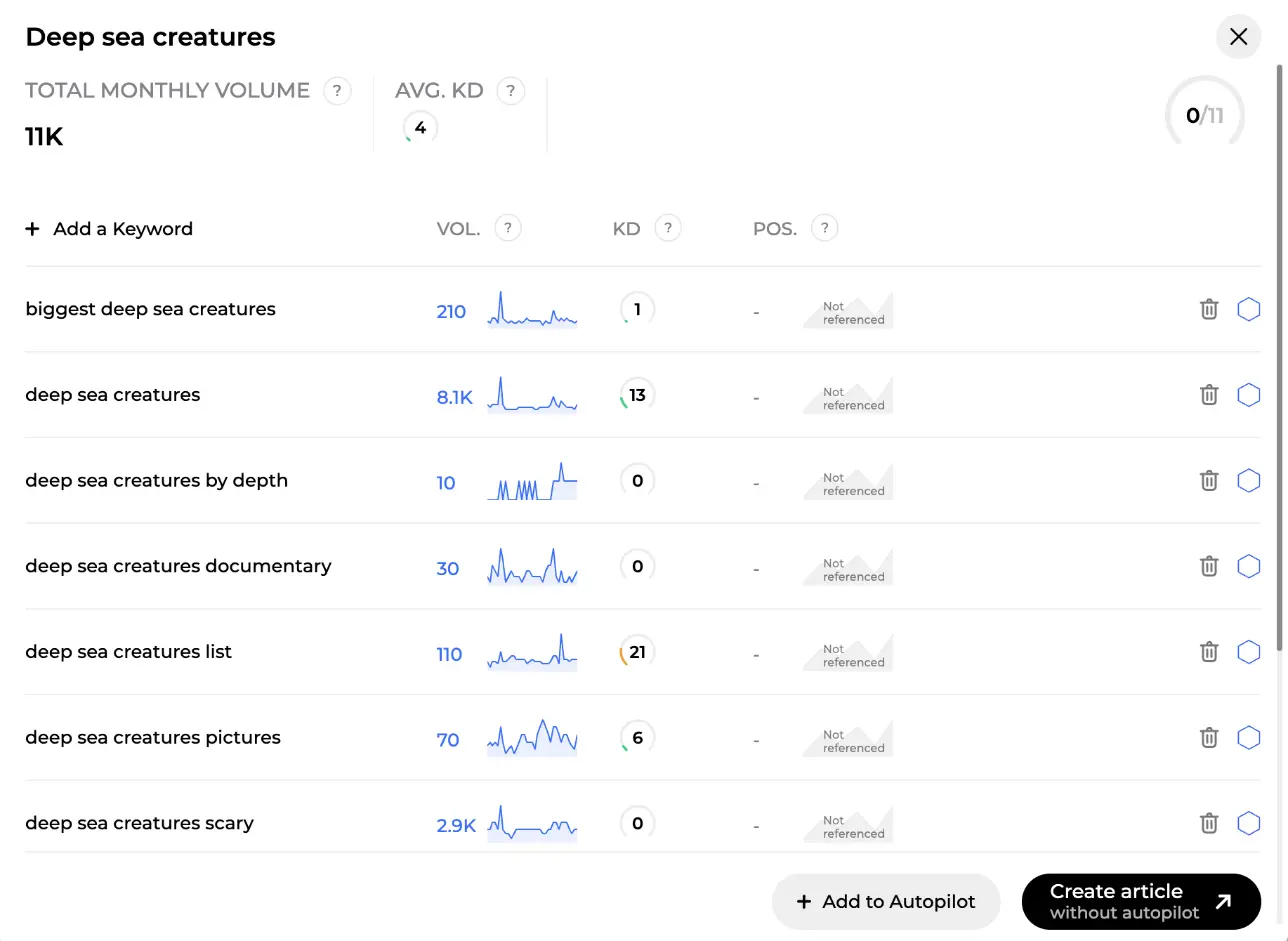
Three numbers decide where to start:
| Indicator | What it tells you | Good starting point |
|---|---|---|
| Volume | Average monthly searches on Google, per keyword and summed per cluster | Above 500 for the cluster, but don't ignore long tail |
| KD (difficulty) | 0 to 100, based on how many advertisers compete on the keyword | Low (0-33) or medium (34-66) |
| Coverage | Share of keywords that already have a published or ranking article | Below 30%, the red zone |
Each keyword also carries a search intent: informational, commercial, transactional or navigational, read from the wording, your brand context and Google's first page. Informational keywords make blog posts; commercial and transactional ones deserve product or category pages, Rémi's territory. New to the distinction? Our guide on search intent covers it in ten minutes. And "deep sea creatures scary", 2.9K searches, KD 0? That's a long-tail keyword found before the competition.
Coverage rate and filters
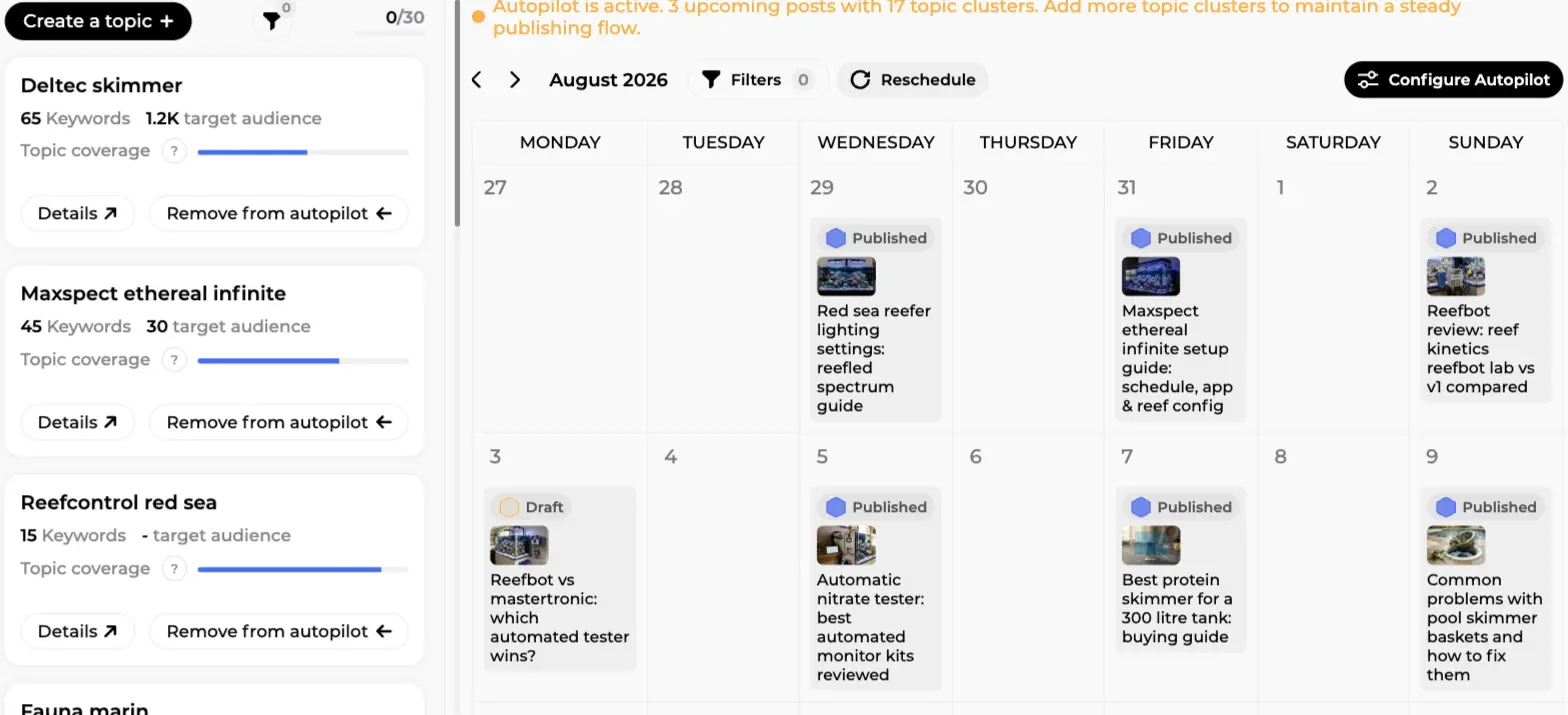
Back on the Blog Strategy screen, every topic card shows the same logic one level up. On this screen you can see three topics ("Deltec skimmer", "Maxspect ethereal infinite", "Reefcontrol red sea") with their keyword count, target audience (total monthly volume) and a Topic coverage bar. Details opens the clusters; Remove from autopilot shows the topic is already feeding Alya. The funnel icon is the filter: only topics in autopilot, or only topics under a given coverage rate, handy past ten topics.
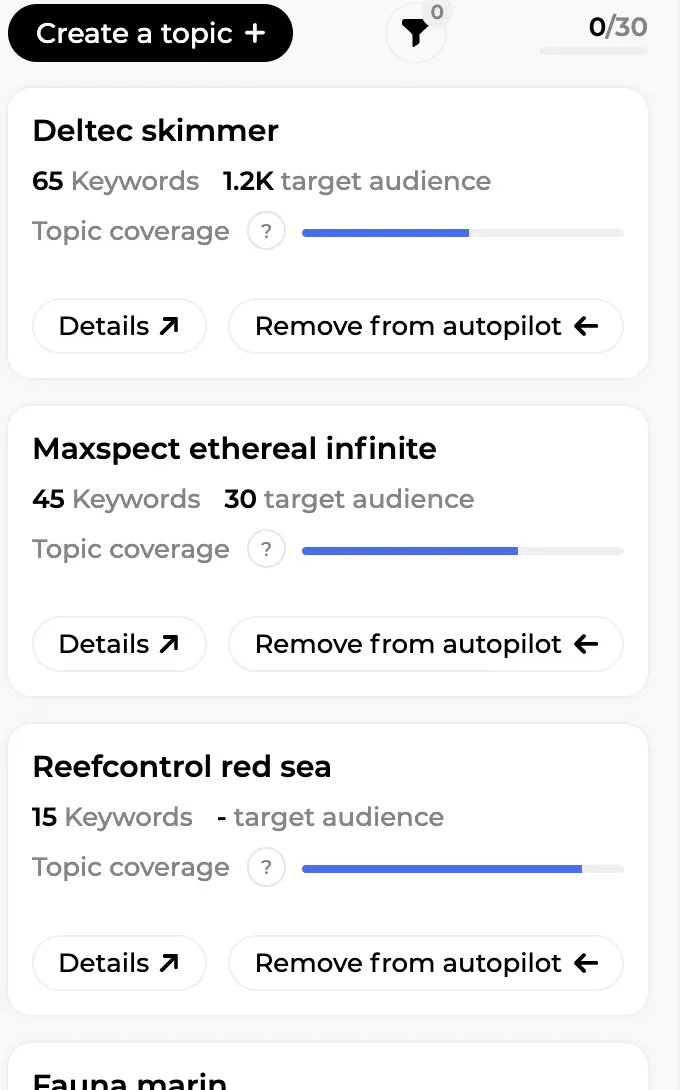
How is coverage counted? A keyword is covered once an article targeting it is published on your site, or better, ranking in Google's top 100. Drafts don't count, nor does an article still waiting in your CMS. The hexagon next to each keyword shows its state: not referenced, draft, transferred, published, ranked. Rule of thumb: aim for more than 60% coverage on a topic before opening the next one. Below 30% the bar shows red, which reads as "priority".
Coverage is the one number that tells you whether your blog is building authority or scattering posts. Once the articles are live, SEO Visibility with Marc shows the clicks and positions they earn.
The editorial calendar
The right-hand part of the screen is the editorial calendar, a monthly grid from Monday to Sunday. On this screen you can see a status line at the top ("Autopilot is active. 3 upcoming posts with 17 topic clusters. Add more topic clusters to maintain a steady publishing flow."), month arrows, a Filters button, a Reschedule button and Configure Autopilot. In the cells, published articles appear with a thumbnail and a blue "Published" badge, while a "Draft" card on Monday 3 August is still waiting for its go-live.
What can you do here, as long as the day is in the future?
- Add an article on any upcoming day with the "+" button, choosing the main and secondary keywords yourself.
- Move an article by dragging it to another day.
- Modify rules for one scheduled article: writing style, number of sections, image type and count, SERP analysis, knowledge, extra instructions, internal and external links. Only that article is affected.
- Delete a scheduled article you don't want.
- Reschedule everything if you changed your clusters or your pace: Alya recalculates the plan.
Glance at the status colour each week. Green: four or more posts scheduled. Orange, as in the example: Alya is running low, attach more clusters. Red: autopilot is off or has nothing to work with. If you've ever kept an editorial calendar by hand, you'll appreciate one that fills itself.
Autopilot: Alya schedules, or you do
Autopilot is the piece that turns a plan into a habit. Click Configure Autopilot and the first question is the important one: Who picks the publishing dates? Two answers.
- Alya schedules automatically: she looks at the clusters you attached, picks the best uncovered keywords and places articles on the calendar for the coming weeks. When the stock runs low and new keywords are available, she regenerates the schedule on her own.
- I schedule them myself in the calendar: you keep the days and the frequency, but you decide which keyword goes where by adding articles to the calendar by hand.
Next, select the days when your agent will write an article. On this screen you can see Monday, Wednesday, Friday and Sunday ticked, each with an Every week or Choose weeks toggle, so a day runs weekly or only on the weeks you pick. An Upcoming posts line previews the next dates (Sun 30 August, Mon 31 August, Wed 2 September...). Then the number of articles generated per day: 1, 2 or 3. Two buttons close the panel, Disable Autopilot and Save changes.
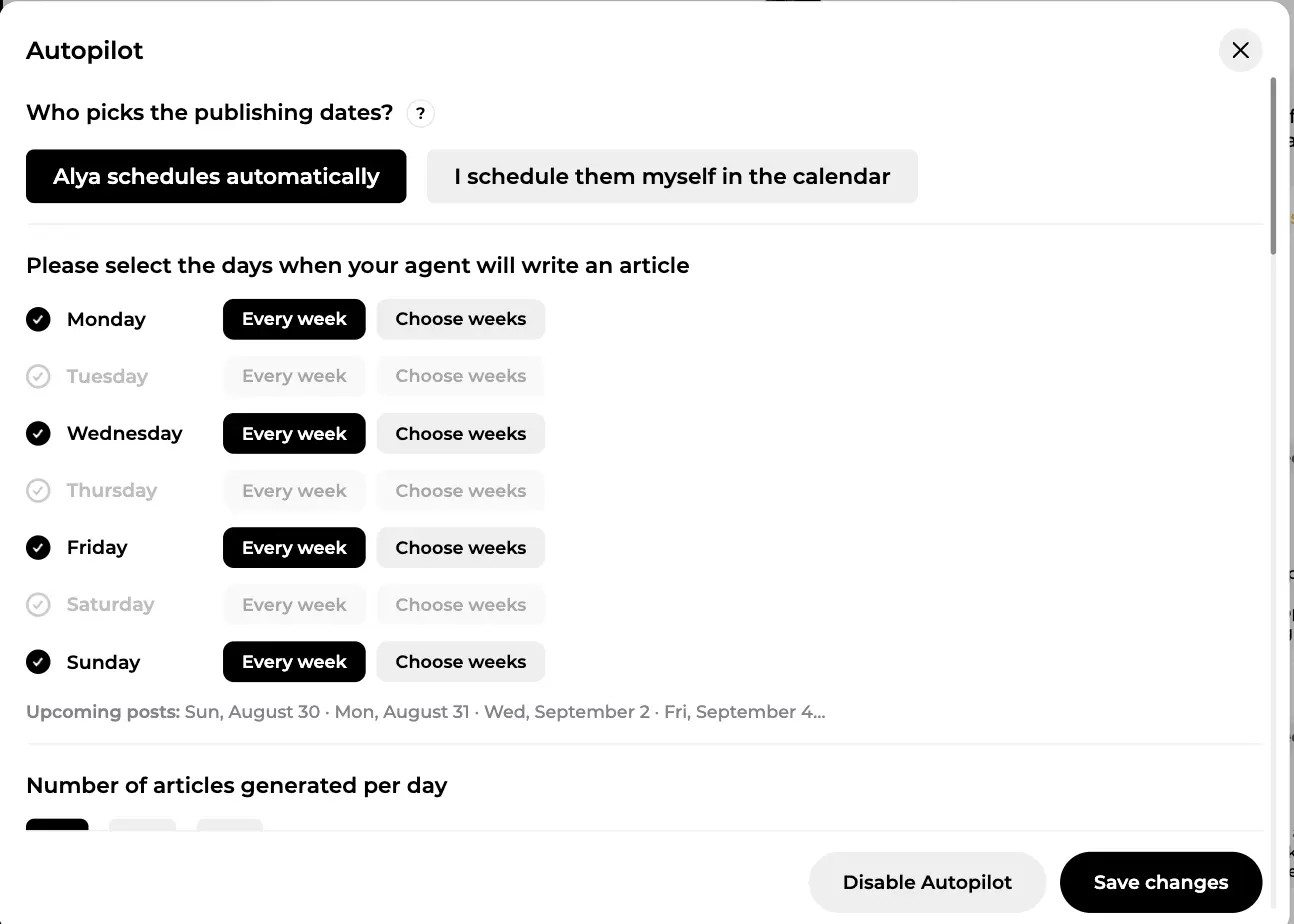
Further down the same panel you set what each generated article looks like: writing style, image type (product placement, website images, AI-generated, royalty-free or none), a pool of authors, and the advanced options: table of contents, FAQ, internal linking, external links, Google competitor analysis, automatic import into your CMS, automatic publication or draft, and an email for every article created. All of it inherits the tone, excluded terms and graphic elements you defined in site configuration.
Which keywords does Alya actually use? Only uncovered ones with an informational or navigational intent, so autopilot never duplicates an existing article and never turns a "buy" keyword into a blog post. An exhausted cluster drops out by itself. Start with two or three days a week at one article per day, review the first handful, then increase.
From plan to published article
Whether Alya scheduled it or you did, each article goes through the same process: SERP and AI analysis, knowledge, instructions, title proposals, outline, seven-phase writing with a quality-control loop, then the editor with its content score and GEO panel. On the scheduled day the article is generated, imported into your CMS and, depending on your setting, published or left as a draft for review. The screen-by-screen walkthrough is in writing an article with AI.
Want one article right now? In a cluster, tick one to six keywords and click Create article without autopilot: the creation flow opens with the keywords filled in.
Following your articles
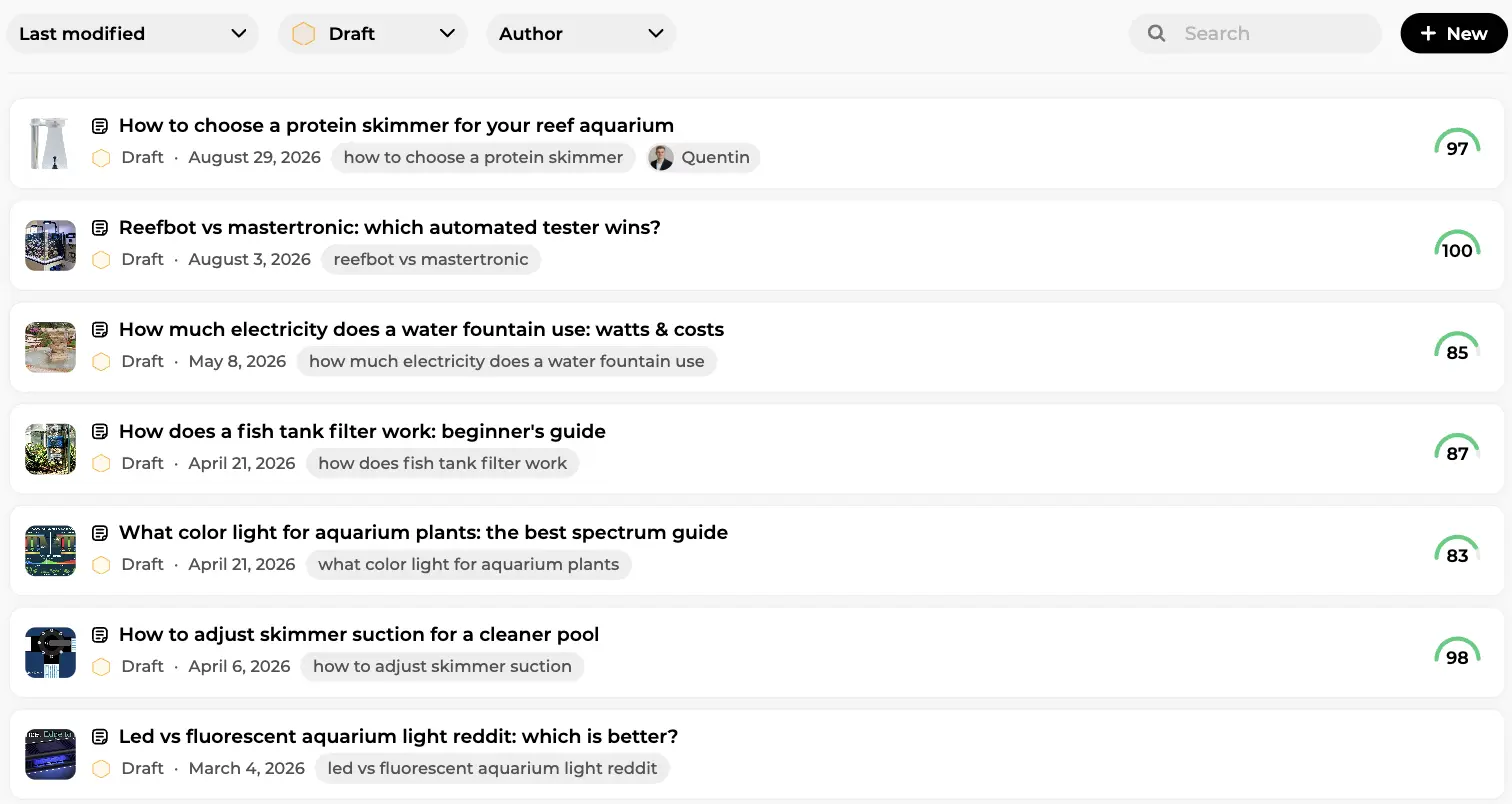
The Articles list keeps every piece in one place. On this screen you can see the drafts sorted by last modification, each with thumbnail, status, date, the main keyword as a tag, the author when assigned, and the content score on the right (97, 100, 85, 87 in the example). Filters at the top sort by date, status or author; New starts an article.
Scheduling a publication
Want a finished article to go live on Tuesday at 9am while you're on the road? From the editor, open the options menu, click Schedule publication, pick the date and time, confirm. The article moves to the Scheduled state, locked in read-only so what you approved is what goes out, and appears on the calendar. At the chosen time Sedestral publishes it to your connected CMS as if you had pressed Publish. Schedule up to six months ahead; Cancel scheduling sends the article back to draft at any time. Autopilot uses the same mechanism, so you'll sometimes find scheduled articles you didn't schedule yourself.
Once live, the article joins content tracking, where Rémi's content audit watches its clicks and position and flags it when it deserves a refresh. Strategy, writing, publication, measurement, optimisation: the loop is closed.
In short
- A topic holds hundreds of real keywords grouped into clusters, sourced from Google search and from AI models.
- The topic map (Focus areas) shows the subject as a table of contents and filters clusters by section.
- Volume, KD and coverage tell you where to start; search intent tells you what to write.
- The editorial calendar fills itself and stays editable: add, move, adjust rules, reschedule.
- Autopilot lets Alya pick dates and keywords, or leaves the dates to you: days, weeks, articles per day.
- Each article can be scheduled for a precise day and time, then published to your CMS automatically.
Sedestral has a free plan, then paid plans from €119 per month (shown in your local currency), with 30% off on annual billing. Starting from zero? The Sedestral overview guide shows where Blog Strategy fits among the six agents.

Automate Your SEO With AI Agents
Sedestral connects six AI agents to your website to handle content, audits, rankings and backlinks, without the manual grind.