You publish, you optimise, you build a few links... and then what? Most site owners open Google Search Console once a month, stare at a curve, and close it without a single decision. The data is there. The interpretation isn't. And nobody has an afternoon to cross-check 1,800 keywords against last quarter.
In Sedestral, Marc, the Competitors and analytics agent, does that reading for you. This guide walks through the SEO Visibility screens (overview, My keywords, My pages), the Competitors overview and the Analyze a site tool, with real screenshots from a connected store. Then we show how to turn the numbers into work for the other agents, because a dashboard that doesn't trigger an action is just decoration.
Prerequisite: connect Google Search Console from the site selector (top left, "Connect Search Console"). With a CMS module such as WordPress or PrestaShop, the connection is made automatically during setup. Without it, Marc can only show estimated positions and volumes, not your real clicks, impressions and CTR. Once connected, your data is updated daily, with the usual 2 to 3 day delay of Search Console data.
What Sedestral's AI Agents Cover
- Alya creates and publishes keyword-led content automatically
- Rémi audits and improves existing pages for better rankings
- Nox runs technical SEO audits across your entire site
- Marc tracks your rankings and monitors competitor movements
- Maya identifies and manages backlink opportunities, and Louise creates your images

SEO Visibility: the overview that reads itself
Open SEO Visibility in the left menu, under "Results & insights". The Overview tab opens on Marc's weekly summary: one sentence, in plain English, about where your visibility is heading. On this screen, Marc writes that over the past 4 weeks the site recorded 4,489 clicks, 9.62% growth in top 10 keywords and 1,299 top 10 rankings, with impressions up 9.47%. Below it, "Updated 5 d" tells you when the analysis was last refreshed. Marc compares the last 4 weeks with the 8 weeks before, so a good week doesn't get mistaken for a trend.
Right under the summary, the Select period control lets you pick your analysis window (28 days by default, here a 3-month range). Four cards then give the headline numbers with their variation against the previous period: SEO traffic (13.7K clicks, +54.7%), Impressions (1.3M, +48.0%), Total keywords (1.8K, +41.3%) and Top 10 keywords (1.3K, +43.8%). A green arrow means growth, red a drop, grey a flat line. No need to compute anything.
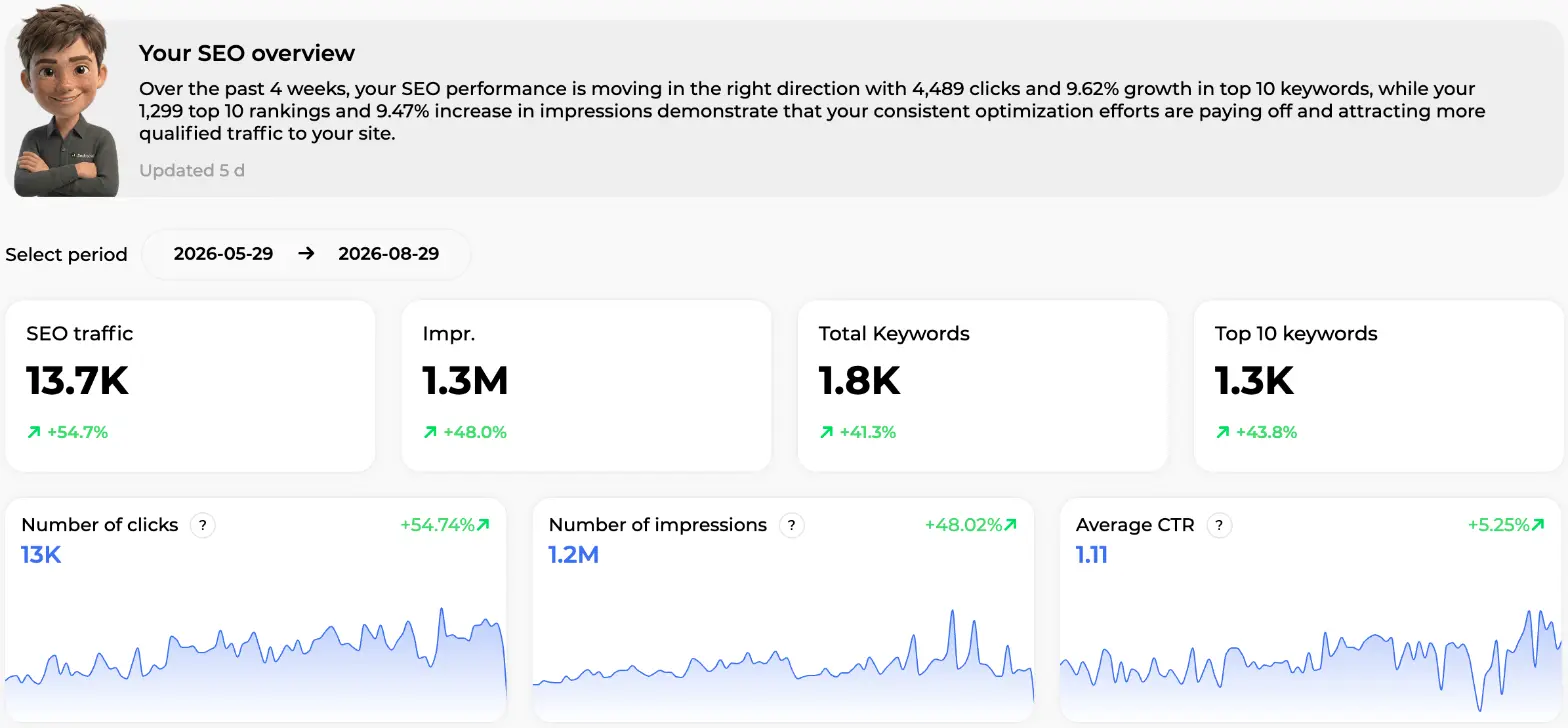
The first row of charts tracks Number of clicks (13K, +54.74%), Number of impressions (1.2M, +48.02%) and Average CTR (1.11, +5.25%) day by day. Scroll down and you get the ranking side: average position, total ranked keywords, then the Keyword status table that splits your keywords by position range (Top 1, Top 2-3, Top 4-10, Top 11-20 and so on to Top 91-100), each with a mini chart and its own percentage variation. Two counters show how many keywords are progressing and how many are declining, and a stacked bar summarises the position distribution in three groups: Top 10, Top 30, Top 100.
Why does this layout matter? Because an average position hides everything. Twenty keywords sliding from 3 to 9 and twenty others climbing from 60 to 40 give the same average and two completely different stories. The range table shows you both at once. The Top 4-10 bucket is the one to watch: those pages are already on the first page, one solid optimisation away from the top 3.
Two practical details. Search Console data arrives with a 2 to 3 day delay, so the last few days always look low. And positions naturally wobble by a few places; read trends over 7 to 30 days before you react. On Max plans and above, you can also switch on the Email report at the top of the page to receive Marc's summary every 15 days without logging in.
My keywords: rank tracking without the spreadsheet
The My keywords tab lists every query your site ranks for, straight from Search Console, with a sparkline per metric so you see the shape of the last few weeks, not just a number. On this table, each row shows the Keyword with the icon of the content type that ranks for it (blog post, product, category or CMS page), the Positions chart with the average position and a badge when it moved (-1 on "best reef salt", +1 on "best time to turn on aquarium light", +2 on "how to adjust pool skimmer suction"), then Clicks, Impr. and CTR with their own mini charts, the ranking Page, and the Date of the next refresh (11 h, 1 d, 2 d). The first row, "solar water feature with battery backup", sits at position 5.99 with 93 clicks, 2.2K impressions and a 4.26% CTR.
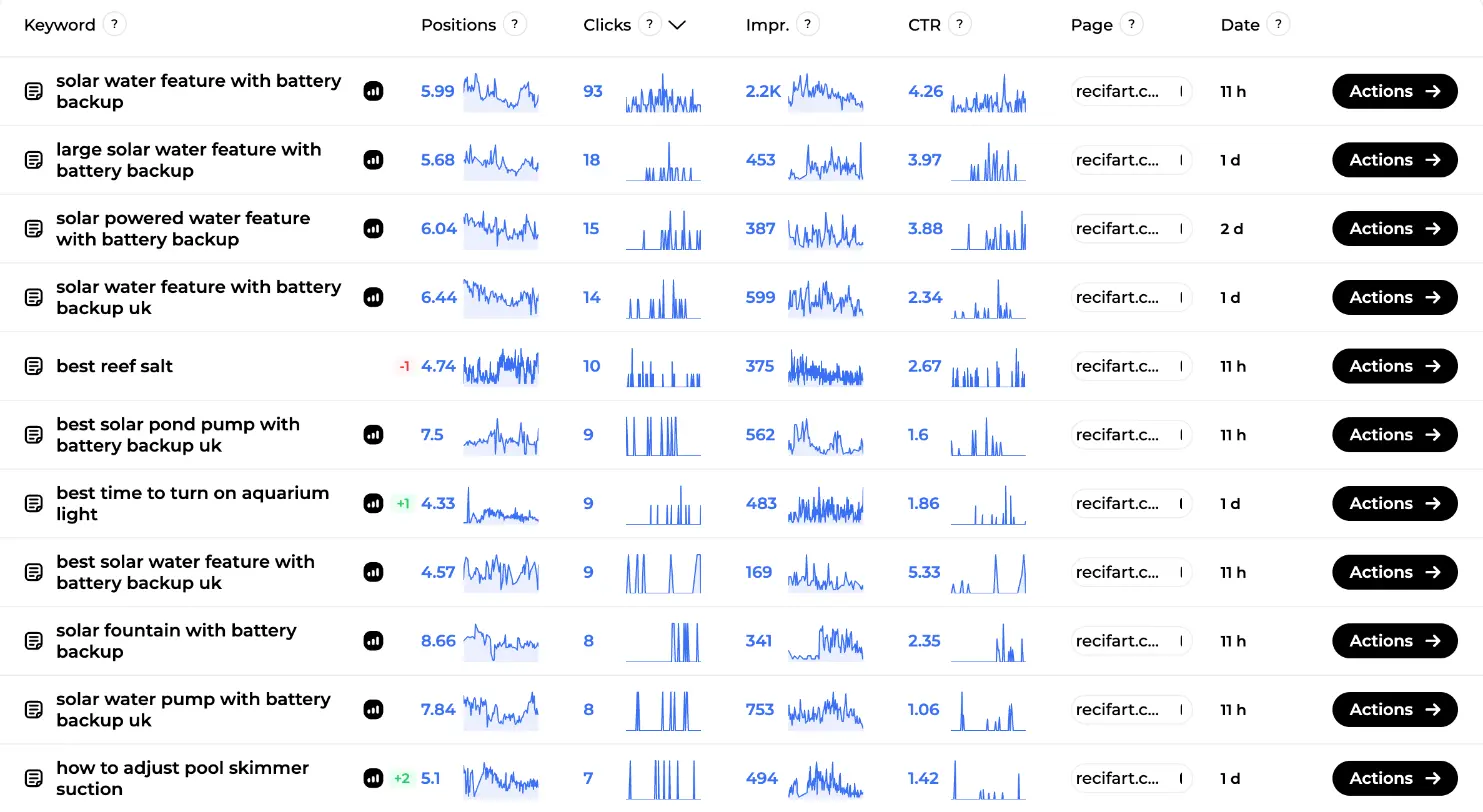
Click a column header to sort by clicks, impressions, CTR or position. The Filters button does the heavy lifting: filter by keyword, by URL route (type "/blog/" to isolate the blog), by position range, clicks, impressions, CTR, by page type (Products, Product categories, CMS page, Blog posts, Other pages), and a checkbox called Positioned by Sedestral only that keeps just the keywords won by content created or optimised in the tool. That last filter is the honest way to measure what Sedestral actually brought you. Filters are saved between visits.
Three filters worth running every fortnight:
- Position 4 to 10, sorted by impressions: your quick wins. High visibility, first page, not yet in the top 3.
- Position 11 to 20: keywords one push away from page one.
- High impressions, low CTR: Google shows you, people don't click. That's a title and meta description problem, not a content problem. Our guide on meta descriptions covers the fix.
Each row ends with an Actions button, and this is where analytics stops being passive. Three options: Create an article targeting that keyword (Alya starts writing), Schedule via autopilot (the keyword joins the editorial calendar and gets written on the next slot), or Create a topic (a keyword cluster is built around it). Reading a keyword's search intent first helps you pick: an informational query calls for an article, a transactional one for a better product or category page.
My pages: which URLs carry your traffic
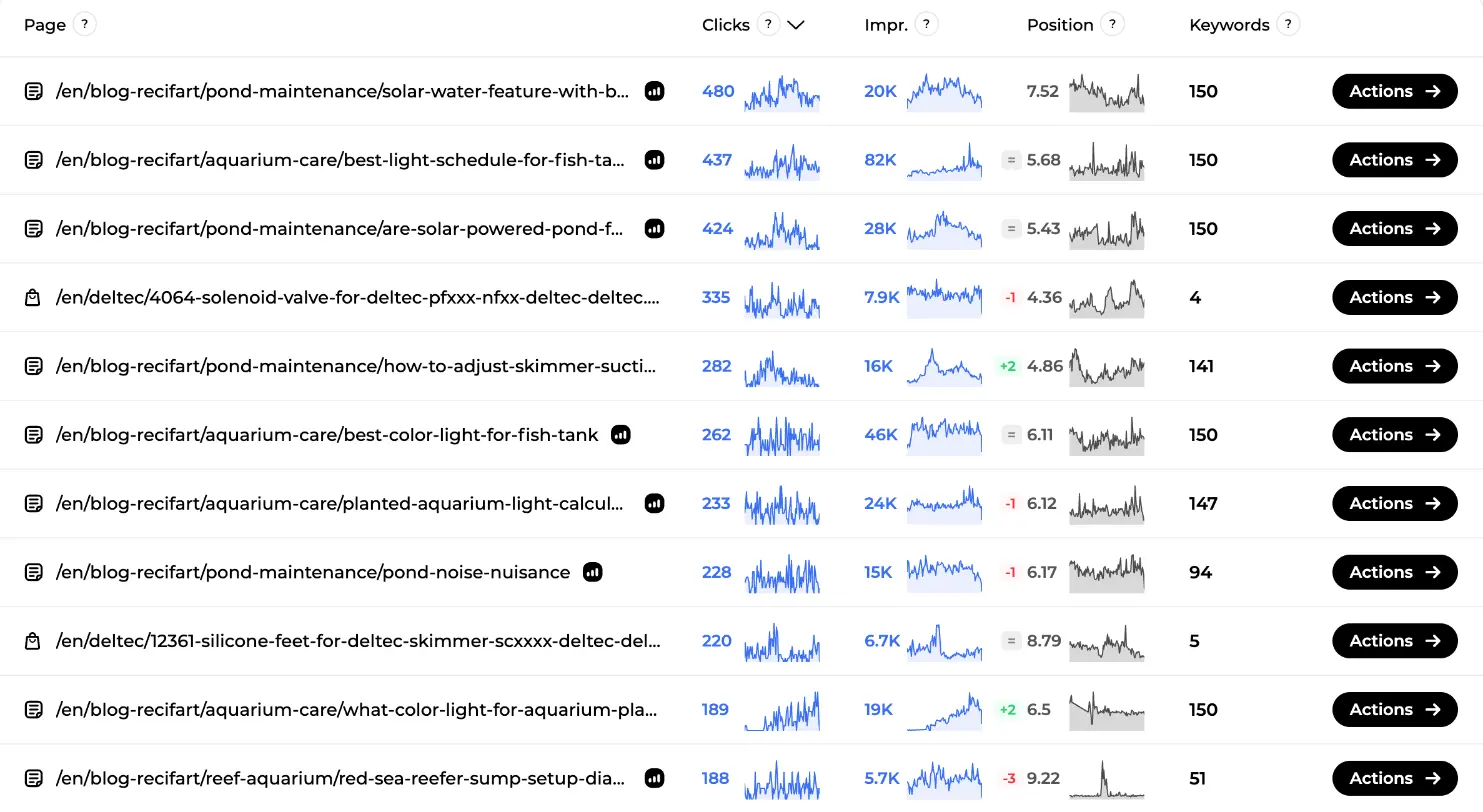
Keywords tell you what people search. Pages tell you what earns. The My pages tab aggregates all keywords per URL. On this screen you can see each Page with its format icon (article or product), Clicks and Impr. sparklines, the average Position with its movement badge (= for stable, -1, +2, -3), and the number of Keywords the page ranks for. The top article, on solar water features, brings 480 clicks from 20K impressions at position 7.52 and ranks for 150 keywords. A few rows down, a product page (a Deltec solenoid valve) earns 335 clicks with only 4 keywords: a typical transactional page, few queries, high value.
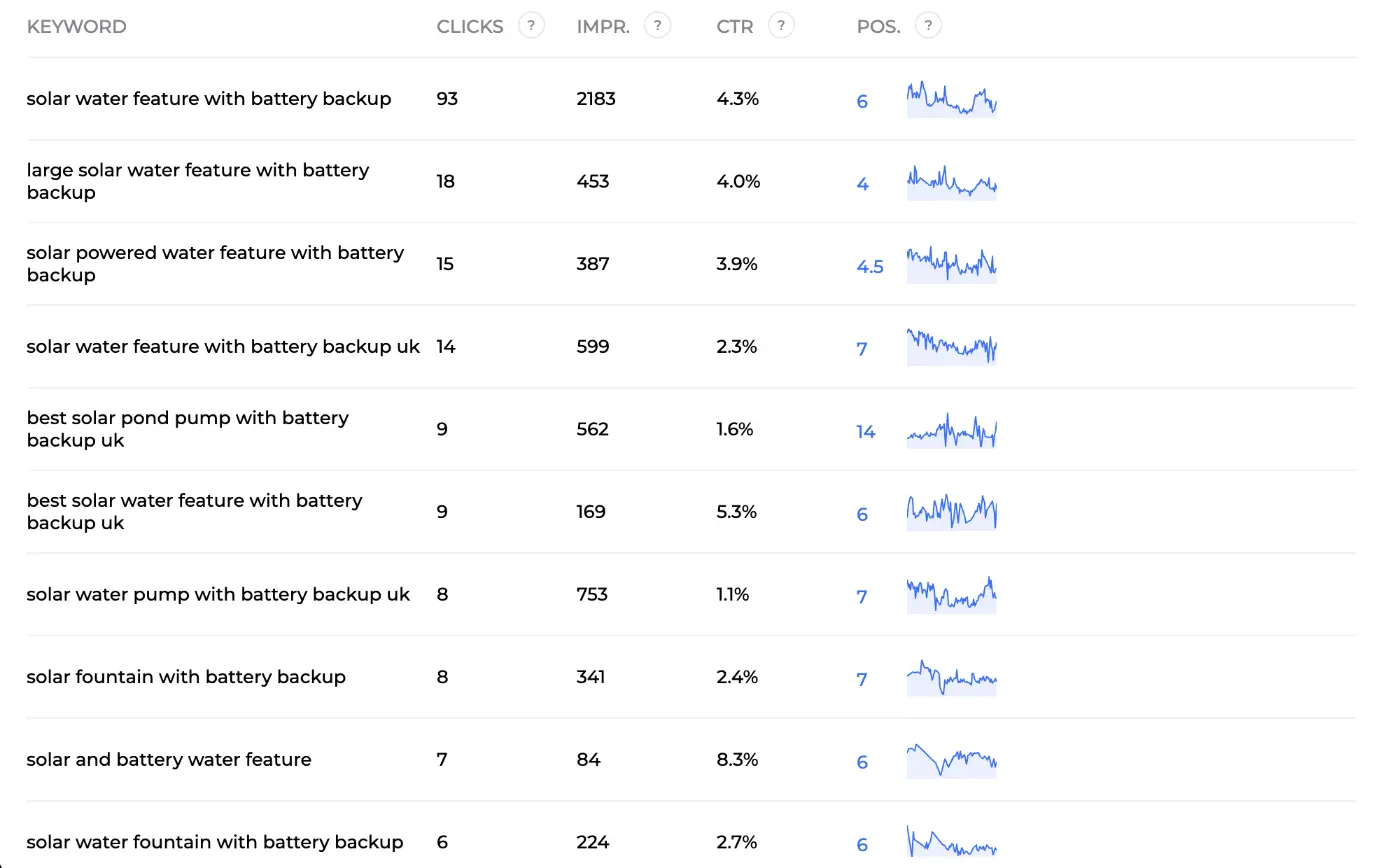
Click Actions then Details on a page to open its window. The Keywords tab lists every query the page ranks for with clicks, impressions, CTR and position. On this example, the solar water feature article ranks at 6 for its main query (93 clicks, 4.3% CTR), at 4 for "large solar water feature with battery backup", and at 14 for "best solar pond pump with battery backup uk" (562 impressions, 1.6% CTR). That single line is a brief for Rémi: add a section on pond pumps and the page can pick up a second first-page ranking.
The second tab, Indexation status, shows whether Google indexed the page, the cause if it didn't (robots.txt, 404, server error), Google's own comment, the last crawl and whether the URL sits in a sitemap. Handy when a page has impressions that suddenly stop. Page filters mirror the keyword ones, plus Only pages without keywords, a quick way to find content that exists but is invisible.
Competitors: your SEO pillars compared to the market
Open Competitors under Marc in the SEO team menu. You don't enter competitor names. Marc analyses the top 1,000 Google results for your ranked keywords, keeps the domains that keep showing up against you, checks that each one is genuinely in your field, and pulls their content, authority and backlink metrics. The list refreshes every 14 days. He needs at least 30 ranked keywords to start, and he filters out disproportionate giants so you aren't compared to a marketplace.
The page opens on Marc analyzes your real SEO competitors, with a summary sentence updated every 15 days, and a counter: on this screen, "Analysis based on 679 competitor analyses", with the note that the more you create and optimise, the more refined the detection becomes. In this example the tracking has only just started, so the report says the comparison will appear shortly.
Two blocks follow. SEO pillars compared to your market shows three cards: content quality (score out of 100, from the content scores of your articles and tracked pages), domain authority (out of 10, based on backlinks and referring domains) and technical quality (out of 100, from your tracked pages or your latest technical audit), each with your strengths and gaps ranked critical, moderate or minor. Then the Top SEO Competitors table: Website, Common keywords, Content Quality, Technical, Authority, Backlinks, Ref. Domains. Your own site sits on the first row with a "YOU" badge: here, recifart.com scores 70 in content, 87 in technical, 4 in authority, with 434 backlinks from 126 referring domains. Competitors then appear below, sorted by the number of keywords you share.
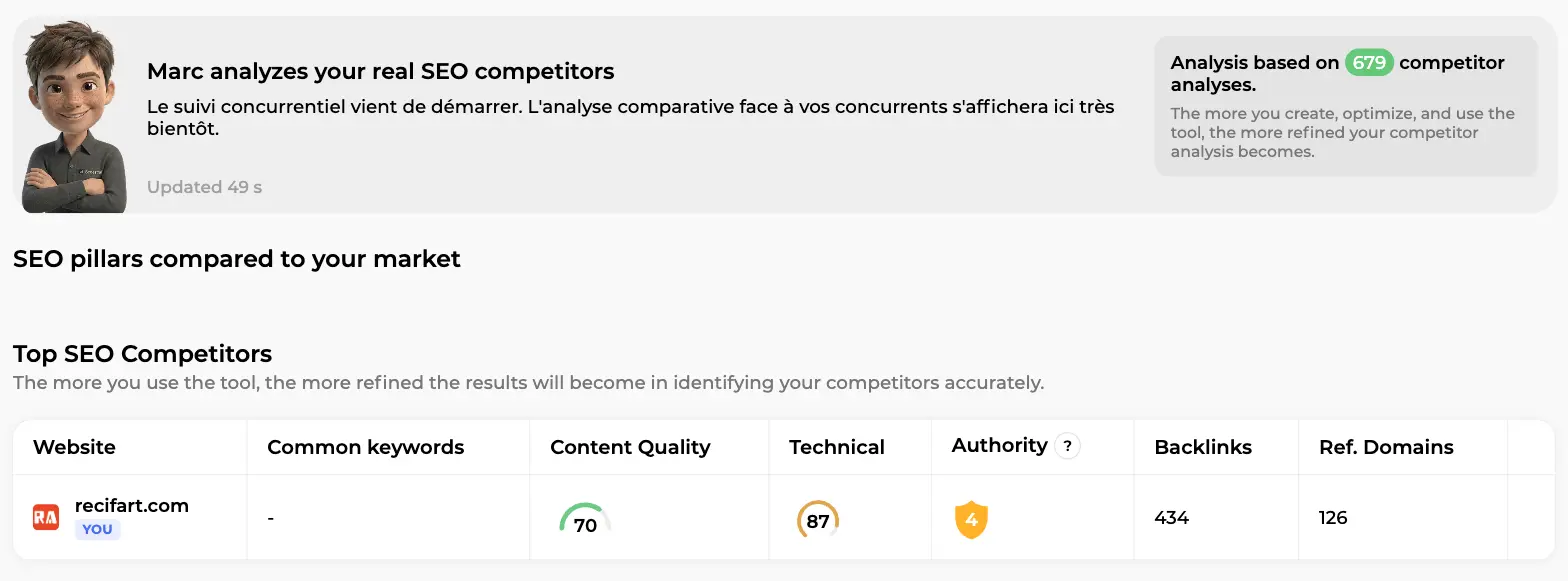
Reading the table takes ten seconds. A competitor with more common keywords and a higher content score is out-writing you: work with Alya and Rémi. One with a similar content score but three times your referring domains is out-linking you: that's Maya's job. One with a weak technical score is beatable on the fundamentals alone. Our competitor analysis guide goes deeper into the method.
Click Details on a competitor (Pro plans and above) for the full view: Marc's per-competitor summary, the three pillars side by side with the gap in green or red, their total keywords, Top 3, Top 10 and estimated traffic, referring domains, backlinks and toxicity, position distribution charts, their top 300 keywords with the same Actions menu (create an article, add to schedule, create a topic), their main backlinks, and a Shared keywords table comparing your rank to theirs, query by query.
Analyze a site: any URL, one click
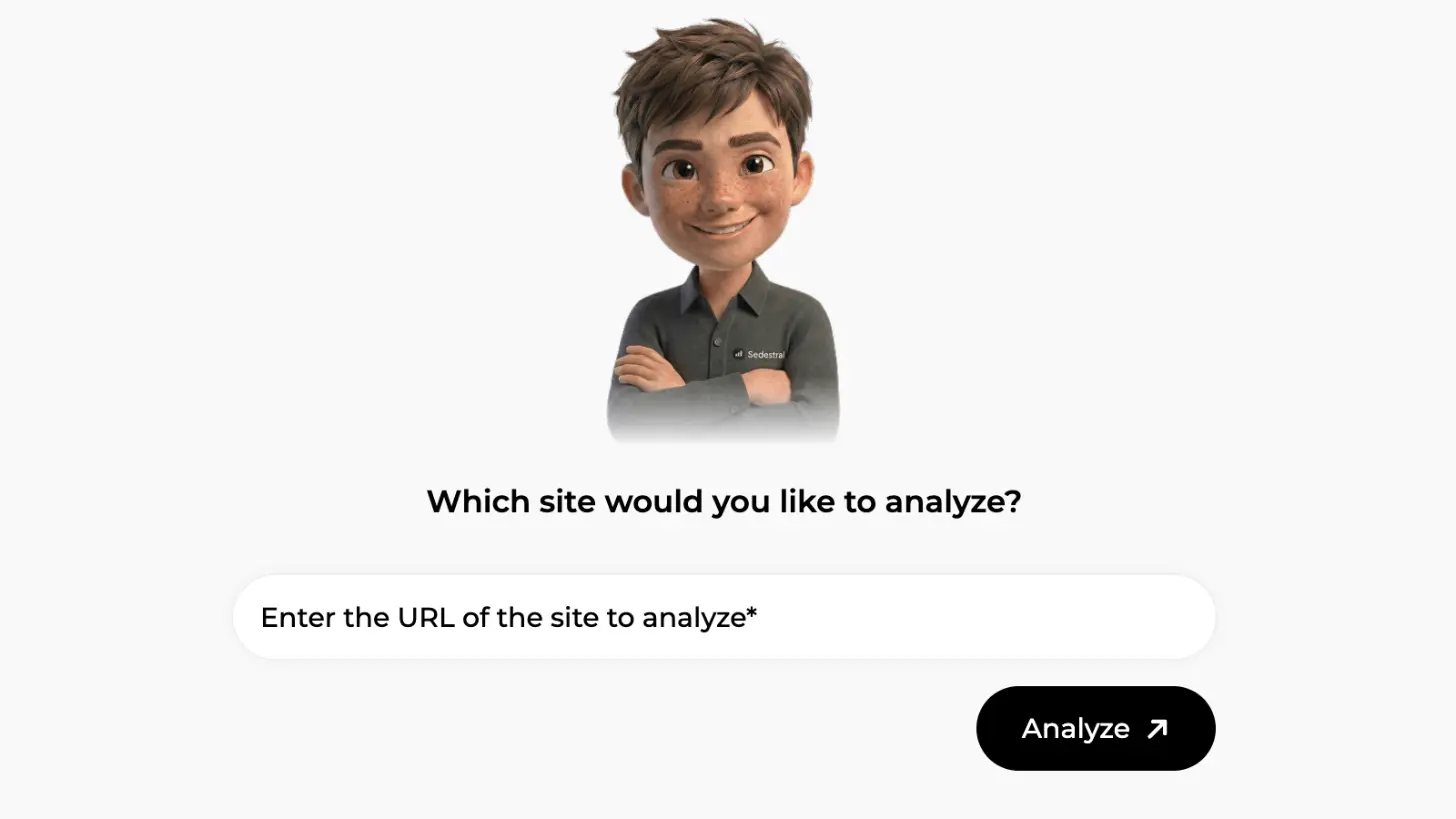
Sometimes the site you want to check isn't in Marc's list yet: a newcomer, a supplier's shop, a prospect. Click Analyze a site, and Marc asks a single question: "Which site would you like to analyze?" Paste the URL, hit Analyze.
The result page opens with five cards. On this screen, for an aquarium retailer in the same market, you see SEO traffic (20K, stable versus the previous period), Total Keywords (5K, stable), Domain Authority (5 out of 10 on a green shield), Total Backlinks (1.3K) and Referring Domains (541). Below, Top ranking keywords lists their best queries with search volume, keyword difficulty (KD), position and an Actions button, and Incoming backlinks lists the sites linking to them with the anchor text, a Page Authority shield and a Link Equity score.
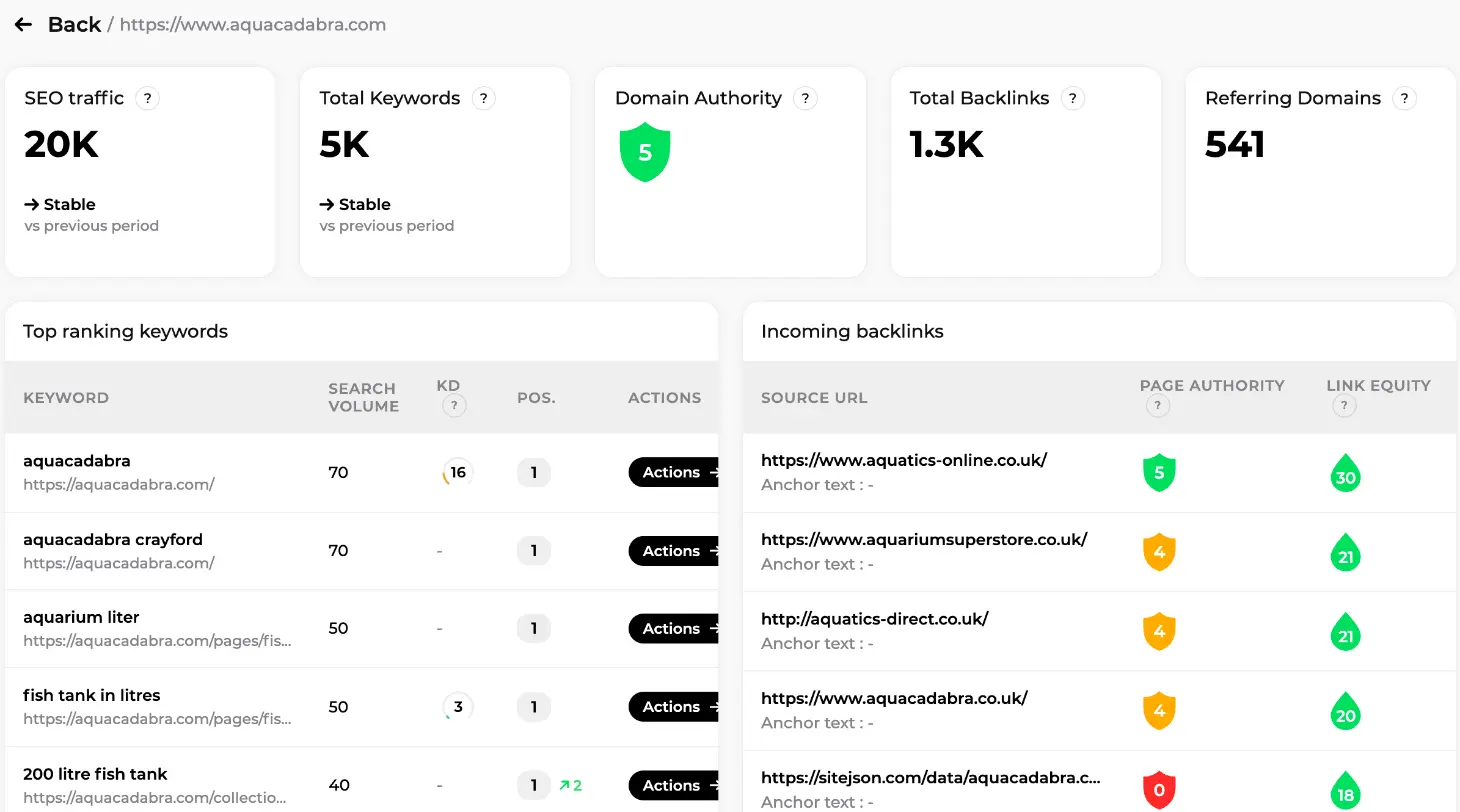
Two things to do with this. First, scan their keywords for queries you don't rank for and send the good ones to Alya with the Actions button. Second, look at their backlink sources: a UK aquatics shop linking to them will very likely accept a relevant guest article from you too. That list is a ready-made target file for a backlink campaign with Maya.
From numbers to actions: hand the work to the team
Here's the honest truth about SEO analytics: the value isn't in the charts, it's in what you do the next morning. Sedestral's screens are wired to the agents so the handover takes a click, not a meeting. A simple weekly routine:
| What Marc shows | What it means | Who acts |
|---|---|---|
| Keywords in position 4-10 with impressions | First page, not yet top 3 | Rémi optimises the page (content audit, then optimisation) |
| Competitor keywords you don't rank for | Topics missing from your blog | Alya writes them or adds them to autopilot (content strategy) |
| High impressions, low CTR | Weak title or meta description | Rémi rewrites the tags |
| Competitors with far more referring domains | Authority gap | Maya runs a monthly backlink campaign |
| A page with impressions that drop to zero | Indexing or technical issue | Nox checks it in the technical audit |
| Declining keywords, several places lost | Content ageing or a competitor catching up | Rémi refreshes, Maya reinforces |
Every step keeps you in the loop. Alya's article lands in the editor for validation, Rémi's optimisation shows a word-by-word diff you can undo, Maya's campaign proposes pages and anchors before any budget is spent. Marc points, you decide, the agents execute.
One more screen belongs to the same family. Google is no longer the only place people ask questions, and Marc also runs AI Visibility: a weekly check of chosen prompts on ChatGPT, Gemini, Perplexity, Google AI Overview and Google AI Mode, showing whether your brand is cited, with what sentiment, and which competitors are named instead. Same logic, different search engine.
In short
- SEO Visibility turns your Search Console data into a weekly sentence from Marc, four KPI cards, daily charts and a keyword distribution by position range.
- My keywords and My pages are your rank tracker, with filters, sparklines, indexation status and an Actions button that sends work to Alya.
- Competitors finds your real SEO rivals automatically and compares content, technical and authority, site by site.
- Analyze a site profiles any URL: traffic, keywords, authority, backlinks, top rankings.
- The point of it all: each number maps to an agent and an action, and you validate before anything goes live.
Read the full Sedestral overview
Automate Your SEO With AI Agents
Sedestral connects six AI agents to your website to handle content, audits, rankings, backlinks and images, without the manual grind.